
# 异步和单线程
同步和异步的区别是什么?
前端使用异步的场景有哪些?
# 知识点
JS是单线程语言,只能同时做一件事儿
浏览器和nodejs 已支持JS启动进程,如Web Worker
JS和DOM渲染共用同一个线程,因为JS可修改DOM结构
遇到等待(网络请求,定时任务)不能卡住
需要异步
回调callback函数形式
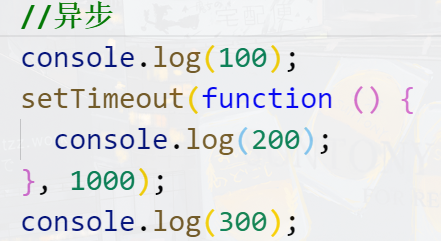
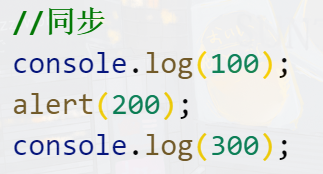
基于JS是单线程语言
异步不会阻塞代码执行
同步会阻塞代码执行
# 应用场景
网络请求,如ajax图片加载
定时任务,如setTimeout
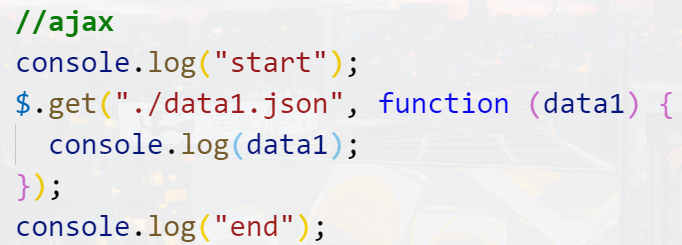
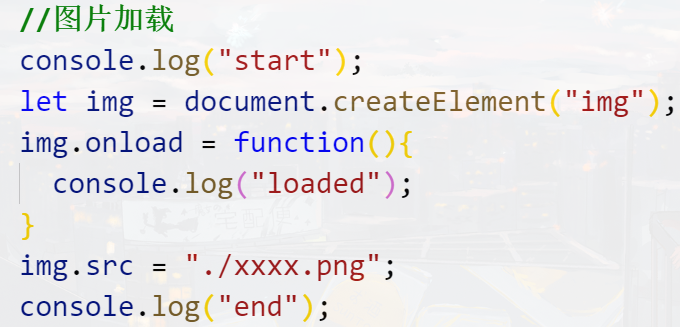
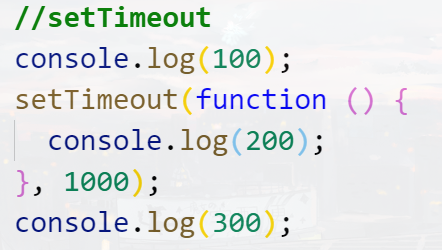
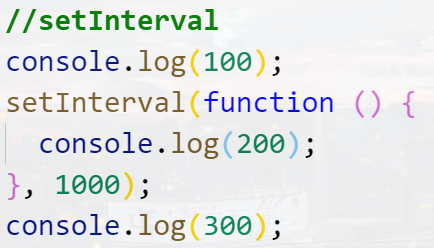
setTimeout 笔试题
console.log(1)
setTimeout(function(){
    console.log(2)
} ,1000)
console.log(3)
setTimeout(function () {
    console.log(4)
},0)
console.log(5)
2
3
4
5
6
7
8
9
# 课程简介
# 学什么
初识 Promise
Promise的实例方法
Promise的构造函数方法
Promise的注意事项和应用
# 初识Promise
Promise是什么
Promise的基本用法
# Promise的实例方法
then()
catch()
finally()
# Promise的构造函数方法
Promise.resolve()
Promise.reject()
Promise.all()
Promise.race()
Promise.allSettled()
# Promise的注意事项和应用
Promise的注意事项
Promise的应用
# Promise
# 1.Promise是什么
认识Promise
什么时候使用Promise
# 1.认识 Promise
Promise 是异步操作的一种解决方案
//回调函数解决异步问题
document.onclick = function(){
    console.log('这里是异步的');
}

console.log('这里是同步的');
2
3
4
5
6
# 2.什么时候使用 Promise
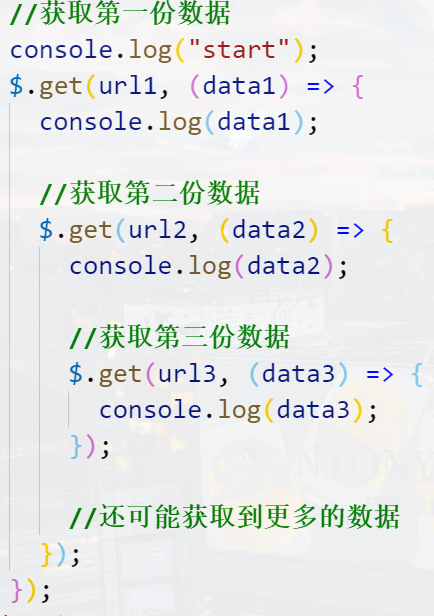
Promise 一般用来解决层层嵌套的回调函数(回调地狱 callback hell)的问题
[ (opens new window)](https://imgchr.com/i/DdfKZn)

<style>
    * {
        padding: 0;
        margin: 0;
    }

    #box {
        width: 300px;
        height: 300px;
        background-color: orange;
        transition: all 0.5s;
    }
</style>
</head>
<body>
    <div id="box"></div>
    <script>
        const move = (el, { x = 0, y = 0 } = {}, end = () => {}) => {
            el.style.transform = `translate3d(${x}px, ${y}px, 0)`;

            el.ontransitionend = function () {
                end();
            };
        };

        const oBox = document.getElementById("box");

        document.onclick = function(){
            move(oBox,{x: 150, y: 0},() => {
                move(oBox,{x: 150, y: 150},() => {
                    move(oBox, { x: 0, y: 150 },() => {
                        move(oBox, { x: 0, y: 0 });
                    })
                })
            })
        }
    </script>
2
3
4
5
6
7
8
9
10
11
12
13
14
15
16
17
18
19
20
21
22
23
24
25
26
27
28
29
30
31
32
33
34
35
36
37
# 2.Promise 的基本用法
实例化构造函数生成实例对象
Promise的状态
then方法
resolve和reject 函数的参数
# 1.实例化构造函数生成实例对象
console.log(Promise); //构造函数

// Promise 解决的不是回调函数,而是回调地狱
const p = new Promise(() => {});
2
3
4
# 2.Promise 的状态
Promise 有 3 种状态,一开始是 pending(未完成)
执行 resolve,变成 fulfilled(resolved),已成功
执行 reject,变成 rejected,已失败
Promise 的状态一旦变化,就不会再改变了
const p = new Promise((resolve, reject) => {
    // pending-> fulfilled   或者 resolved
    // resolve(); //变为成功态


    //pending -> rejected //变为失败态
    //reject();
}

console.log(p);
2
3
4
5
6
7
8
9
10
# 3.then 方法
p.then(
    () => {
        console.log('success');
    },
    () => {
        consol.log('error');
    }
    //成功执行第一个  失败执行第二个
);
2
3
4
5
6
7
8
9
# 4.resolve 和 reject 函数的参数
const p = new Promise((resolve, reject) => {
    resolve({ name: "云牧", age: 18 });

    //reject('reason');
    //一般失败传递一个错误对象
    reject(new Error('reason'));
});


p.then(
    (data) => {
        console.log("我是成功的", data);
    },
    () => {
        console.log("我是失败的");
    }
);
2
3
4
5
6
7
8
9
10
11
12
13
14
15
16
17
# 3.实例方法
# then()
什么时候执行
执行后的返回值
then方法返回的Promise 对象的状态改变
向后传值
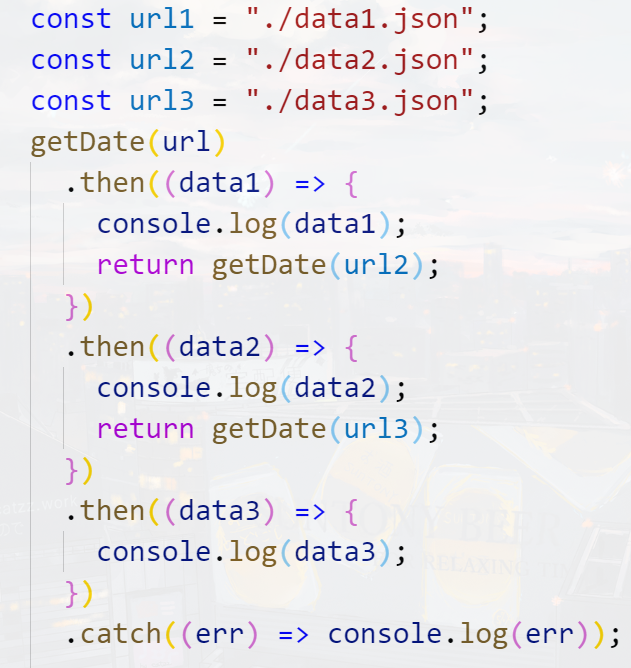
使用Promise解决回调地狱
# 1.什么时候执行
pending -> fulfilled 时,执行 then 的第一个回调函数
pending -> rejected 时,执行 then 的第二个回调函数
# 2.执行后的返回值
then 方法执行后返回一个新的 Promise 对象
const p1 = new Promise((resolve, reject) => {
    resolve();
    // reject();
});


const p2 = p1.then(
    () => {},
    () => {}
)//.then().then();

console.log(p1);
console.log(p2); //p2也返回一个promise对象
console.log(p1 === p2);
2
3
4
5
6
7
8
9
10
11
12
13
14
# 3.then 方法返回的 Promise 对象的状态改变
const p = new Promise((resolve, reject) => {
    //resolve();

    reject();
});

p.then(
    () => {
        console.log("我是成功的1");
    },
    () => {
        console.log("我是失败的1");
        //在 then 的回调函数中,return 后面的东西,会用 Promise 包装一下
        //return undefined;
        //等价于
        //  return new Promise(resolve => {
        //   resolve(undefined);   默认返回的永远都是成功状态的 Promise 对象
        // });


        //return 123;
        //等价于
        // return new Promise(resolve => {
        //   resolve(123);
        // });

        //要返回失败的Promise对象的话
        return new Promise((resolve, reject) => {
            reject("reson");
        });
        //或者
        throw new Error("reson2");
    }
).then(
    () => {
        console.log("我是成功的2");
    },
    (err) => {
        console.log("我是失败的2", err);
    }
);
2
3
4
5
6
7
8
9
10
11
12
13
14
15
16
17
18
19
20
21
22
23
24
25
26
27
28
29
30
31
32
33
34
35
36
37
38
39
40
41
改写之前的运动
<body>
    <style>
        * {
            padding: 0;
            margin: 0;
        }

        #box {
            width: 300px;
            height: 300px;
            background-color: orange;
            transition: all 0.5s;
        }
    </style>
    </head>
<body>
    <div id="box"></div>
    <script>
        const move = (el, { x = 0, y = 0 } = {}, end = () => {}) => {
            el.style.transform = `translate3d(${x}px, ${y}px, 0)`;

            el.ontransitionend = function () {
                end();
            };
        };

        const oBox = document.getElementById("box");

        const moveEl = (el, point) => {
            return new Promise((reslove) => {
                move(el, point, () => {
                    reslove();
                });
            });
        };


        document.onclick = function(){
            moveEl(oBox,{x: 150, y: 0}).then(() => {
                return moveEl( oBox,{x: 150, y: 150} )
            }).then(() => {
                return moveEl( oBox,{x: 0, y: 150} )
            }).then(() => {
                return moveEl( oBox,{x: 0, y: 0} )
            })
        }
    </script>
</body>
2
3
4
5
6
7
8
9
10
11
12
13
14
15
16
17
18
19
20
21
22
23
24
25
26
27
28
29
30
31
32
33
34
35
36
37
38
39
40
41
42
43
44
45
46
47
48
49
# catch()
有什么用
基本用法
# 1.有什么用
then(
    data => {},
    err => {}
);//then方法接收两个函数 第一个处理成功函数  第二个处理失败的函数

then(data => {}); //但是我们一般只需要成功的函数
2
3
4
5
6
catch 专门用来处理 rejected 状态
then(null, err => {});
举例
new Promise((resolve, reject) => {
    // resolve(123);
    reject('reason');
})
.then(data => {
    console.log(data);
})
// .then(null, err => {
//   console.log(err);
// });
    .catch(err => {
    console.log(err);

    // return undefined;
    throw new Error('reason');
}).then(data => {
    console.log(data);
})
.catch(err => {
    console.log(err);
});

//catch() 可以捕获它前面的错误
// 一般总是建议,Promise 对象后面要跟 catch 方法,这样可以处理 Promise 内部发生的错误
2
3
4
5
6
7
8
9
10
11
12
13
14
15
16
17
18
19
20
21
22
23
24
# finally()
什么时候执行
本质
# 1.什么时候执行
当 Promise 状态发生变化时,不论如何变化都会执行,不变化不执行
new Promise((resolve, reject) => {
    // resolve(123);
    reject('reason');
})
    .finally(data => {
    console.log(data);
})
    .catch(err => {});

//当我们使用javascript去操作数据库  数据库很多操作也可以使用promise
//很多时候不管成功还是失败都需要关闭数据库 都需要用到finally
2
3
4
5
6
7
8
9
10
11
# 2.本质
finally() 本质上是 then() 的特例
new Promise((resolve, reject) => {
    //   // resolve(123);
    //   reject('reason');
    // })
    //   .finally(data => {
    //     console.log(data);
    //   })
    //   .catch(err => {});


    // 等同于
    new Promise((resolve, reject) => {
        // resolve(123);
        reject('reason');
    })
        .then(
        result => {
            return result;
        },
        err => {
            return new Promise((resolve, reject) => {
                reject(err);
            });
        }
    )
   .then(data => {
        console.log(data);
    })
        .catch(err => {
        console.log(err);
    });
2
3
4
5
6
7
8
9
10
11
12
13
14
15
16
17
18
19
20
21
22
23
24
25
26
27
28
29
30
31
# Promise.resolve()和Promise.reject()
本质
参数
在then方法中的应用
# 1.Promise.resolve()
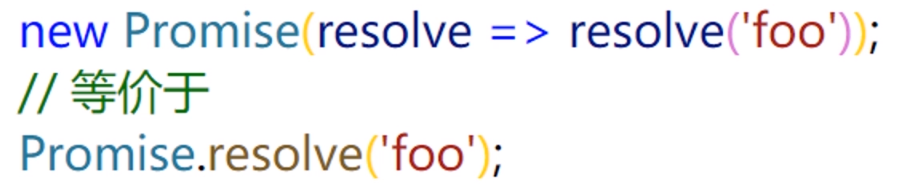
是成功状态 Promise 的一种简写形式
new Promise(resolve => resolve('foo'));
// 简写
Promise.resolve('foo');
2
3
# 参数
一般参数
Promise.resolve('foo').then(data => {
    console.log(data);
});
2
3
当 Promise.resolve() 接收的是 Promise 对象时,直接返回这个 Promise 对象,什么都不做
const p1 = new Promise(resolve => {
    setTimeout(resolve, 1000, '我执行了');
    // setTimeout(() => {
    //   resolve('我执行了');
    // }, 1000);
});


Promise.resolve(p1).then(data => {
    console.log(data);
});

// 等价于
//p1.then(data => {
//console.log(data);
//});
//console.log(Promise.resolve(p1) === p1);

console.log(Promise.resolve(p) === p); //true


// 当 resolve 函数接收的是 Promise 对象时,后面的 then 会根据传递的 Promise 对象的状态变化决定执行哪一个回调
new Promise(resolve => resolve(p1)).then(data => {
    console.log(data);
});
2
3
4
5
6
7
8
9
10
11
12
13
14
15
16
17
18
19
20
21
22
23
24
25
26
27
28
29
# Promise.all()
- 有什么用
- 基本用法
# 1.有什么用
Promise.all() 关注多个 Promise 对象的状态变化
传入多个 Promise 实例,包装成一个新的 Promise 实例返回
# 2.基本用法
Promise.all() 的状态变化与所有传入的 Promise 实例对象状态有关
所有状态都变成 resolved,最终的状态才会变成 resolved
只要有一个变成 rejected,最终的状态就变成 rejected
const delay = ms => {
    return new Promise(resolve => {
        setTimeout(resolve, ms);
    });
};

const p1 = delay(1000).then(() => {
    console.log('p1 完成了');

    return "p1的数据";
    //return Promise.reject('reason');
});

const p2 = delay(2000).then(() => {
    console.log('p2 完成了');

    return "p2的数据";
    // return Promise.reject('reason');
});
2
3
4
5
6
7
8
9
10
11
12
13
14
15
16
17
18
19
Promise.all() 的状态变化与所有传入的 Promise 实例对象状态有关
//所有状态都变成 resolved,最终的状态才会变成 resolved
//只要有一个变成 rejected,最终的状态就变成 rejected
const p = Promise.all([p1, p2]);
p.then(
    data => {
        console.log(data);
    },
    err => {
        console.log(err);
    }
);
2
3
4
5
6
7
8
9
10
11
# Promise.race() 和 Promise.allSettled()
# 1.Promise.race()
const delay = ms => {
    return new Promise(resolve => {
        setTimeout(resolve, ms);
    });
};
const p1 = delay(1000).then(() => {
    console.log('p1 完成了');

    return 'p1';
    // return Promise.reject('reason');
});
const p2 = delay(2000).then(() => {
    console.log('p2 完成了');

    // return 'p2';
    return Promise.reject('reason');
});

//romise.race() 的状态取决于第一个完成的 Promise 实例对象,如果第一个完成的成功了,那最终的就成功;如果第一个完成的失败了,那最终的就失败
const racePromise = Promise.race([p1, p2]);
racePromise.then(
    data => {
        console.log(data);
    },
    err => {
        console.log(err);
    }
);
2
3
4
5
6
7
8
9
10
11
12
13
14
15
16
17
18
19
20
21
22
23
24
25
26
27
28
# 2.Promise.allSettled()
//Promise.allSettled() 的状态与传入的Promise 状态无关
//永远都是成功的
//它只会忠实的记录下各个 Promise 的表现
const allSettledPromise = Promise.allSettled([p1, p2]);
allSettledPromise.then(data => {
    console.log('succ', data);
});
2
3
4
5
6
7
# 4.Promise的注意事项
- resolve或reject 执行后的代码
- Promise.all/race/allSettled的参数问题
- Promise.all/race/allSettled 的错误处理
# 1.resolve 或 reject 函数执行后的代码
推荐在调用 resolve 或 reject 函数的时候加上 return,不再执行它们后面的代码
new Promise((resolve, reject) => {
    //resolve(123);
    // return resolve(123);
    //  return reject('reason');

    console.log('hi');
});
2
3
4
5
6
7
# 2.Promise.all/race/allSettled 的参数问题
参数如果不是 Promise 数组,会将不是 Promise 的数组元素转变成 Promise 对象
Promise.all([1, 2, 3]).then(datas => {
    console.log(datas);
});

//等价于
Promise.all([
    Promise.resolve(1),
    Promise.resolve(2),
    Promise.resolve(3)
]).then(datas => {
    console.log(datas);
});


//不只是数组,任何可遍历的都可以作为参数
//数组、字符串、Set、Map、NodeList、arguments
Promise.all(new Set([1, 2, 3])).then(datas => {
    console.log(datas);
});
2
3
4
5
6
7
8
9
10
11
12
13
14
15
16
17
18
19
20
# 3.Promise.all/race/allSettled 的错误处理
错误既可以单独处理,也可以统一处理
一旦被处理,就不会在其他地方再处理一遍
const delay = ms => {
    return new Promise(resolve => {
        setTimeout(resolve, ms);
    });
};

const p1 = delay(1000).then(() => {
    console.log('p1 完成了');

    // return 'p1';
    return Promise.reject('reason');
});
// .catch(err => {
//   console.log('p1', err);
// });
const p2 = delay(2000).then(() => {
    console.log('p2 完成了');

    return 'p2';
    // return Promise.reject('reason');
});
// // .catch(err => {
// //   console.log('p2', err);
// });

const allPromise = Promise.all([p1, p2]);
allPromise
    .then(datas => {
    console.log(datas);
})
    .catch(err => console.log(err));
2
3
4
5
6
7
8
9
10
11
12
13
14
15
16
17
18
19
20
21
22
23
24
25
26
27
28
29
30
31
// 第一题
Promise.resolve().then(() => {
    console.log(1)
}).catch(() => {
    console.log(2)
}).then(() => {
    console.log(3)
})

// 第二题
Promise.resolve().then(() => { // 返回 rejected 状态的 promise
    console.log(1)
    throw new Error('erro1')
}).catch(() => { // 返回 resolved 状态的 promise
    console.log(2)
}).then(() => {
    console.log(3)
})

// 第三题
Promise.resolve().then(() => { // 返回 rejected 状态的 promise
    console.log(1)
    throw new Error('erro1')
}).catch(() => { // 返回 resolved 状态的 promise
    console.log(2)
}).catch(() => {
    console.log(3)
})
2
3
4
5
6
7
8
9
10
11
12
13
14
15
16
17
18
19
20
21
22
23
24
25
26
27
28
# 5.Promise的应用
const loadImg = url => {
    return new Promise((resolve,reject) => {

        let newImg = document.createElement("img");

        newImg.onload = function(){
            resolve(newImg);
        }


        newImg.onerror = function(){
            reject(new Error(`Could not load lmage at ${url}`));
        }


        newImg.src = url;

    })
}

loadImg("https://s1.ax1x.com/2020/09/26/0irQ0g.jpg").then( img => {


    console.log(img.width,img.height);

    document.body.appendChild(img);

    return loadImg("https://s1.ax1x.com/2020/09/26/0irm1P.jpg");

}).then(img => {

    console.log(img.width,img.height);

    document.body.appendChild(img)
}).catch(err => {console.log(err)})
2
3
4
5
6
7
8
9
10
11
12
13
14
15
16
17
18
19
20
21
22
23
24
25
26
27
28
29
30
31
32
33
34
35
# 课程总结
# Promise
初识Promise
Promise的实例方法
Promise的构造函数方法
Promise的注意事项和应用
# Promise是什么
Promise是异步操作的一种解决方案
Promise一般用来解决层层嵌套的回调函数的问题
Promise解决的不是回调函数,而是回调地狱
# Promise的状态
Promise有3种状态
pending(未完成)
resolved/fulfilled(已成功)
rejected(已失败)
状态一旦变化,就不会再改变了
# Promise的基本用法
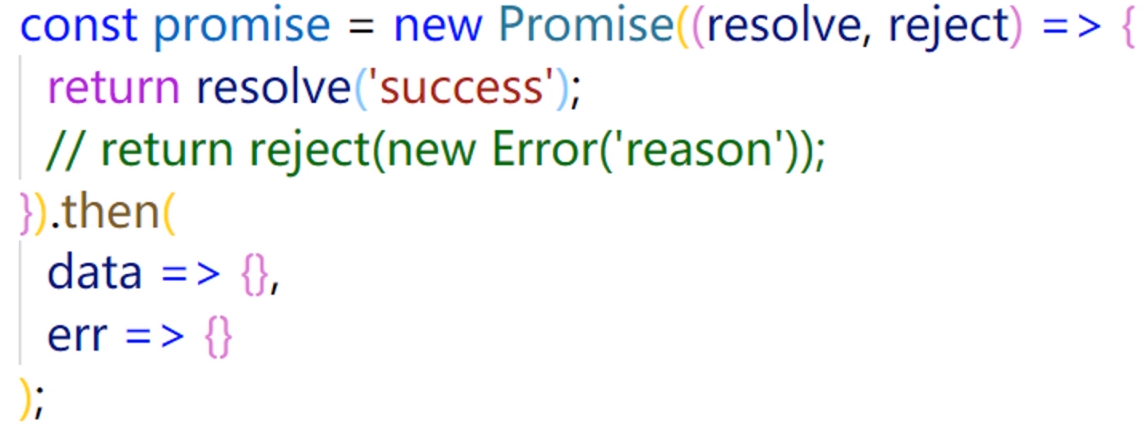
推荐在调用resolve或 reject函数的时候加上return
# then()
pending->resolved时,执行then的第一个回调函数
pending->rejected时,执行then的第二个回调函数
状态不改变,then()的回调函数都不会被执行
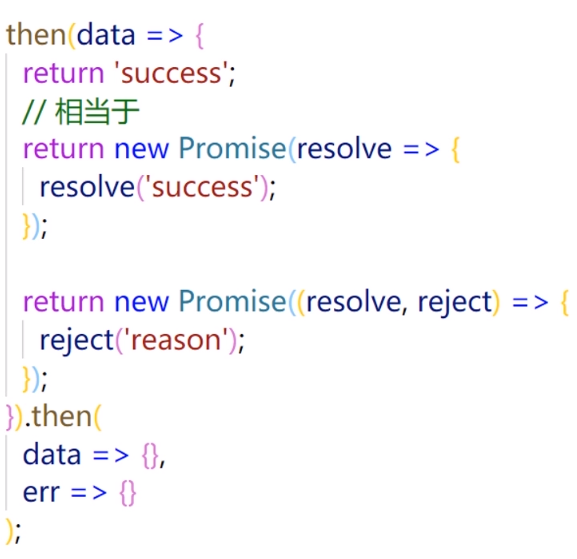
then()执行后返回一个新的Promise对象
可以通过return语句改变返回的Promise对象的状态
then()可以向后传值
# catch()
catch专门用来处理rejected状态
catch 本质上是then的特例
建议Promise 对象后面要跟catch方法,这样可以处理Promise内部发生的错误
# finally()
当Promise状态发生变化时,不论如何变化都会执行
finally()本质上是then()的特例
# Promise.resolve()的本质
成功状态Promise的一种简写形式
# Promise.resolve()的参数
参数是 Promise 实例对象时,直接返回这个Promise对象
参数是其他值时,相当于通过resolve函数传参
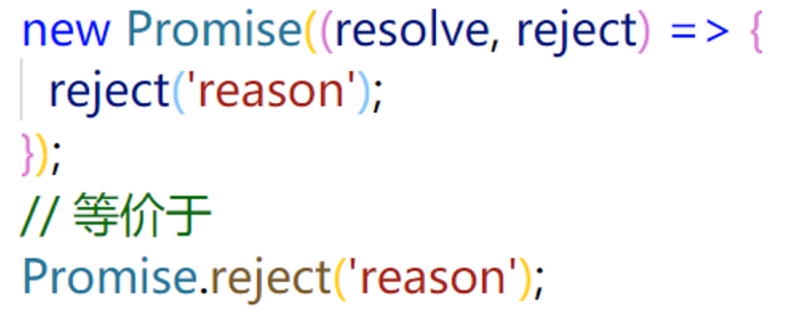
# Promise.reject()
失败状态 Promise的一种简写形式
不管什么参数,都会原封不动地向后传递,作为后续方法的参数
# Promise.all/race/allSettled()
只要是可遍历的,都可作为参数
参数的“集合”中若有成员不是 Promise 对象,内部会将其转变成Promise 对象
返回一个新的 Promise 实例对象
错误既可以单独处理,也可以统一处理
# Promise.all()
所有状态都变成resolved,最终的状态才会变成resolved
只要有一个变成rejected,最终的状态就变成 rejected
# Promise.race()
最终的状态取决于第一个完成的 Promise 实例对象
如果第一个完成的成功了,那最终的就成功
# Promise.allSettled()
最终的状态永远都是成功的,与传入的Promise 对象状态无关
会记录下各个Promise的表现