
# 课程简介
# 学什么
初识Class
Class的属性和方法
Class的继承
Class的应用
# 初识 Class
Class是什么
Class的两种定义形式
# Class的属性和方法
实例属性、静态方法和静态属性
私有属性和方法
# Class的继承
extends
super
# Class的应用
幻灯片
# 1.初识class
- 认识Class
- Class的基本用法
- Class 与构造函数
# 1.Class是什么
# 1.认识 Class
人类:类
具体的人:实例、对象
类可以看做是对象的模板,用一个类可以创建出许多不同的对象
# 2.Class 的基本用法
类名一般大写 不需要圆括号和分号
class Person {} √
class Person() {} ×
class Person {}; ×
1
2
3
2
3
class Person {
    // 实例化时执行构造方法,所以必须有构造方法
    constructor(name, age) {
        console.log('实例化时执行构造方法');
        //this 代表实例对象,上面定义的是实例属性/方法
        this.name = name;
        this.age = age;

        // 一般在构造方法中定义属性,方法不在构造方法中定义
        //this.speak = () => {};
    }

    //speak:function(){}

    speak() {
        console.log('speak');
    }
}


const zs = new Person('ZS', 18);
const ls = new Person('LS', 28);
console.log(zs.name);
console.log(zs.age);
console.log(zs.speak;
console.log(ls.name);
console.log(ls.age);
console.log(ls.speak);
zs.speak();
console.log(zs.speak === ls.speak); //false
1
2
3
4
5
6
7
8
9
10
11
12
13
14
15
16
17
18
19
20
21
22
23
24
25
26
27
28
29
30
2
3
4
5
6
7
8
9
10
11
12
13
14
15
16
17
18
19
20
21
22
23
24
25
26
27
28
29
30
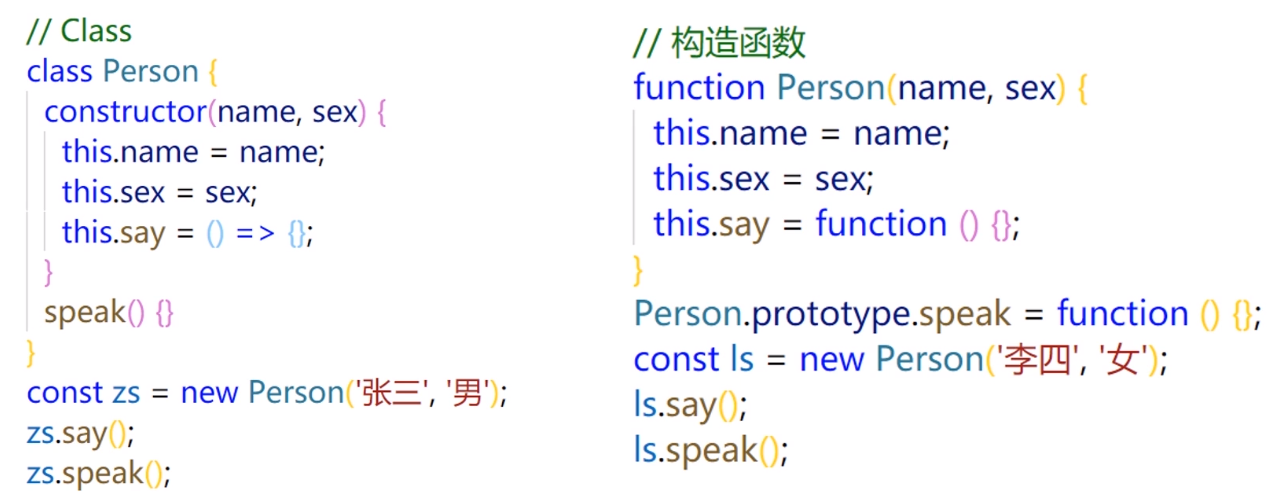
# 3.Class 与构造函数
//Class
class Person {
    constructor(name, age) {
        this.name = name;
        this.age = age;
    }

    speak() {
        console.log('speak');
    }
}

console.log(typeof Person);
console.log(Person.prototype.speak);  //本质上是函数并且方法是绑定在原型之上


//构造函数
function Person(name, age) {
    this.name = name;
    this.age = age;
    //不在这里声明
    //this.speak = () => {};
}
Person.prototype.speak = function () {};
1
2
3
4
5
6
7
8
9
10
11
12
13
14
15
16
17
18
19
20
21
22
23
24
25
2
3
4
5
6
7
8
9
10
11
12
13
14
15
16
17
18
19
20
21
22
23
24
25
# 2.Class的两种定义形式
声明形式
表达式形式
# 1.声明形式
class Person {
    constructor() {}

    speak() {}
}
1
2
3
4
5
2
3
4
5
# 2.表达式形式
function Person(){}
const Person = function () {};
//构造函数声明与表达式的形式

//匿名的类赋值给常量
const Person = class {
    constructor() {
        console.log('constructor');
    }
    speak() {}
}
new Person();


//立即执行函数
(function () {
    console.log('fn');
})();

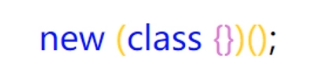
new (class {
    constructor() {
        console.log('constructor');
    }
})();
1
2
3
4
5
6
7
8
9
10
11
12
13
14
15
16
17
18
19
20
21
22
23
24
2
3
4
5
6
7
8
9
10
11
12
13
14
15
16
17
18
19
20
21
22
23
24
# 2.属性与方法
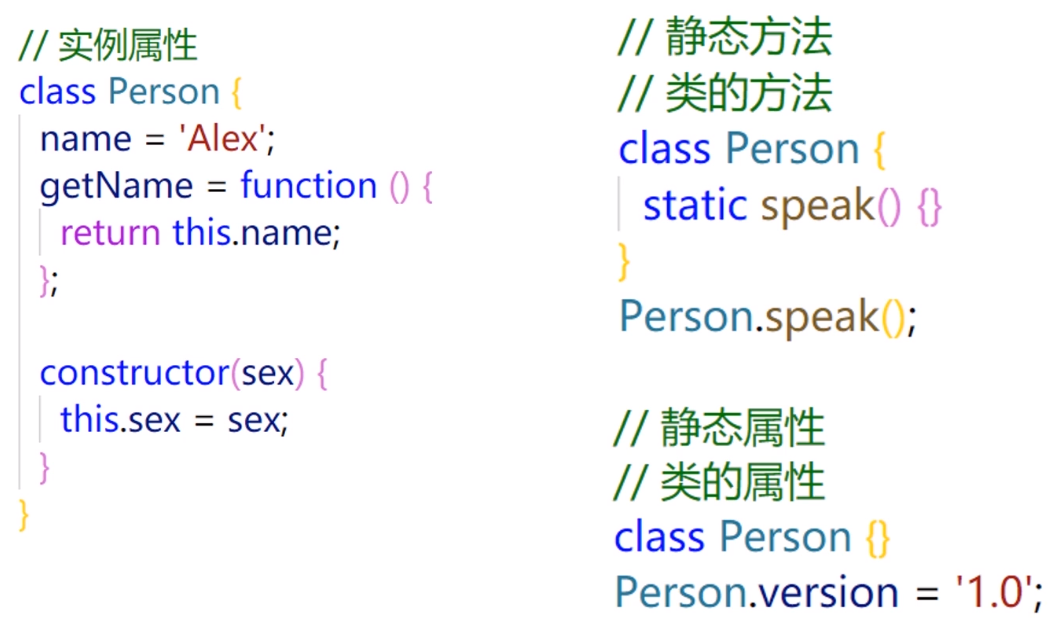
# 1.实例属性和方法
class Person {
    age = 0;
	sex = 'male';
	//方法就是值为函数的特殊属性
	getSex = function () {
    	return this.sex;
	};

	constructor(name, sex) {
 	   this.name = name;
        //如果用户没有传递sex值,那么就是用默认值的
        //实例化时传入的值,那么就使用传入的值
        //实例化时没有传入值,那么就使用默认的值
        this.sex = sex || this.age;
	}
	//实例方法
	speak() {
    	console.log("speak")
	}
}

const p = new Person('"yunmu"',"male");
console.log(p.name);
console.log(p.age);
1
2
3
4
5
6
7
8
9
10
11
12
13
14
15
16
17
18
19
20
21
22
23
24
2
3
4
5
6
7
8
9
10
11
12
13
14
15
16
17
18
19
20
21
22
23
24
# 2.静态方法
类的方法
class Person {
    age = 0;
	sex = 'male';

	constructor(name, sex) {
 	    this.name = name;
    	this.sex = sex;
	}

	speak() {
    	this.age = 18;
         console.log(this); //指向对象
	}

	//静态方法  建议这一种
	static speak() {
   		console.log('人类可以说话');
        console.log(this);  // this 指向类
 	}
}

//静态方法 第二种定义
Person.speak = function () {
    console.log('人类可以说话');
    console.log(this);
};

const p = new Person('Alex');
p.speak();
Person.speak(); //不会冲突
1
2
3
4
5
6
7
8
9
10
11
12
13
14
15
16
17
18
19
20
21
22
23
24
25
26
27
28
29
30
2
3
4
5
6
7
8
9
10
11
12
13
14
15
16
17
18
19
20
21
22
23
24
25
26
27
28
29
30
# 3.静态属性
类的属性
class Person {
    constructor(name) {
        this.name = name;
    }

    //  不要这么写,目前只是提案,有兼容性问题
    // static version = '1.0';

    static getVersion() {
        return '1.0';
    }
}
// Person.version = '1.0';

const p = new Person('Alex');
console.log(p.name);
// console.log(Person.version);
console.log(Person.getVersion());
1
2
3
4
5
6
7
8
9
10
11
12
13
14
15
16
17
18
2
3
4
5
6
7
8
9
10
11
12
13
14
15
16
17
18
# 4.私有属性和方法
# 1.为什么需要私有属性和方法
一般情况下,类的属性和方法都是公开的
公有的属性和方法可以被外界修改,造成意想不到的错误
class Person {
    constructor(name) {
        this.name = name;
    }

    speak() {
        console.log('speak');
    }
    //通过方法去获取name  不通过属性
    getName() {
        return this.name;
    }
}
const p = new Person('yunmu');
console.log(p.name);
p.speak();

// ....
// p.name = 'zs';
// console.log(p.name);
1
2
3
4
5
6
7
8
9
10
11
12
13
14
15
16
17
18
19
20
2
3
4
5
6
7
8
9
10
11
12
13
14
15
16
17
18
19
20
# 2.模拟私有属性和方法
1.开头表示私有
class Person {
    constructor(name) {
        this._name = name;
    }

    speak() {
        console.log('speak');
    }

    getName() {
        return this._name;
    }
}
const p = new Person('yunmu');
// console.log(p._name);
p.name = 'zd';
console.log(p.getName());
1
2
3
4
5
6
7
8
9
10
11
12
13
14
15
16
17
2
3
4
5
6
7
8
9
10
11
12
13
14
15
16
17
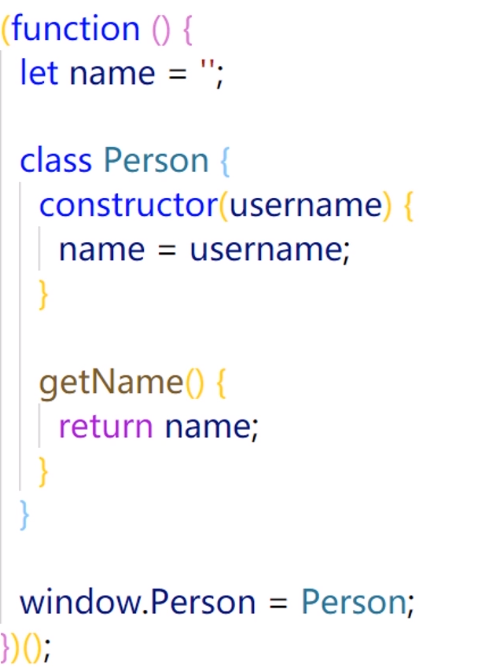
2.将私有属性和方法移出类
(function () {
    let name = '';

    class Person {
        constructor(username) {
            // this.name = name;
            name = username;
        }

        speak() {
            console.log('speak');
        }

        getName() {
            return name;
        }
    }

    window.Person = Person;
})();

(function () {
    const p = new Person('yunmu');
    console.log(p.name);
    //只能通过这样访问
    console.log(p.getName());
})();
1
2
3
4
5
6
7
8
9
10
11
12
13
14
15
16
17
18
19
20
21
22
23
24
25
26
27
2
3
4
5
6
7
8
9
10
11
12
13
14
15
16
17
18
19
20
21
22
23
24
25
26
27
# 3.继承
# extends
- 子类继承父类
- 改写继承的属性或方法
# 1.子类继承父类
  //父类
class People {
    constructor(name) {
        this.name = name;
    }

    eat(){
        console.log(`${this.name} eat something`);
    }

    static speak(){
        console.log(`人类的本质都是复读机`);
    }
}

//子类
class Student extends People{
    constructor(name, number) {
        super(name);
        //this.name = name;
        this.number = number;

        //this.gender = "female";
    }
    sayHi() {
        console.log(`姓名${this.name} 学号${this.number}`);
    }
}

//子类
class Teacher extends People{
    constructor(name,major){
        super(name);
        this.major = major;
    }

    teach(){
        console.log(`${this.name} 教授 ${this.major}`);
    }
}

//学生实例
const liyujiao = new Student("李玉俏", 100);
console.log(liyujiao);
console.log(liyujiao.name);
console.log(liyujiao.number);
liyujiao.sayHi();

//学生实例
//const lindaiyu = new Student("林黛玉", 101);
//console.log(lindaiyu);
//console.log(lindaiyu.name);
//console.log(lindaiyu.number);
//lindaiyu.sayHi();


//老师实例
const jiayucun = new Teacher("贾雨村", "诗词格律");
console.log(jiayucun);
console.log(jiayucun.name);
console.log(jiayucun.major);
jiayucun.teach();
jiayucun.eat();
1
2
3
4
5
6
7
8
9
10
11
12
13
14
15
16
17
18
19
20
21
22
23
24
25
26
27
28
29
30
31
32
33
34
35
36
37
38
39
40
41
42
43
44
45
46
47
48
49
50
51
52
53
54
55
56
57
58
59
60
61
62
63
2
3
4
5
6
7
8
9
10
11
12
13
14
15
16
17
18
19
20
21
22
23
24
25
26
27
28
29
30
31
32
33
34
35
36
37
38
39
40
41
42
43
44
45
46
47
48
49
50
51
52
53
54
55
56
57
58
59
60
61
62
63
# 2.改写继承的属性或方法
//父类
class People {
    constructor(name) {
        this.name = name;
    }

    eat(){
        console.log(`${this.name} eat something`);
    }

    static speak(){
        console.log(`人类的本质都是复读机`);
    }
}

//子类
class Student extends People{
    constructor(name, number) {
        super(name);
        //this.name = name;
        this.number = number;

        //this.gender = "female";
    }
    sayHi() {
        console.log(`姓名${this.name} 学号${this.number}`);
    }
}

//子类
class Teacher extends People{
    constructor(name,major){
        super(name);
        //this 操作不能放在 super 前面
        this.major = major;
    }

    teach(){
        console.log(`${this.name} 教授 ${this.major}`);
    }

    //同名覆盖
    eat(){
        console.log(`${this.name} 在吃饭`);
    }

    //同名覆盖
    static speak(){
        console.log("学者必求师 为师不可不谨也");
    }
}

//学生实例
const liyujiao = new Student("李玉俏", 100);
console.log(liyujiao);
console.log(liyujiao.name);
console.log(liyujiao.number);
liyujiao.sayHi();

//学生实例
//const lindaiyu = new Student("林黛玉", 101);
//console.log(lindaiyu);
//console.log(lindaiyu.name);
//console.log(lindaiyu.number);
//lindaiyu.sayHi();


//老师实例
const jiayucun = new Teacher("贾雨村", "诗词格律");
console.log(jiayucun);
console.log(jiayucun.name);
console.log(jiayucun.major);
jiayucun.teach();
jiayucun.eat();
Teacher.speak()
1
2
3
4
5
6
7
8
9
10
11
12
13
14
15
16
17
18
19
20
21
22
23
24
25
26
27
28
29
30
31
32
33
34
35
36
37
38
39
40
41
42
43
44
45
46
47
48
49
50
51
52
53
54
55
56
57
58
59
60
61
62
63
64
65
66
67
68
69
70
71
72
73
74
75
2
3
4
5
6
7
8
9
10
11
12
13
14
15
16
17
18
19
20
21
22
23
24
25
26
27
28
29
30
31
32
33
34
35
36
37
38
39
40
41
42
43
44
45
46
47
48
49
50
51
52
53
54
55
56
57
58
59
60
61
62
63
64
65
66
67
68
69
70
71
72
73
74
75
# super
- 作为函数调用
- 作为对象使用
- 注意事项
# 1.作为函数调用
代表父类的构造方法,只能用在子类的构造方法中,用在其他地方就会报错
super 虽然代表了父类的构造方法,但是内部的 this 指向子类的实例
//父类
class People {
    constructor(name) {
        console.log(this);
        this.name = name;
    }

    eat() {
        console.log(`${this.name} eat something`);
    }

    static speak() {
        console.log(`人类的本质都是复读机`);
    }
}

//子类
class Student extends People {
    constructor(name, number) {
        super(name);
        this.number = number;
    }

    sayHi() {
        //super(); // ×
        console.log(`姓名${this.name} 学号${this.number}`);
    }
}

//学生实例
const liyujiao = new Student("李玉俏", 100);
console.log(liyujiao.name);
console.log(liyujiao.number);
liyujiao.sayHi();
1
2
3
4
5
6
7
8
9
10
11
12
13
14
15
16
17
18
19
20
21
22
23
24
25
26
27
28
29
30
31
32
33
34
2
3
4
5
6
7
8
9
10
11
12
13
14
15
16
17
18
19
20
21
22
23
24
25
26
27
28
29
30
31
32
33
34
# 2.作为对象使用
#
//父类
class People {
    constructor(name) {
        this.name = name;
    }

    eat() {
        console.log(this);
        console.log(`${this.name} eat something`);
    }

    static speak() {
        console.log(this);
        console.log(`人类的本质都是复读机`);
    }
}
/*
        1.在构造方法中使用或一般方法中使用

        super 代表父类的原型对象 Person.prototype

        所以定义在父类实例上的方法或属性,是无法通过 super 调用的

        通过 super 调用父类的方法时,方法内部的 this 指向当前的子类实例

      */
//子类
class Student extends People {
    constructor(name, number) {
        super(name);
        this.number = number;

        //作为对象在构造方法中调用
        //super.eat();
    }

    sayHi() {
        console.log(`姓名${this.name} 学号${this.number}`);
    }

    eat() {
        //作为对象在一般方法中调用
        super.eat();
        console.log("吃大口");
    }
    //2.在静态方法中使用
    //指向父类,而不是父类的原型对象
    //通过 super 调用父类的方法时,方法内部的 this 指向当前的子类,而不是子类的实例
    static speak(){
        super.speak();
        console.log(`我是${this.name} 我正在学习!`);
    }
}

//学生实例
const liyujiao = new Student("李玉俏", 100);
console.log(liyujiao.name);
console.log(liyujiao.number);
liyujiao.sayHi();
liyujiao.eat();
Student.speak();
1
2
3
4
5
6
7
8
9
10
11
12
13
14
15
16
17
18
19
20
21
22
23
24
25
26
27
28
29
30
31
32
33
34
35
36
37
38
39
40
41
42
43
44
45
46
47
48
49
50
51
52
53
54
55
56
57
58
59
60
61
2
3
4
5
6
7
8
9
10
11
12
13
14
15
16
17
18
19
20
21
22
23
24
25
26
27
28
29
30
31
32
33
34
35
36
37
38
39
40
41
42
43
44
45
46
47
48
49
50
51
52
53
54
55
56
57
58
59
60
61
# 3.注意事项
使用 super 的时候,必须显式指定是作为函数还是作为对象使用,否则会报错
//父类
class People {
    constructor(name) {
        this.name = name;
    }

    eat() {
        console.log(this);
        console.log(`${this.name} eat something`);
    }

    static speak() {
        console.log(this);
        console.log(`人类的本质都是复读机`);
    }
}

//子类
class Student extends People {
    constructor(name, number) {
        super(name);
        this.number = number;

        //console.log(super); // ×
        //console.log(super());
        //console.log(super.speak);
    }
}
1
2
3
4
5
6
7
8
9
10
11
12
13
14
15
16
17
18
19
20
21
22
23
24
25
26
27
28
2
3
4
5
6
7
8
9
10
11
12
13
14
15
16
17
18
19
20
21
22
23
24
25
26
27
28
# 4.Class的应用
<!DOCTYPE html>
<html lang="en">
    <head>
        <meta charset="UTF-8" />
        <title>Class 的应用</title>
        <style>

            /* css reset */
            * {
                padding: 0;
                margin: 0;
            }
            a {
                text-decoration: none;
                outline: none;
            }
            img {
                vertical-align: top;
            }

            /* layout */
            .slider-layout {
                width: 80%;
                height: 420px;
                margin: 100px auto;
            }

            /* slider */
            .slider,
            .slider-content,
            .slider-item,
            .slider-img {
                width: 100%;
                height: 100%;
            }
            .slider {
                overflow: hidden;
            }
            .slider-item {
                float: left;
            }
            .slider-animation {
                transition-property: transform;
                transition-duration: 0ms;
            }


        </style>
    </head>
    <body>
        <div class="slider-layout">
            <div class="slider">
                <div class="slider-content">
                    <div class="slider-item">
                        <a href="javascript:;"
                           ><img src="./imgs/1.jpg" alt="1" class="slider-img"
                                 /></a>
                    </div>
                    <div class="slider-item">
                        <a href="javascript:;"
                           ><img src="./imgs/2.jpg" alt="1" class="slider-img"
                                 /></a>
                    </div>
                    <div class="slider-item">
                        <a href="javascript:;"
                           ><img src="./imgs/3.jpg" alt="1" class="slider-img"
                                 /></a>
                    </div>
                    <div class="slider-item">
                        <a href="javascript:;"
                           ><img src="./imgs/4.jpg" alt="1" class="slider-img"
                                 /></a>
                    </div>
                </div>
            </div>
        </div>

        <script>
            // 默认参数
            const DEFAULTS = {
                // 初始索引
                initialIndex: 0,
                // 切换时是否有动画
                animation: true,
                // 切换速度,单位 ms
                speed: 300
            };
            // base
            const ELEMENT_NODE = 1;
            const SLIDER_ANIMATION_CLASSNAME = 'slider-animation';

            class BaseSlider {
                constructor(el, options) {
                    console.log(options)
                    if (el.nodeType !== ELEMENT_NODE)
                        throw new Error('实例化的时候,请传入 DOM 元素!');

                    // 实际参数
                    this.options = {
                        ...DEFAULTS,
                        ...options
                    };

                    const slider = el;
                    const sliderContent = slider.querySelector('.slider-content');
                    const sliderItems = sliderContent.querySelectorAll('.slider-item');

                    // 添加到 this 上,为了在方法中使用
                    this.slider = slider;
                    this.sliderContent = sliderContent;
                    this.sliderItems = sliderItems;

                    this.minIndex = 0;
                    this.maxIndex = sliderItems.length - 1;
                    this.currIndex = this.getCorrectedIndex(this.options.initialIndex);

                    // 每个 slider-item 的宽度(每次移动的距离)
                    this.itemWidth = sliderItems[0].offsetWidth;

                    this.init();
                }

                // 获取修正后的索引值
                // 随心所欲,不逾矩
                getCorrectedIndex(index) {
                    if (index < this.minIndex) return this.maxIndex;
                    if (index > this.maxIndex) return this.minIndex;
                    return index;
                }

                // 初始化
                init() {
                    // 为每个 slider-item 设置宽度
                    this.setItemsWidth();

                    // 为 slider-content 设置宽度
                    this.setContentWidth();

                    // 切换到初始索引 initialIndex
                    this.move(this.getDistance());

                    // 开启动画
                    if (this.options.animation) {
                        this.openAnimation();
                    }
                }

                // 为每个 slider-item 设置宽度
                setItemsWidth() {
                    for (const item of this.sliderItems) {
                        item.style.width = `${this.itemWidth}px`;
                    }
                }

                // 为 slider-content 设置宽度
                setContentWidth() {
                    this.sliderContent.style.width = `${
                    this.itemWidth * this.sliderItems.length
                }px`;
                }

                // 不带动画的移动
                move(distance) {
                    this.sliderContent.style.transform = `translate3d(${distance}px, 0px, 0px)`;
                }

                // 带动画的移动
                moveWithAnimation(distance) {
                    this.setAnimationSpeed(this.options.speed);
                    this.move(distance);
                }

                // 设置切换动画速度
                setAnimationSpeed(speed) {
                    this.sliderContent.style.transitionDuration = `${speed}ms`;
                }

                // 获取要移动的距离
                getDistance(index = this.currIndex) {
                    return -this.itemWidth * index;
                }

                // 开启动画
                openAnimation() {
                    this.sliderContent.classList.add(SLIDER_ANIMATION_CLASSNAME);
                }

                // 关闭动画
                closeAnimation() {
                    this.setAnimationSpeed(0);
                }

                // 切换到 index 索引对应的幻灯片
                to(index) {
                    index = this.getCorrectedIndex(index);
                    if (this.currIndex === index) return;

                    this.currIndex = index;
                    const distance = this.getDistance();

                    if (this.options.animation) {
                        return this.moveWithAnimation(distance);
                    } else {
                        return this.move(distance);
                    }
                }

                // 切换上一张
                prev() {
                    this.to(this.currIndex - 1);
                }

                // 切换下一张
                next() {
                    this.to(this.currIndex + 1);
                }

                // 获取当前索引
                getCurrIndex() {
                    return this.currIndex;
                }
            }


        </script>
        <script>
            // console.log(BaseSlider);

            class Slider extends BaseSlider {
                constructor(el, options) {
                    super(el, options);

                    this._bindEvent();
                }

                _bindEvent() {
                    document.addEventListener('keyup', ev => {
                        // console.log(ev.keyCode);
                        if (ev.keyCode ===  37) {
                            // ←
                            this.prev();
                        } else if (ev.keyCode === 39) {
                            // →
                            this.next();
                        }
                    });
                }
            }
            new Slider(document.querySelector('.slider'), {
                initialIndex: 1,
                animation: true,
                speed: 1000
            });
        </script>
    </body>
</html>
1
2
3
4
5
6
7
8
9
10
11
12
13
14
15
16
17
18
19
20
21
22
23
24
25
26
27
28
29
30
31
32
33
34
35
36
37
38
39
40
41
42
43
44
45
46
47
48
49
50
51
52
53
54
55
56
57
58
59
60
61
62
63
64
65
66
67
68
69
70
71
72
73
74
75
76
77
78
79
80
81
82
83
84
85
86
87
88
89
90
91
92
93
94
95
96
97
98
99
100
101
102
103
104
105
106
107
108
109
110
111
112
113
114
115
116
117
118
119
120
121
122
123
124
125
126
127
128
129
130
131
132
133
134
135
136
137
138
139
140
141
142
143
144
145
146
147
148
149
150
151
152
153
154
155
156
157
158
159
160
161
162
163
164
165
166
167
168
169
170
171
172
173
174
175
176
177
178
179
180
181
182
183
184
185
186
187
188
189
190
191
192
193
194
195
196
197
198
199
200
201
202
203
204
205
206
207
208
209
210
211
212
213
214
215
216
217
218
219
220
221
222
223
224
225
226
227
228
229
230
231
232
233
234
235
236
237
238
239
240
241
242
243
244
245
246
247
248
249
250
251
252
253
254
255
256
257
2
3
4
5
6
7
8
9
10
11
12
13
14
15
16
17
18
19
20
21
22
23
24
25
26
27
28
29
30
31
32
33
34
35
36
37
38
39
40
41
42
43
44
45
46
47
48
49
50
51
52
53
54
55
56
57
58
59
60
61
62
63
64
65
66
67
68
69
70
71
72
73
74
75
76
77
78
79
80
81
82
83
84
85
86
87
88
89
90
91
92
93
94
95
96
97
98
99
100
101
102
103
104
105
106
107
108
109
110
111
112
113
114
115
116
117
118
119
120
121
122
123
124
125
126
127
128
129
130
131
132
133
134
135
136
137
138
139
140
141
142
143
144
145
146
147
148
149
150
151
152
153
154
155
156
157
158
159
160
161
162
163
164
165
166
167
168
169
170
171
172
173
174
175
176
177
178
179
180
181
182
183
184
185
186
187
188
189
190
191
192
193
194
195
196
197
198
199
200
201
202
203
204
205
206
207
208
209
210
211
212
213
214
215
216
217
218
219
220
221
222
223
224
225
226
227
228
229
230
231
232
233
234
235
236
237
238
239
240
241
242
243
244
245
246
247
248
249
250
251
252
253
254
255
256
257




# 课程总结
# Class的基本用法
# Class的两种定义形式
# 声明形式

# 表达式形式

# 实例属性、静态方法和静态属性
# 私有属性和方法
_开头表示私有
将私有属性和方法移出类
# extends
使用extends可以实现继承
可以改写继承到的属性或方法,同名覆盖
# super
作为函数调用
作为对象使用
使用super的时候,必须显式指定作为函数还是作为对象使用
# super作为函数调用
super代表父类的构造方法,只能用在子类的构造方法中
内部的this指向子类的实例
# super作为对象使用
在构造方法和一般方法中使用
super代表父类的原型对象
通过super调用父类的方法时,方法的this指向当前的子类实例
在静态方法中使用
super代表父类
通过super调用父类的方法时,方法的this指向当前的子类