
# 课程简介
Cookie
localStorage
# cookie
# Cookie
初识Cookie
Cookie的基本用法
Cookie的属性
Cookie的封装
Cookie的注意事项
# localStorage
初识localStorage
localStorage的注意事项
# 1.初识Cookie
Cookie是什么
Cookie有什么用
在浏览器中操作Cookie
# 1.Cookie 是什么
设想一下 我们访问一个中英文网站 第一次英文 我们修改为中文 第二次继续访问 就是中文了 不用在手动切换 一种比较简单的做法就是使用cookie
Cookie 全称 HTTP Cookie,简称 Cookie
是浏览器存储数据的一种方式
因为存储在用户本地,而不是存储在服务器上,是本地存储
一般会自动随着浏览器每次请求发送到服务器端
利用cookie的这些特点 和上面描述的中英文网站的需求非常贴合 当我们修改语言的时候 我们可以把修改的结果放在cookie中
下次再打开网站 cookie随着HTTP请求发送到服务器 服务器端就能知道你选择的语言发送给你
# 2.Cookie 有什么用
利用 Cookie 跟踪统计用户访问该网站的习惯,
比如什么时间访问,访问了哪些页面,在每个网页的停留时间等
一方面更好为用户提供个性化服务 另一方面也可以更加了解用户行为的工具 对于网站经营策略是有一定价值的 有一些国外的网站会明确提示你使用了cookie 是否继续使用 你在浏览某网页的时候可以使用cookie记录下你的浏览习惯 随着下一次访问 cookie会随着请求发送的到服务器端,服务器端接收到了 会根据你的习惯调整网页的内容 将你感兴趣的放在前面
# 3.在浏览器中操作 Cookie
不要在 Cookie 中保存密码等敏感信息
 (opens new window)](https://imgchr.com/i/BHQrRJ)
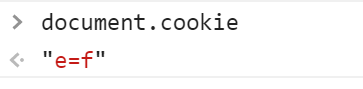
当我重新刷新页面的时候 cookie会随着请求放送到服务端
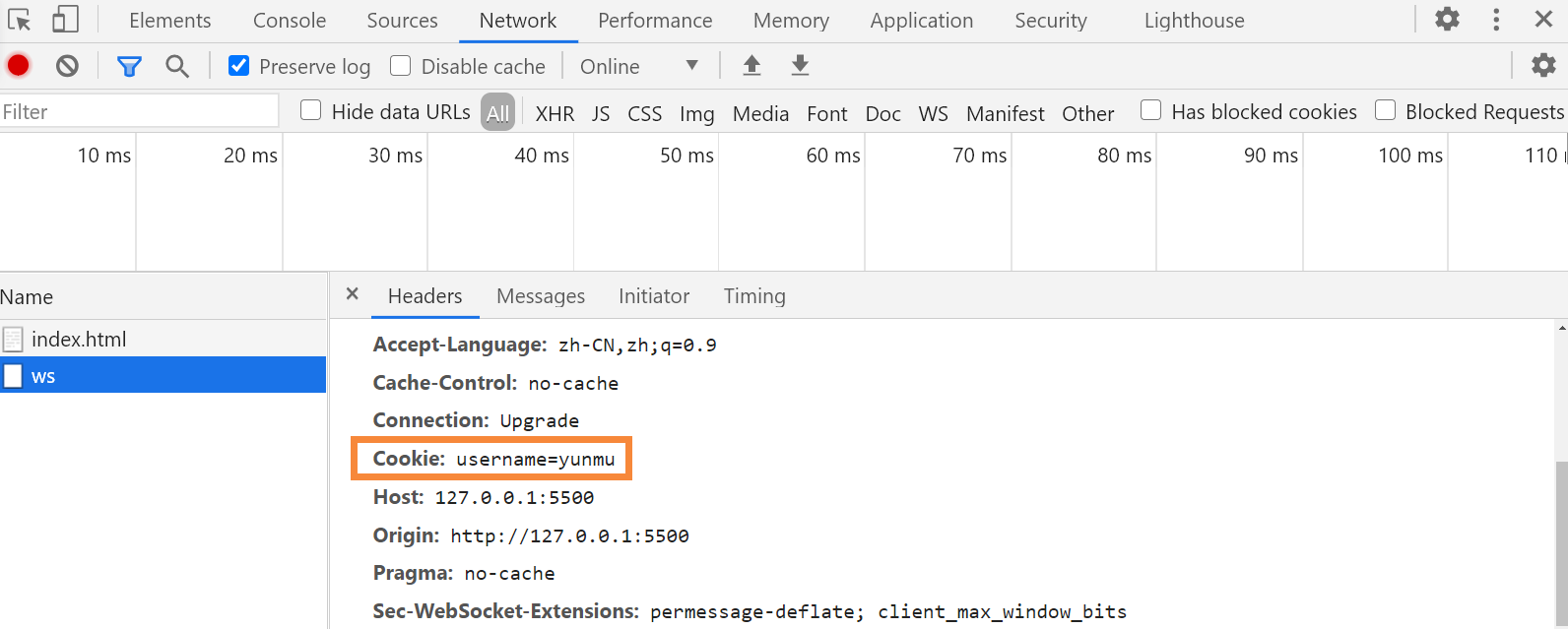
如何获取cookie?
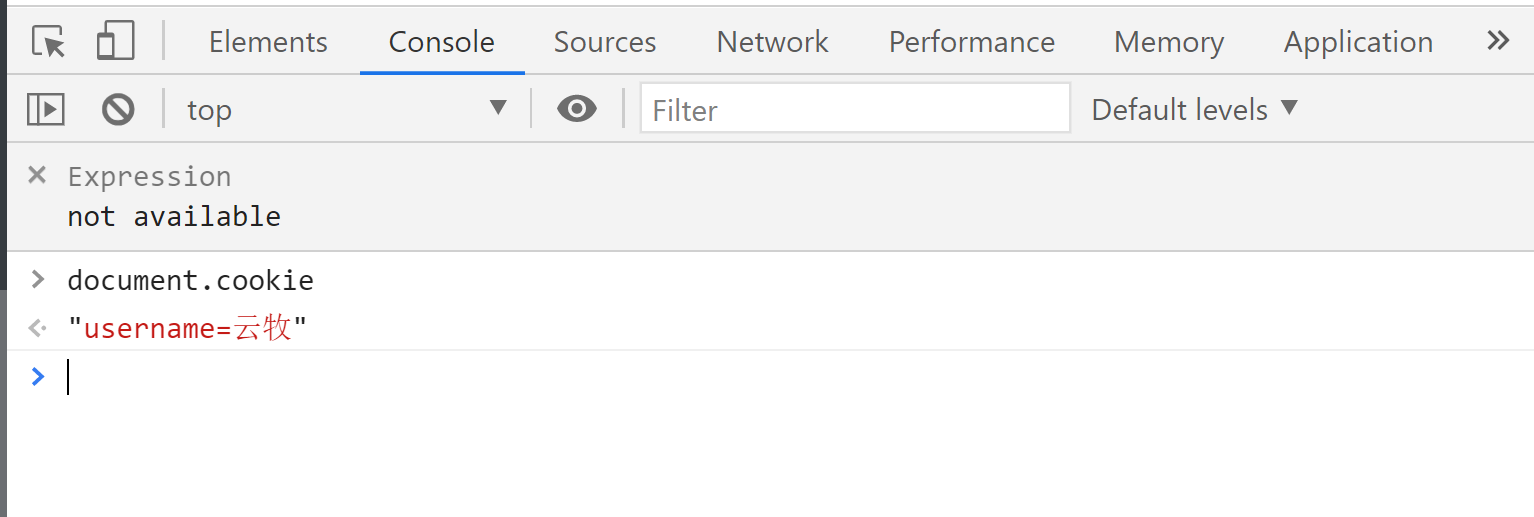
可以设置和获取多个cookie


# 3.Cookie的基本用法
- 写入Cookie
- 读取Cookie
# 1.写入 Cookie
document.cookie = 'username=yunmu';
document.cookie = 'age=18';

//不能一起设置,只能一个一个设置
document.cookie = 'username=zs; age=18';
2
3
4
5
# 2.读取 Cookie
console.log(document.cookie);

//读取的是一个由名值对构成的字符串,每个名值对之间由“; ”(一个分号和一个空格)隔开
//只能一次性全部读取出来
2
3
4
# 4.Cookie的属性
- Cookie的名称(Name)和值(Value)
- 失效(到期))时间
- Domain域
- Path路径
- HttpOnly
- Secure
# 1.Cookie 的名称(Name)和值(Value)
最重要的两个属性,创建 Cookie 时必须填写,其它属性可以使用默认值
Cookie 的名称或值如果包含非英文字母,
则写入时需要使用 encodeURIComponent() 编码,
读取时使用 decodeURIComponent() 解码
document.cookie = `username=${encodeURIComponent('云牧')}`;

document.cookie = `${encodeURIComponent('用户名')}=${encodeURIComponent('云牧')}`;

//一般名称使用英文字母,不要用中文,值可以用中文,但是要编码
2
3
4
5

当我们能通过name读取vlaue的时候 再进行解码使用
# 2.失效(到期)时间
对于失效的 Cookie,会被浏览器清除
如果没有设置失效(到期)时间,这样的 Cookie 称为会话 Cookie
它存在内存中,当会话结束,也就是浏览器关闭时,Cookie 消失
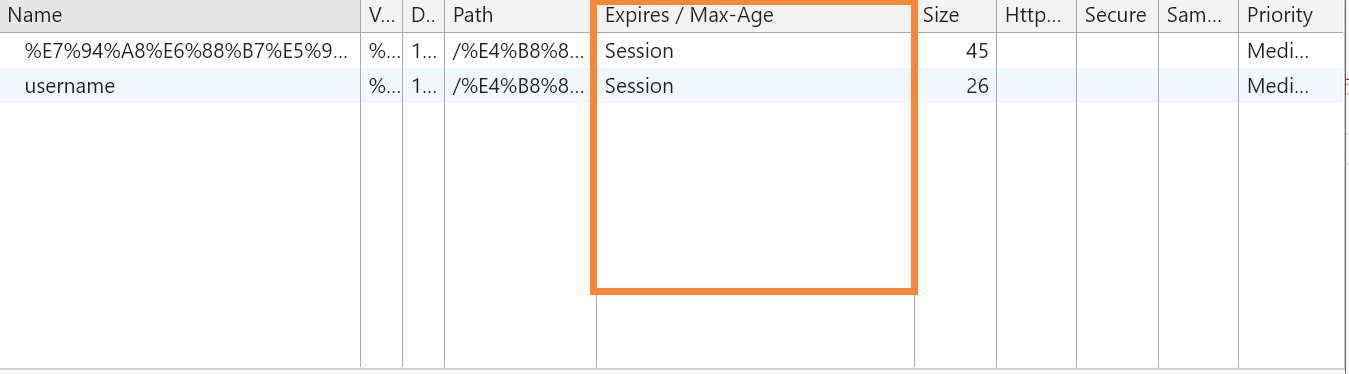
document.cookie = 'username=yunmu'; // 这就是会话 Cookie

//想长时间存在,设置 expires 或 max-Age
//expires
//值为 Date 类型

document.cookie = `username=yunmu; expires=${new Date(
    '2100-1-1 00:00:00'
)}`;
2
3
4
5
6
7
8
9

//max-age
//值为数字,表示当前时间 + 多少秒后过期,单位是秒
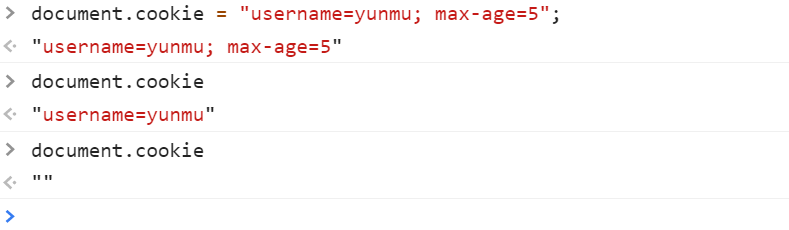
document.cookie = 'username=yunmu; max-age=10'; //只能存在十秒钟

//如果我们想让他存在30天
document.cookie = `username=yunmu; max-age=${24 * 3600 * 30}`;

//如果 max-age 的值是 0 或负数,则 Cookie 会被删除
document.cookie = 'username=yunmu';
document.cookie = 'username=yunmu; max-age=0';
document.cookie = 'username=yunmu; max-age=-1';
2
3
4
5
6
7
8
9
10
11
# 3.Domain域
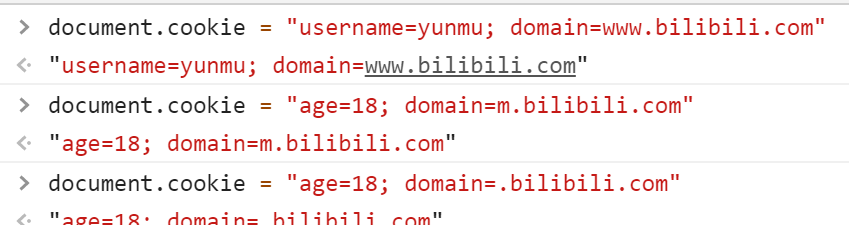
Domain 限定了访问 Cookie 的范围(不同域名)




pc和移动合起来是bilili的整个官网 这是两个子网站 我们想设置一个cookie让整个站点都能访问

使用 JS 只能读写当前域或父域的 Cookie,无法读写其他域的 Cookie
document.cookie = "username=yunmu; domain=www.bilibili.com"

//www.imooc.com m.imooc.com 当前域
//父域:.imooc.com
2
3
4
# 4.Path 路径
Path 限定了访问 Cookie 的范围(同一个域名下)


同一个域名 后面的路径不一样
同一个域名下默认设置的都是根目录 所以我们都能访问到

如果我们要限定cookie在特定的路径下访问

里层目录可以访问到上层目录
使用 JS 只能读写当前路径和上级路径的 Cookie,无法读写下级路径的 Cookie
document.cookie = 'username=yunmu; path=/course/list';

document.cookie = 'username=yunmu; path=/code';
2
3
当 Name、Domain、Path 这 3 个字段都相同的时候,才是同一个 Cookie
# 5.HttpOnly
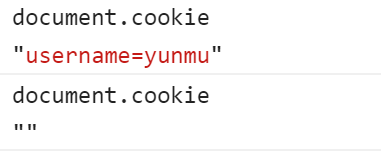
设置了 HttpOnly 属性的 Cookie 不能通过 JS 去访问

# 6.Secure 安全标志
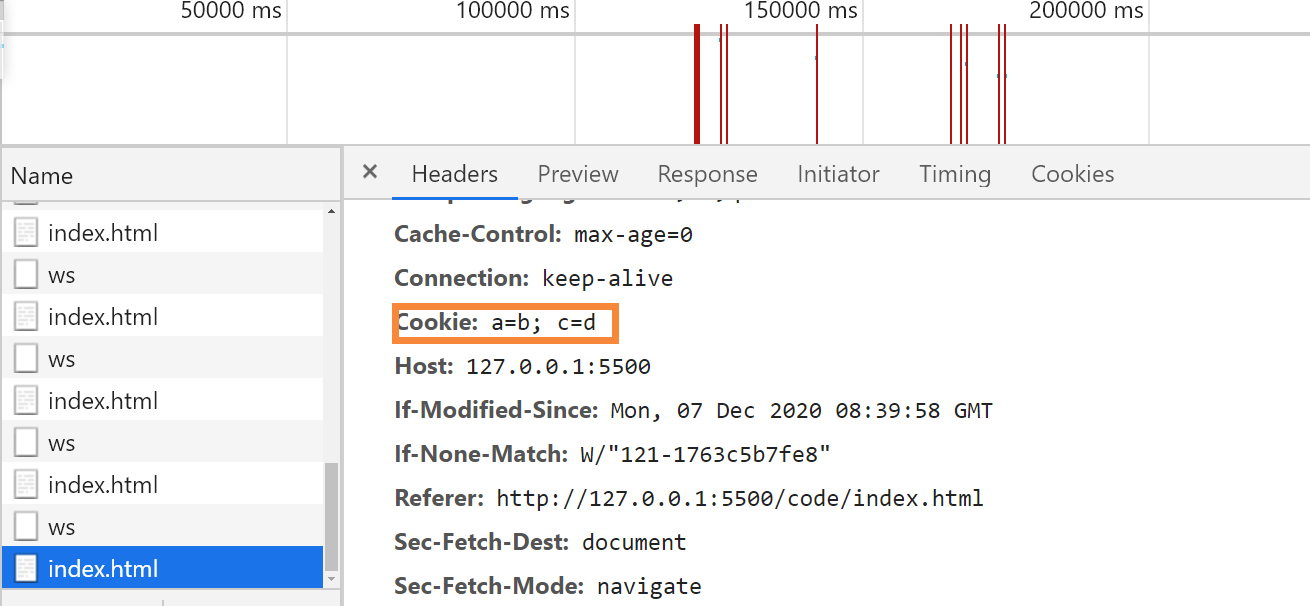
Secure 限定了只有在使用了 https 而不是 http 的情况下才可以发送给服务端

# 5.Cookie的封装
封装Cookie
使用封装好的Cookie 实现网站语言切换
封装 写入 读取 删除


// 写入 Cookie
const set = (name, value, { maxAge, domain, path, secure } = {}) => {
  let cookieText = `${encodeURIComponent(name)}=${encodeURIComponent(value)}`;

  if (typeof maxAge === 'number') {
    cookieText += `; max-age=${maxAge}`;
  }

  if (domain) {
    cookieText += `; domain=${domain}`;
  }

  if (path) {
    cookieText += `; path=${path}`;
  }

  if (secure) {
    cookieText += `; secure`;
  }

  document.cookie = cookieText;

  // document.cookie='username=alex; max-age=5; domain='
};


// 通过 name 获取 cookie 的值
const get = name => {
  name = `${encodeURIComponent(name)}`;

  const cookies = document.cookie.split('; ');

  for (const item of cookies) {
    const [cookieName, cookieValue] = item.split('=');

    if (cookieName === name) {
      return decodeURIComponent(cookieValue);
    }
  }

  return;
};


// 根据 name、domain 和 path 删除 Cookie
const remove = (name, { domain, path } = {}) => {
  set(name, '', { domain, path, maxAge: -1 });
};

export { set, get, remove };


// 使用封装好的 Cookie 实现网站语言切换

<button id="cn">中文</button>
<button id="en">英文</button>

<script type="module">
    import { set } from "./index.js";


const cnBtn = document.getElementById("cn");
const enBtn = document.getElementById("en");


console.log(document.cookie);

cnBtn.onclick = function(){
    set("language","cn",{
        maxAge:3600
    });


    window.location.reload();
}

enBtn.onclick = function(){
    set("language","en",{
        maxAge:3600
    });


    window.location.reload();
}
2
3
4
5
6
7
8
9
10
11
12
13
14
15
16
17
18
19
20
21
22
23
24
25
26
27
28
29
30
31
32
33
34
35
36
37
38
39
40
41
42
43
44
45
46
47
48
49
50
51
52
53
54
55
56
57
58
59
60
61
62
63
64
65
66
67
68
69
70
71
72
73
74
75
76
77
78
79
80
81
82
83
84
85
86
87
88
89
# 6.Cookie 的注意事项
# 1.前后端都可以创建 Cookie
# 2.Cookie 有数量限制
每个域名下的 Cookie 数量有限
当超过单个域名限制之后,再设置 Cookie,浏览器就会清除以前设置的 Cookie
# 3.Cookie 有大小限制
每个 Cookie 的存储容量很小,最多只有 4KB 左右
# localStorage
# 1.初识localStorage
- localStorage是什么
- 在浏览器中操作localStorage
- localStorage的基本用法
- 使用localStorage 实现自动填充
# 1.localStorage 是什么
localStorage 也是一种浏览器存储数据的方式(本地存储),它只是存储在本地,不会发送到服务器端
单个域名下的 localStorage 总大小有限制
# 2.在浏览器中操作 localStorage
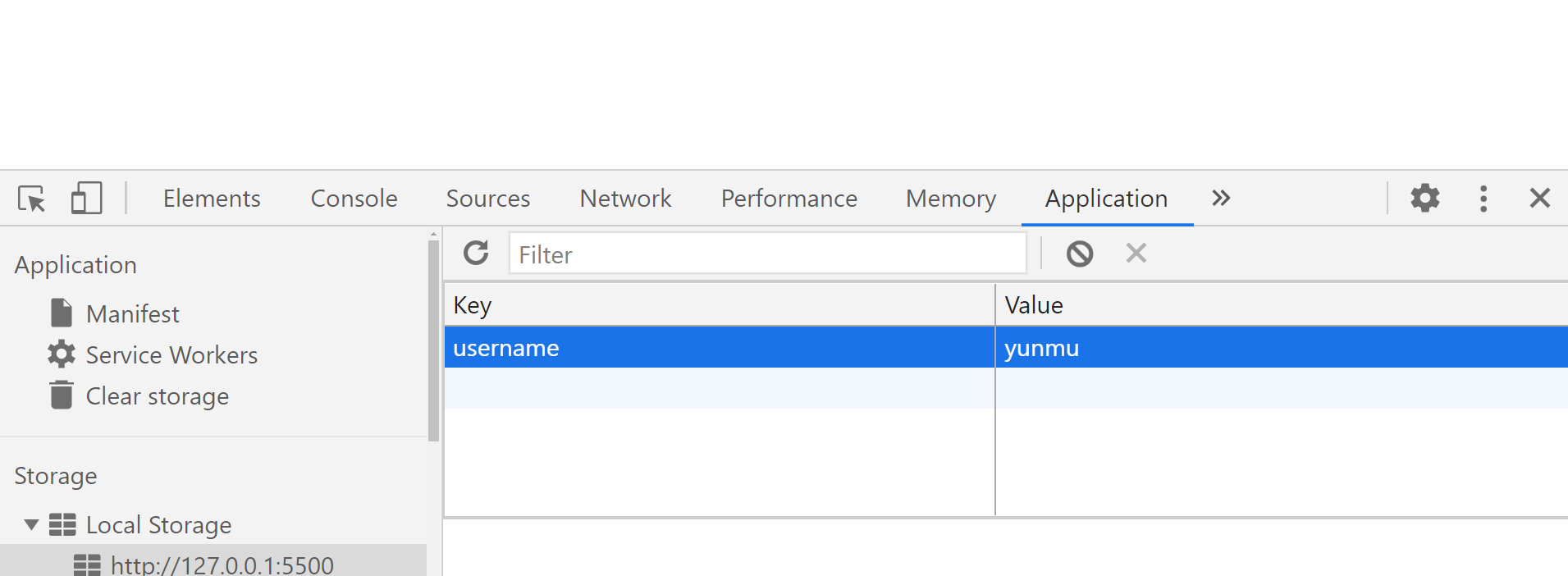
# 3.localStorage 的基本用法
console.log(localStorage);


//setItem()
localStorage.setItem("username" , "yunmu");
//同名覆盖
localStorage.setItem("username" , "xiyan");
localStorage.setItem("age" , 18);
localStorage.setItem("sex" , "female");

//length
console.log(localStorage.length);

//getItem()
console.log(localStorage.getItem("username"));
console.log(localStorage.getItem("age"));

//获取不存在的返回 null
console.log(localStorage.getItem("name"));

//removeItem()
console.log(localStorage.removeItem("username"));
console.log(localStorage.removeItem("age"));

//删除不存在的 key,不报错
localStorage.removeItem("name");

//clear()  全部删除
localStorage.clear();
console.log(localStorage);
2
3
4
5
6
7
8
9
10
11
12
13
14
15
16
17
18
19
20
21
22
23
24
25
26
27
28
29
30
# 4.使用localStorage 实现自动填充
<body>
    <form id="login" action="https://www.baidu.com" method="post">
      <input type="text" name="username" />
      <input type="password" name="password" />
      <input type="submit" id="btn" value="登录" />
    </form>

    <script>
      const loginForm = document.getElementById("login");
      const btn = document.getElementById("btn");
      const username = localStorage.getItem("username");

      if(username){
        loginForm.username.value = username;
      }


      btn.addEventListener("click", (e) => {

        //阻止提交
        e.preventDefault();


        // 数据验证
        console.log(loginForm.username.value);
        localStorage.setItem("username",loginForm.username.value);


        loginForm.submit();

      });


    </script>
  </body>
2
3
4
5
6
7
8
9
10
11
12
13
14
15
16
17
18
19
20
21
22
23
24
25
26
27
28
29
30
31
32
33
34
35
# 5.localStorage的注意事项
- localStorage的存储期限
- localStorage键和值的类型
- 不同域名下能否共用localstorage
- localStorage的兼容性
# 2.localStorage 的存储期限
# 1.localStorage 的存储期限
localStorage 是持久化的本地存储,除非手动清除(比如通过 js 删除,或者清除浏览器缓存),否则
数据是永远不会过期的
sessionStorage
当会话结束(比如关闭浏览器)的时候,sessionStorage 中的数据会被清空
sessionStorage.setItem('username', 'yunmu');
sessionStorage.getItem('username');
sessionStorage.removeItem('username');
sessionStorage.clear();
console.log(sessionStorage.length);
2
3
4
5
# 2.localStorage 键和值的类型
localStorage 存储的键和值只能是字符串类型
不是字符串类型,也会先转化成字符串类型再存进去
localStorage.setItem({}, 18);

console.log(
    typeof localStorage.getItem('[object Object]'),
    localStorage.getItem('[object Object]')
);


localStorage.setItem('students', [{},{}]);
2
3
4
5
6
7
8
9
# 3.不同域名下能否共用 localStorage
不同的域名是不能共用 localStorage 的
# 4.localStorage 的兼容性
IE7及以下版本不支持 localStorage,IE8 开始支持
caniuse.com
# 课程总结
# Cookie
浏览器存储数据的一种方式
存储在用户本地,而不是存储在服务器上
可以随着浏览器每次请求发送到服务器端
# Cookie的用法
写入Cookie

读取Cookie

# Cookie的属性
名称( Name)和值(Value)
创建Cookie时必须填写,其它属性可以使用默认值
如果包含非英文字母,写入时要用encodeURIComponent()编码
如果写入时编码,读取时要用decodeURIComponent()解码
失效(到期)时间
失效的Cookie,会被浏览器清除
如果没有设置失效时间,默认会话结束后,Cookie会被清除
想Cookie长时间存在,可以设置Expires 或 Max-Age
expires 值为Date类型,表示具体什么时间过期
max-age值为数字,表示当前时间加多少秒后过期,单位是秒
如果设置max-age的值是О或负数,则Cookie会被删除
Domain
Domain限定了访问Cookie的范围(不同域下)
使用JS只能写入/读取当前域或父域的Cookie,无法写入/读取其他域的Cookie
Path
Path 限定了访问Cookie的范围(同域不同路径下)
使用JS只能写入/读取当前路径和上级路径的Cookie,无法写入/读取其他路径的Cookie
当Name、Domain、Path这3个字段都相同的时候,才是同一个Cookie
HttpOnly
前端不能通过JS去设置一个 HttpOnly类型的Cookie,这种类型的Cookie只能是后端来设置
只要是HttpOnly类型的,通过document.cookie是获取不到的,也不能进行修改
Secure
Secure 限定了只有在使用了https而不是http的情况下才可以发送给服务端
Domain、Path、Secure都要满足条件,还不能过期的Cookie才能随着请求发送到服务器端
# Cookie的注意事项
前后端都可以写入和获取Cookie
每个域名下的Cookie数量有限
每个Cookie的存储容量很小,最多只有4KB左右
# localStorage
浏览器存储数据的一种方式
存储在用户本地,不会发送到服务器端
单个域名下的总大小有限制(一般最大5M左右)
# localStorage的基本用法
setltem()

getItem

removeItem

clear

length


