
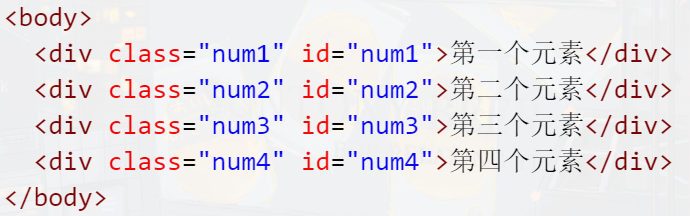
# 1.代码如下图所示,如果想获取到“第二个元素“,获取方法该怎么写?(选择一项)
**A.**document.getElementById(“.num2”);
**B.**document.getElementById(“#num2”);
**C:**document.getElementsById(“ num2”);
**D:**document.getElementById(“ num2”);
该题考察的是dom的查找方法
正确选项为D;getElementById() 方法返回带有指定 ID 的元素,括号里面直接写ID名即可
# 2.关于dom的查找方法,下列选项中说法正确的是?(选择两项)
**A.**getElementByTagName()方法返回带有指定标签名的所有元素,返回的是一个元素
**B.**getElementsByTagName()方法返回带有指定标签名的所有元素,返回的是元素的集合
**C.**getElementById()方法返回带有指定 ID 的元素
**D.**getElementsById() 方法返回带有指定 ID 的元素
该题考察的是dom的查找方法,正确选项为BC; A:getElementsByTagName()方法返回带有指定标签名的所有元素,返回的是元素的集合,可以通过下标的方式去获取每个元素。
D:getElementById() 方法返回带有指定 ID 的元素,Element没有s。
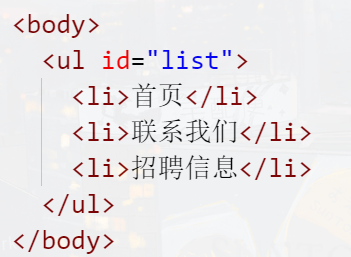
# 3.代码如下图所示,想要获取到ul里面的所有li,获取方法怎么写?(选择一项)
**A.**document.getElementsByTagName("li") ;
**B.**document.getElementByTagName("li") ;
**C.**document.getElementByTagName("list") ;
**D.**document.getElementsByTagName("list") ;
该题考察的是dom的查找方法,正确选项为A;
getElementsByTagName()方法返回带有指定标签名的所有元素,返回的是元素的集合,括号里面写的是想要获取的元素名,且Elements需要有s。
# 4.以下选项中,哪一个不能获取到效果图中所有的p元素?(选择一项)
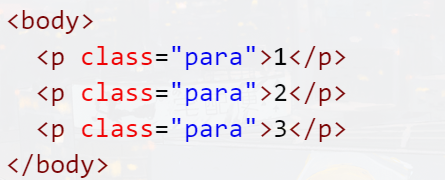
本题考查获取dom元素的常用方法。
document.getElementsByClassName("para")表示获取页面中所有类名为para的元素。
document.getElementsByTagName("p")表示获取页面中所有标签名为p的元素。
document.querySelector(".para")表示通过选择器".para",获取类名为para的元素。注意它只能返回一个元素,如果有多个类名为para的元素,那么默认返回第一个类名为para的元素。
document.querySelectorAll(".para")表示通过选择器".para",获取页面中所有类名为para的元素。
所以本题答案为C。
# 5.下面代码的运行结果是?(选择一项)
A.<span><a href="#">链接</a></span>
B.<a href="#">链接</a>
**C.**链接
D.<div><span>链接</a></div>
该题考察的是dom的innerHTML属性,正确选项为A;
innerHTML属性是用来获取元素的开始标签和结束标签之间的所有内容,如果有html标签,也会直接拿出来,不会被编译。
# 6.在DOM的HTML事件中,下列哪个事件是当用户单击鼠标时触发的?(选择一项)
**A.**onload
**B.**onclick
**C.**onblur
**D.**onmouseout
# 7.DOM中的哪个事件会在网页中的所有元素(文本、图像、CSS样式等)加载完后才触发执行?(选择一项)
**A.**onload
**B.**onclick
**C.**onmouseover
**D.**onblur
该题考察的是DOM的onload事件,正确选项为A;
onload事件是在网页中的元素(图片、外部关联文件等)都完全加载到浏览器之后才执行。
B:onclick是在点击的时候触发。
C:onmouseover 事件会在鼠标指针移动到指定的元素上时发生。
D:onblur事件是失去焦点时触发。
# 8.观察截图中的代码,选项中说法正确的是?(选择两项)
**A.**页面打开时会弹出“hello
**B.**点击按钮,会弹出“hello”
**C.**系统报错,设置的onclick事件为空
**D.**页面要顺利执行脚本弹出“hello”,需加上onload事件
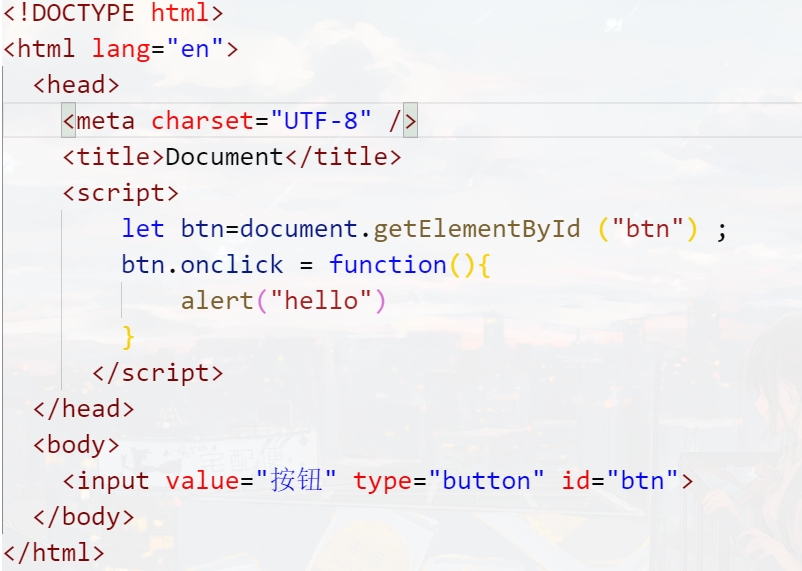
该题考察的是DOM的onload事件,正确选项为CD;
onload事件是在网页中的元素(图片、外部关联文件等)都完全加载到浏览器之后才执行。题干代码中,当浏览器读到脚本时,body中的元素还未解析,所以找不到对应的DOM元素,所以系统会报错,需要给他加上onload事件即可。
# 9.编程练习
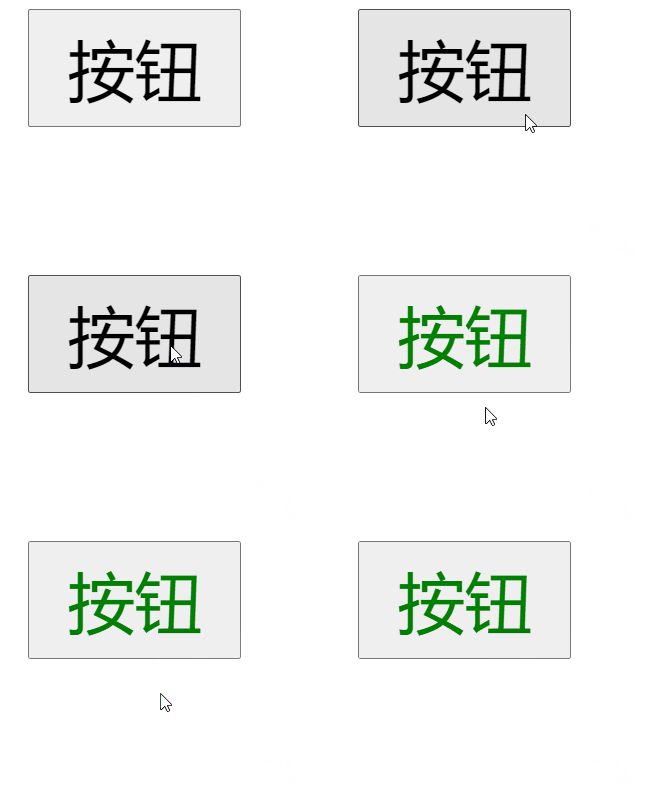
(1) 当点击按钮时,按钮的字体颜色变成红色
(2) 当鼠标离开按钮时,字体颜色变成绿色
注意,把js脚本写在<head>标签中。
第一步:定义onload方法,并把所有的js代码放到onload方法中。
第二步:通过元素获取dom对象的方式获取到按钮元素
第三步:按钮绑定点击事件,当点击按钮时,按钮的字体颜色变为红色
第四步:按钮再绑定鼠标离开事件,当鼠标离开按钮时,按钮的字体颜色变为绿色
# 10.编程练习
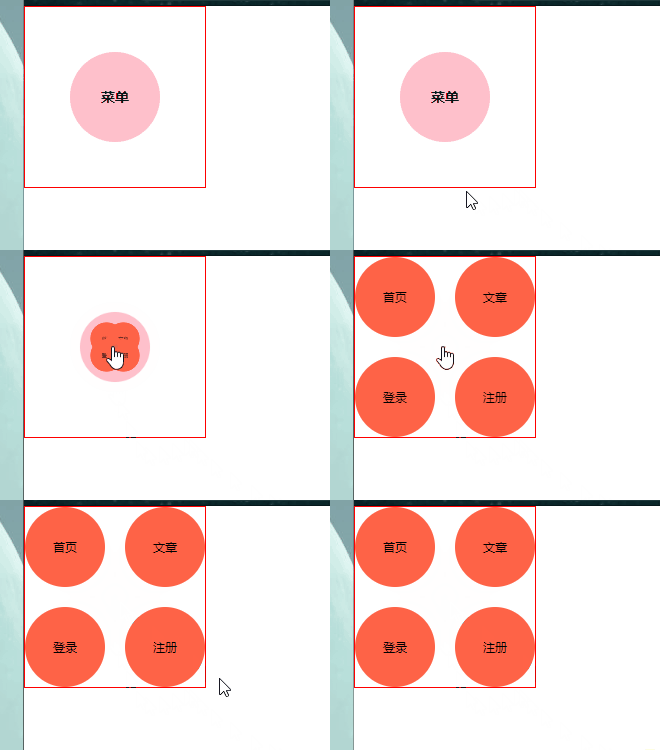
<style>
        *{
            margin: 0;
            padding: 0;
        }

        #wrap{
            position: relative;
            width: 180px;
            height: 180px;
            border: 1px solid red;
        }

        #wrap .menu{
            position: absolute;
            top: 50%;
            left: 50%;
            margin-top:-45px ;
            margin-left: -45px;
            width: 90px;
            height: 90px;
            font-size: 14px;
            font-weight: bold;
            text-align: center;
            line-height: 90px;
            background-color: pink;
            border-radius: 50%;
            cursor: pointer;
            transform: scale(1);
            transition: .6s;
        }

        #wrap .menu.hidden{
            transform: scale(0);
        }

        #wrap .child{
            position: absolute;
            top: 50px;
            left: 50px;
            width: 80px;
            height: 80px;
            background-color: tomato;
            border-radius: 50%;
            line-height: 80px;
            text-align: center;
            font-size: 12px;
            transform: scale(0) translate(0px ,0px);
            transition: .4s;
        }

         #wrap .child.show{
            transform: scale(1);
        }

        #wrap p.c1.show{
            /* top: 0;
            left: 0; */
            transform: scale(1) translate(-50px , -50px);
        }

        #wrap p.c2.show{
            /* top: 0;
            left: 100px; */
            transform: scale(1) translate(50px , -50px);
        }

        #wrap p.c3.show{
            /* top: 100px;
            left: 0; */
            transform: scale(1) translate(-50px , 50px);
        }

        #wrap p.c4.show{
           /* top: 100px;
           left: 100px; */
           transform: scale(1) translate(50px , 50px);
        }
    </style>
</head>
<body>


    <div id="wrap">
        <p class="menu">菜单</p>
        <p class="child c1">首页</p>
        <p class="child c2">文章</p>
        <p class="child c3">登录</p>
        <p class="child c4">注册</p>

    </div>

    <script>
        let oMenu = document.querySelector("#wrap .menu"),
            aChild = document.querySelectorAll("#wrap .child");

        oMenu.onclick = function(){

            oMenu.classList.add("hidden");
            aChild[0].classList.add("show");
            aChild[1].classList.add("show");
            aChild[2].classList.add("show");
            aChild[3].classList.add("show");
        }

    </script>


    //改进

    <script>
        let oMenu = document.querySelector("#wrap .menu"),
            oWrap = document.getElementById("wrap")

            oMenu.onclick = function(){
                oWrap.classList.add("show");
            }

    </script>
2
3
4
5
6
7
8
9
10
11
12
13
14
15
16
17
18
19
20
21
22
23
24
25
26
27
28
29
30
31
32
33
34
35
36
37
38
39
40
41
42
43
44
45
46
47
48
49
50
51
52
53
54
55
56
57
58
59
60
61
62
63
64
65
66
67
68
69
70
71
72
73
74
75
76
77
78
79
80
81
82
83
84
85
86
87
88
89
90
91
92
93
94
95
96
97
98
99
100
101
102
103
104
105
106
107
108
109
110
111
112
113
114
115
116
117
118
119
120
# 11.编程练习
<style>
        #wrap {
            text-align: center;
        }

        img {
            width: 600px;
            transition: .6s;
        }

        button {
            width: 50px;
            height: 25px;
            margin: 0 20px;
        }

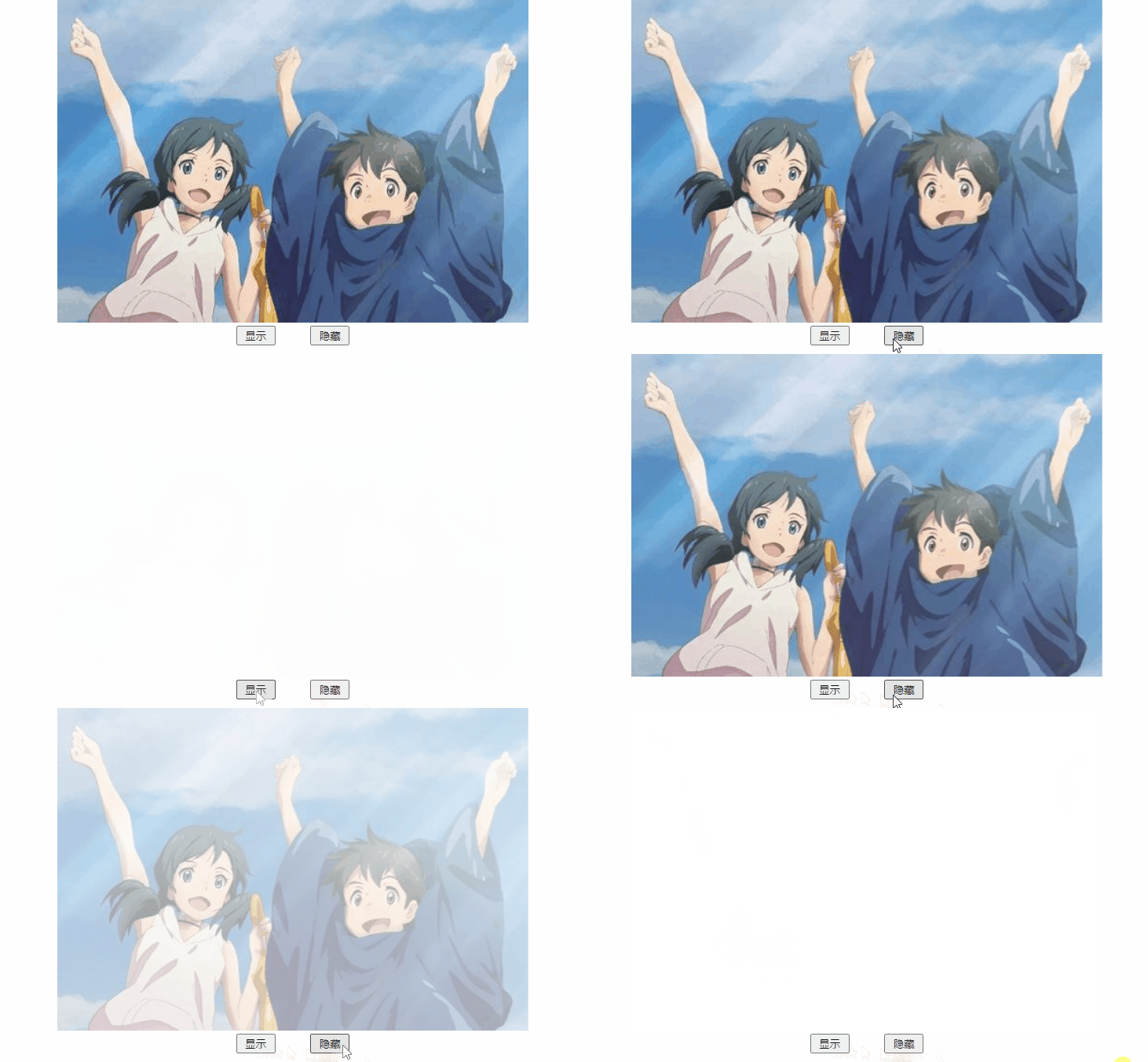
        img.show {
            opacity: 1;
        }

        img.hide {
            opacity: 0;
        }
    </style>
</head>

<body>


    <div id="wrap">
        <img src="./1.jpg" alt="" id="pic">
        <br>
        <button id="btn1">显示</button>
        <button id="btn2">隐藏</button>
    </div>


    <script>
        let oPic = document.getElementById("pic"),
            oBtn1 = document.getElementById("btn1"),
            oBtn2 = document.getElementById("btn2");

        oBtn1.onclick = function () {
            oPic.className = "show"
        }


        oBtn2.onclick = function () {
            oPic.className = "hide"
        }

    </script>
2
3
4
5
6
7
8
9
10
11
12
13
14
15
16
17
18
19
20
21
22
23
24
25
26
27
28
29
30
31
32
33
34
35
36
37
38
39
40
41
42
43
44
45
46
47
48
49
50
51
52
# 12.编程练习
<style>
        * {
            margin: 0;
            padding: 0;
        }

        #box1,
        #box2 {
            width: 200px;
            height: 50px;
            background: #999;
            margin: 50px auto;
            line-height: 50px;
            font-weight: bolder;
            color: #fff;
            text-align: center;
            font-size: 12px;
        }
    </style>

</head>

<body>
    <div id="box1"></div>

    <div id="box2"></div>
    <script>
          let oBox1 = document.getElementById("box1"),
                oBox2 = document.getElementById("box2");

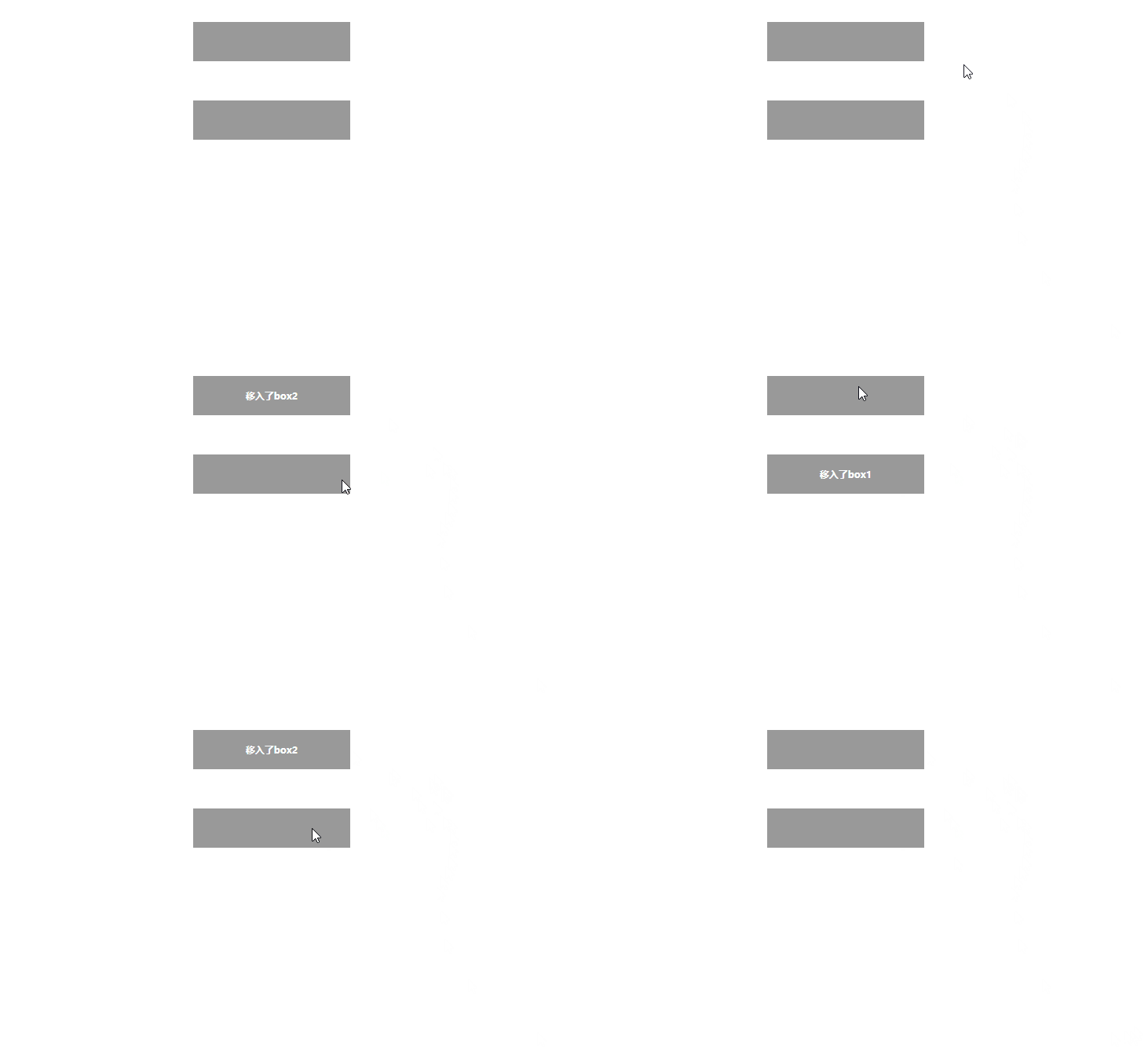
            oBox1.onmouseenter = function () {
                oBox2.innerHTML = "移入了box1";
            };
            oBox1.onmouseleave = function () {
                oBox2.innerHTML = "";
            };

            oBox2.onmouseenter = function () {
                oBox1.innerHTML = "移入了box2";
            };
            oBox2.onmouseleave = function () {
                oBox1.innerHTML = "";
            };


    </script>
2
3
4
5
6
7
8
9
10
11
12
13
14
15
16
17
18
19
20
21
22
23
24
25
26
27
28
29
30
31
32
33
34
35
36
37
38
39
40
41
42
43
44
45
46
# 14.编程练习

<style>
        *{
            margin: 0;
            padding: 0;
        }

        .box1,
        .box2 {
            width: 200px;
            height: 200px;
            background-color: purple;
            margin:  50px auto;
            user-select: none;
        }

    </style>
</head>

<body>
    <div class="bigbox">
        <div class="box1"></div>
        <div class="box2"></div>
    </div>

    <script>

        let box1 = document.querySelector(".box1")
        let box2 = document.querySelector(".box2")

        box1.onclick = function() {
            box2.innerHTML += "云牧真帅"
        }

        box2.onclick = function() {
            box1.innerHTML += "帅的不谈"
        }


    </script>
2
3
4
5
6
7
8
9
10
11
12
13
14
15
16
17
18
19
20
21
22
23
24
25
26
27
28
29
30
31
32
33
34
35
36
37
38
39
← 02-变量与数据类型 04-表达式和操作符 →