# 1.下列关于剩余参数描述错误的选项是?(选择一项)
**A.**剩余参数本质是一个数组
**B.**剩余参数的书写位置是任意的
**C.**普通函数可以使用剩余参数获取所有的参数
**D.**箭头函数可以使用剩余参数获取所有的参数
本题主要考查对剩余参数的理解。
剩余参数本质就是一个数组,用来获取传入函数中的所有参数,但是剩余参数只能作为最后一个参数,位置是固定的,所以B选项描述是错误的,本题答案为B.
# 2.下面代码中,args表示剩余参数的选项是?(选择两项)
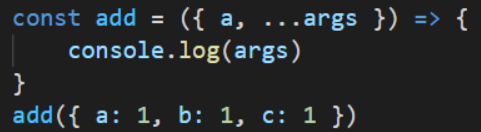
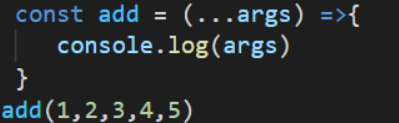
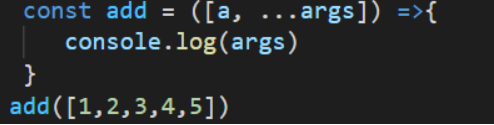
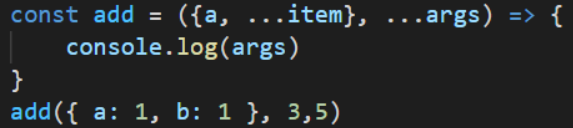
本题主要考查对剩余参数和剩余元素的区分。
剩余参数和剩余元素的书写格式都是使用“…变量名”的方式,不同的是:剩余参数是直接作为函数参数使用的。剩余元素是在解构赋值时,用来接收剩下的元素。
A选项中的参数是一个对象格式,对象中的...args是接受对象中的剩余元素。
B选项中的args是直接作为函数参数使用的,此处的...args表示剩余参数。
C选项中的参数是一个数组格式,数组中的...args表示接收剩余的元素。
D选项中的参数有两个,args是直接作为函数参数使用的,此处的...args表示剩余参数。
所以本题答案为BD.
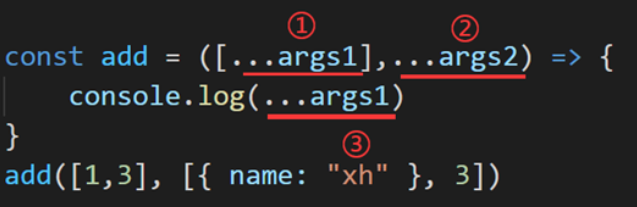
# 3.下图中标注的三处代码,分别表示什么?(选择一项)
**A.**展开运算符、展开运算符、展开运算符
**B.**剩余参数、剩余参数、展开运算符
**C.**展开运算符、剩余参数、展开运算符
**D.**剩余元素、剩余参数、展开运算符
本题主要考查…变量格式,在不同地方使用时所代表的意思。
在函数的参数中与解构赋值结合使用时表示剩余元素;直接作为函数参数使用时表示剩余参数;展开数组中的所有元素,表示展开运算符。
①处表示剩余元素;②处表示剩余参数;③处表示展开运算符**;所以本题答案为D.**
# 4.下图所示代码中有三个对象,执行选项中的代码后,输出结果为{x: 0, y: 0, a: 1}是?(选择一项)
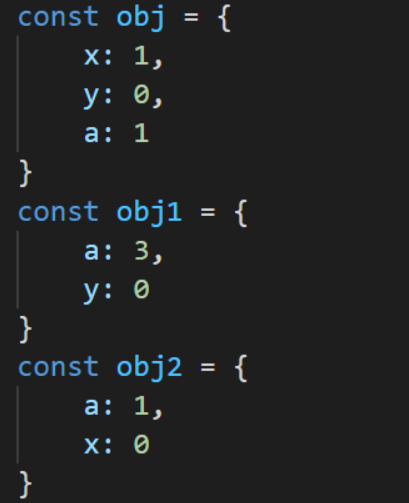



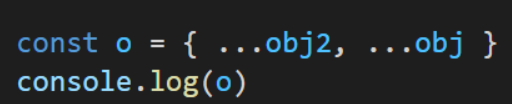
本题主要考查对象的扩展运算符。
对象扩展运算符会将对象中的属性罗列出来,用逗号分隔,放在新的对象中,当合并多个对象时,新对象拥有全部的属性,相同的属性,后者会覆盖前者。
obj1中的相同属性a覆盖了前者,输出结果是{a: 3, y: 0, x: 0},A选项错误。
obj中独有属性y,会添加到新对象中,输出结果是{a: 1, x: 0, y: 1},B选项是错误。
obj2中的相同属性a覆盖了前者,输出结果为{a: 1, x: 0, y: 0}, C选项正确。
obj中的相同属性a和y覆盖了前者,obj中独有属性y,会添加到新对象中,输出结果为{a: 1, x: 1, y: 0},D选项错误。
所以本题答案为C.
# 编程练习
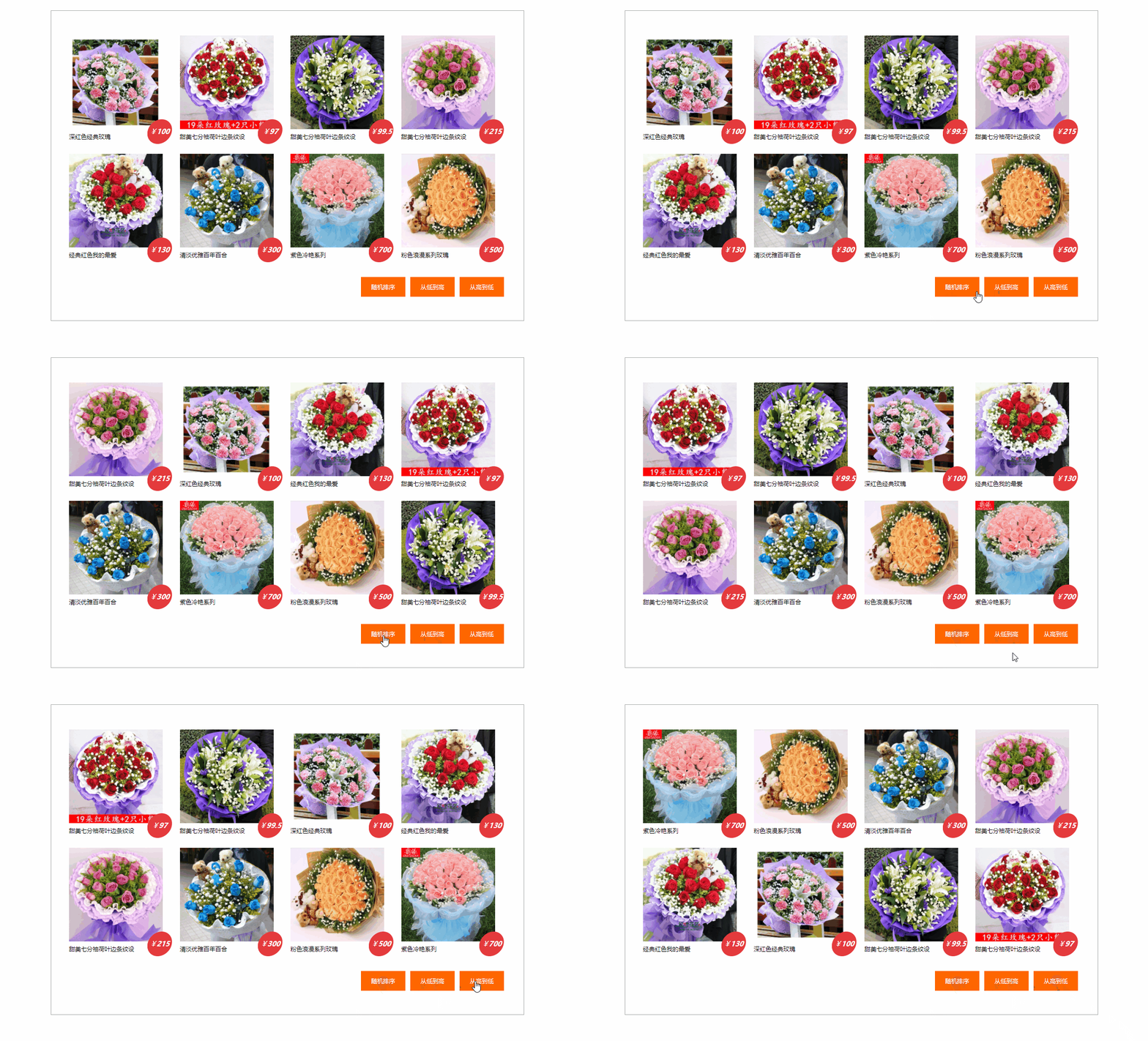
<!DOCTYPE html>
<html lang="zh-cn">
    <head>
        <meta charset="UTF-8" />
        <title>Title</title>
        <style>
            * {
                margin: 0;
                padding: 0;
                list-style: none;
                user-select: none;
                box-sizing: border-box;
            }
            img {
                display: block;
            }
            #wrap {
                width: 960px;
                height: 630px;
                padding: 40px 30px;
                border: 1px solid #aaa;
                margin: 50px auto;
            }
            #wrap .goods {
                display: flex;
                flex-wrap: wrap;
                width: 100%;
            }
            #wrap .goods li {
                position: relative;
                width: 25%;
                height: 240px;
                padding: 10px 6px;
            }

            #wrap .goods li p.price {
                position: absolute;
                bottom: 10px;
                right: 10px;
                width: 50px;
                height: 50px;
                background-image: url("https://s3.ax1x.com/2020/11/19/DuOd0S.png");
                color: #fff;
                line-height: 50px;
                text-align: center;
                font-style: italic;
                font-size: 14px;
            }
            #wrap .goods li p.title {
                font-size: 12px;
                line-height: 30px;
            }

            #wrap .btn {
                display: flex;
                justify-content: flex-end;
            }

            #wrap .btn li {
                width: 90px;
                height: 40px;
                margin-top: 20px;
                margin-right: 10px;
                background-color: #f60;
                line-height: 40px;
                text-align: center;
                font-size: 12px;
                color: #fff;
                cursor: pointer;
            }
        </style>
    </head>
    <body>
        <div id="wrap">
            <ul class="goods">
                <!--<li>
<img width="190" height="190" src="./img/xh_img1.jpg" alt="">
<p class="price">¥<b>100</b></p>
<p class="title">深红色经典玫瑰</p>
</li>
<li>
<img width="190" height="190" src="./img/xh_img2.jpg" alt="">
<p class="price">¥<b>97</b></p>
<p class="title">甜美七分袖荷叶边条纹设</p>
</li>
<li>
<img width="190" height="190" src="./img/xh_img3.jpg" alt="">
<p class="price">¥<b>99.5</b></p>
<p class="title">甜美七分袖荷叶边条纹设</p>
</li>
<li>
<img width="190" height="190" src="./img/xh_img4.jpg" alt="">
<p class="price">¥<b>215</b></p>
<p class="title">甜美七分袖荷叶边条纹设</p>
</li>
<li>
<img width="190" height="190" src="./img/xh_img5.jpg" alt="">
<p class="price">¥<b>130</b></p>
<p class="title">经典红色我的最爱</p>
</li>
<li>
<img width="190" height="190" src="./img/xh_img6.jpg" alt="">
<p class="price">¥<b>300</b></p>
<p class="title">清淡优雅百年百合</p>
</li>
<li>
<img width="190" height="190" src="./img/xh_img7.jpg" alt="">
<p class="price">¥<b>700</b></p>
<p class="title">紫色冷艳系列</p>
</li>
<li>
<img width="190" height="190" src="./img/xh_img8.jpg" alt="">
<p class="price">¥<b>500</b></p>
<p class="title">粉色浪漫系列玫瑰</p>
</li>-->
            </ul>
            <ul class="btn">
                <li>随机排序</li>
                <li>从低到高</li>
                <li>从高到低</li>
            </ul>
        </div>
        <script>
            (function () {
                /*需要从后台请求数据 */
                //先假装我们请求到了数据data
                let data = [
                    {
                        src: "./img/xh_img1.jpg",
                        price: 100,
                        title: "深红色经典玫瑰",
                    },
                    {
                        src: "./img/xh_img2.jpg",
                        price: 97,
                        title: "甜美七分袖荷叶边条纹设",
                    },
                    {
                        src: "./img/xh_img3.jpg",
                        price: 99.5,
                        title: "甜美七分袖荷叶边条纹设",
                    },
                    {
                        src: "./img/xh_img4.jpg",
                        price: 215,
                        title: "甜美七分袖荷叶边条纹设",
                    },
                    {
                        src: "./img/xh_img5.jpg",
                        price: 130,
                        title: "经典红色我的最爱",
                    },
                    {
                        src: "./img/xh_img6.jpg",
                        price: 300,
                        title: "清淡优雅百年百合",
                    },
                    {
                        src: "./img/xh_img7.jpg",
                        price: 700,
                        title: "紫色冷艳系列",
                    },
                    {
                        src: "./img/xh_img8.jpg",
                        price: 500,
                        title: "粉色浪漫系列玫瑰",
                    },
                ];

                //前端的数据处理
                let oGoodsUl = document.querySelector("#wrap .goods");
                let aBtnLi = document.querySelectorAll("#wrap .btn li");

                //点击事件的添加
                (function () {
                    //遍历data生成所需要的前端标签结构
                    init();
                    function init() {
                        let html = "";
                        data.forEach((item) => {
                            html += `<li>
<img src="${item.src}" width="190" height="190" alt="">
<p class="price">¥<b>${item.price}</b></p>
<p class="title">${item.title}</p>
            </li>`;
                        });
                        oGoodsUl.innerHTML = html;
                    }

                    let fnArr = [
                        (a, b) => Math.random() - 0.5,
                        (a, b) => a.price - b.price,
                        (a, b) => b.price - a.price,
                    ];

                    aBtnLi.forEach((node, index) => {
                        //console.log(node);
                        node.onclick = function () {
                            //对data进行排序 --- 根据index来决定使用什么函数做排序
                            data.sort(fnArr[index]);

                            console.log(data);
                            //重新渲染新的页面结构
                            init();

                        };
                    });
                })();

                /*(function(){
        //从高到底
        aBtnLi[0].onclick = function(){
          //对data进行排序
          let fn = (a,b)=>b.price-a.price;
          data.sort(fn);
          //重新渲染新的页面结构
          init();
        };

        //从低到高
        aBtnLi[1].onclick = function(){
          //对data进行排序
          let fn = (a,b)=>a.price-b.price;
          data.sort(fn);
          //重新渲染新的页面结构
          init();
        };

        //随机排序
        aBtnLi[2].onclick = function(){
          //对data进行排序
          let fn = () => Math.random()-0.5;
          data.sort(fn);// -0.5 ~ 0.5
          //重新渲染新的页面结构
          init();
        };
      })();*/

                /*(function(){
        //从高到底
        aBtnLi[0].onclick = function(){
          //对data进行排序
          data.sort((a,b)=>b.price-a.price);
          //重新渲染新的页面结构
          init();
        };

        //从低到高
        aBtnLi[1].onclick = function(){
          //对data进行排序
          data.sort((a,b)=>a.price-b.price);
          //重新渲染新的页面结构
          init();
        };

        //随机排序
        aBtnLi[2].onclick = function(){
          //对data进行排序
          data.sort(()=>Math.random()-0.5);// -0.5 ~ 0.5
          //重新渲染新的页面结构
          init();
        };
      })();*/
            })();
        </script>
    </body>
</html>
2
3
4
5
6
7
8
9
10
11
12
13
14
15
16
17
18
19
20
21
22
23
24
25
26
27
28
29
30
31
32
33
34
35
36
37
38
39
40
41
42
43
44
45
46
47
48
49
50
51
52
53
54
55
56
57
58
59
60
61
62
63
64
65
66
67
68
69
70
71
72
73
74
75
76
77
78
79
80
81
82
83
84
85
86
87
88
89
90
91
92
93
94
95
96
97
98
99
100
101
102
103
104
105
106
107
108
109
110
111
112
113
114
115
116
117
118
119
120
121
122
123
124
125
126
127
128
129
130
131
132
133
134
135
136
137
138
139
140
141
142
143
144
145
146
147
148
149
150
151
152
153
154
155
156
157
158
159
160
161
162
163
164
165
166
167
168
169
170
171
172
173
174
175
176
177
178
179
180
181
182
183
184
185
186
187
188
189
190
191
192
193
194
195
196
197
198
199
200
201
202
203
204
205
206
207
208
209
210
211
212
213
214
215
216
217
218
219
220
221
222
223
224
225
226
227
228
229
230
231
232
233
234
235
236
237
238
239
240
241
242
243
244
245
246
247
248
249
250
251
252
253
254
255
256
257
258
259
260
261
262
263
264
265
266
267
268