# 1.关于函数,下面说法错误的是?(选择两项)
**A.**定义函数使用function
**B.**调用函数可以不加小括号
**C.**函数名可以省略
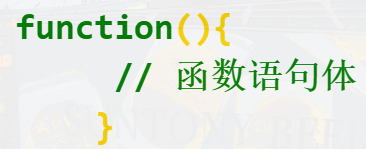
**D.**函数体语句需要放在小括号中
本题考查函数的定义和调用。所以本题答案为BD。
定义函数使用function,A说法正确。
调用函数必须要加小括号,B说法错误。
函数名可以省略,此时叫做匿名函数,C说法正确。
函数体语法需要放在大括号{}中,D说法错误。示例:
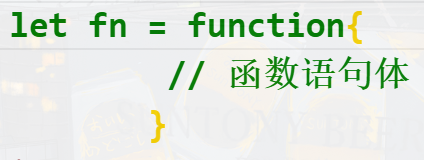
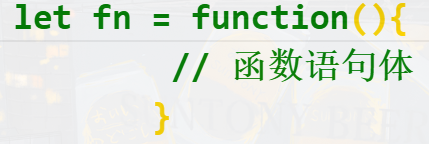
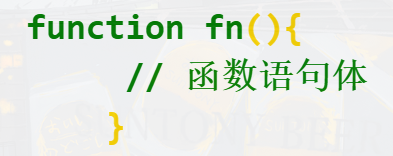
# 2.以下选项中,定义函数的语法正确的是?(选择两项)
A.
B.
C.
D.
本题考查函数定义的基本语法。本题正确答案为BC。
函数定义有两种方式,即function定义函数(function 函数名(){}) 和 函数表达式(var 变量名=function(){})。
A,B选项都是函数表达式,function后面可以省略函数名,但是不能省略小括号,所以A错误。
C,D选项都是function定义函数,function后面函数名和小括号都不能省略,D中省略函数名所以错误。
# 3.以下程序的输出结果是?(选择一项)
**A.**报错
**B.**undefined
**C.**function fn() {}
**D.**fn
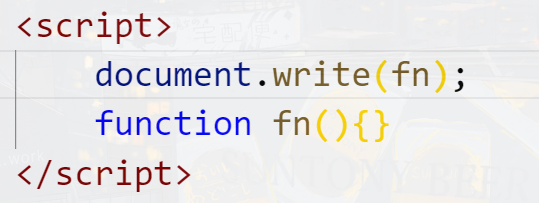
本题考查函数预解析。本题答案为C。
fn函数在预解析时,已经提前进行了该函数的声明。所以document.write(fn)会输出function fn() {},****
# 4.以下程序的输出结果是?(选择一项)
**A.**报错
**B.**undefined
**C.**function fn() {}
**D.**fn
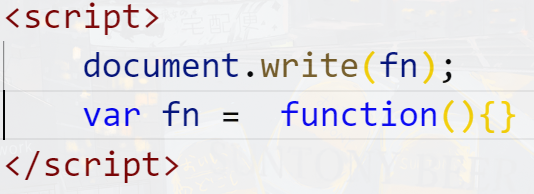
本题考查变量预解析。本题代码为B。
变量预解析时,会提前声明(定义)并赋值为undefined,要注意赋值语句不会预解析。
var fn=function(){}是定义了一个变量,变量值为函数。所以fn遵循的是变量预解析。也就相当于如下:
var fn=undefined;
document.write(fn);
fn=function(){};
所以上面代码输出的结果为undefined,****
# 5.以下代码的输出结果依次为?(选择一项)
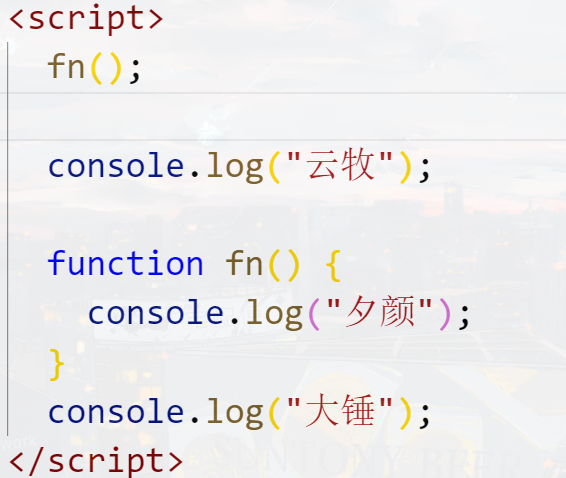
**A.**云牧、夕颜、大锤
**B.**报错
**C.**云牧、大锤、夕颜
**D.**夕颜、云牧、大锤
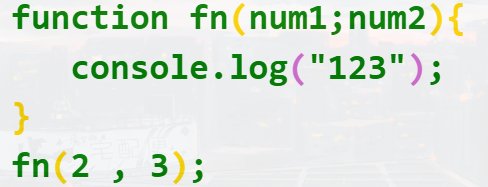
# 6.下面这段代码无法在页面上弹出结果,有几处错误?(选择一项)
**A.**3
**B.**2
**C.**1
**D.**没有错误
本题考查的是函数的语法和应用。所以本题答案为C
错误的地方有1处,即函数的参数使用了分号隔开。正确语法为参数之间用逗号隔开。
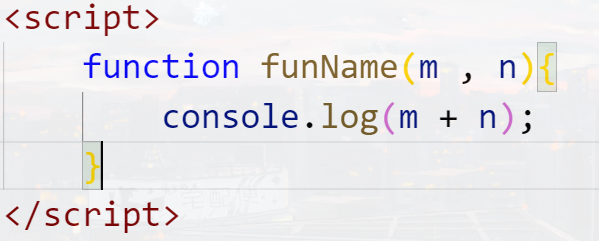
# 7.已知如下函数定义,想要在控制台中输出5和6的和,函数要怎么调用?(选择一项)
**A.**funName(5,6);
**B.**funName();
**C.**funName(m,n);
**D.**funName(5+6);
本题考查的是函数的应用,正确选项为A。
如果函数有参数,那么调用函数时,要将参数的值写在调用函数后面的括号中,参数之间用逗号分开。所以要把5和6作为参数传入,使用逗号隔开,即funName(5,6)。
# 8.关于arguments,下列说法正确的是? (选择两项)
**A.**arguments是数组对象
**B.**arguments.length可以获得传递的参数的个数
**C.**arguments[ ]可获得传递参数的值,索引从1开始
**D.**arguments[ ]可获得传递参数的值,索引从0开始
本题考查的是arguments的使用。所以本题答案为BD。
arguments是类似于数组的对象,但并不是真正的数组对象,A说法错误;
arguments.length可以获得传递的参数的个数,B说法正确;
arguments[ ]可以获得传递参数的值,中括号里面放的参数的索引,索引从0开始,C说法错误,D正确;
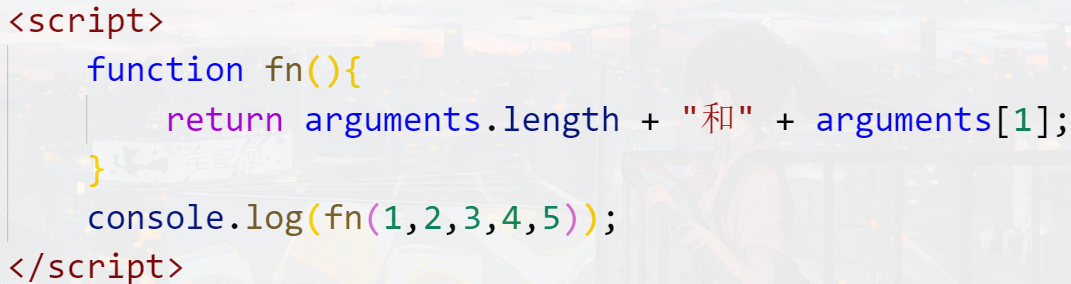
# 9.下面的代码运行结果是?(选择一项)
**A.**1和1
**B.**5和1
**C.**5和2
**D.**1和2
本题考察的是arguments的使用。本题答案为C。
arguments.length可以获得传递的参数的个数(长度).本题代码中,函数调用时,传入5个参数,所以arguments.length为5;arguments[ ]获得传递参数的值,索引从0开始,所以arguments[1]的值是2。
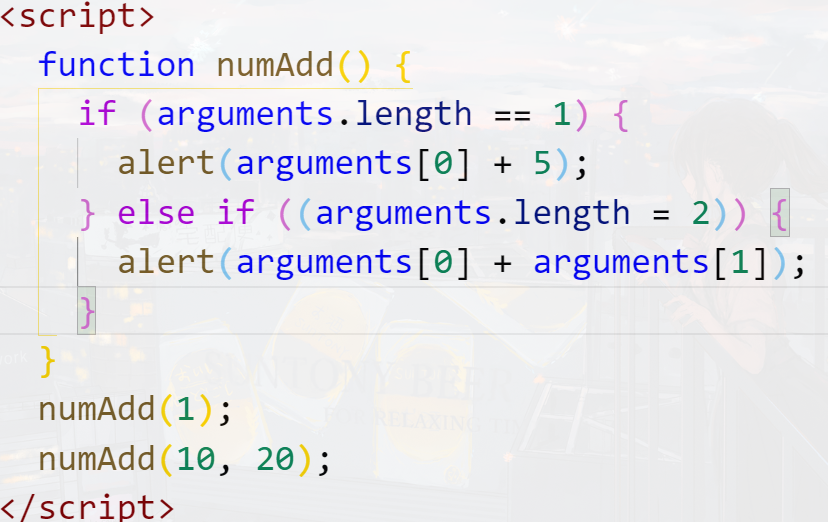
# 10.下面代码的运行结果是?(选择一项)
**A.**分别弹出10和30
**B.**分别弹出6和26
**C.**分别弹出1和30
**D.**分别弹出6和30
本题考察的是arguments.length和arguments[]的使用。本题答案为D。
arguments.length是获取传入的参数的个数(长度),arguments[]是通过数组索引(下标)的方式获取第几个参数。
本题代码中,第一次调用函数numAdd(1),传入的参数长度为1,执行if语句。if语句中,获取了索引为0的参数,即第一个参数1,并与5相加,弹出的结果为6;第二次调用numAdd(10,20),传入的参数长度为2,所以执行else if语句。else if语句中,获取索引为0和索引为1的参数进行相加,即10+20,弹出结果30。
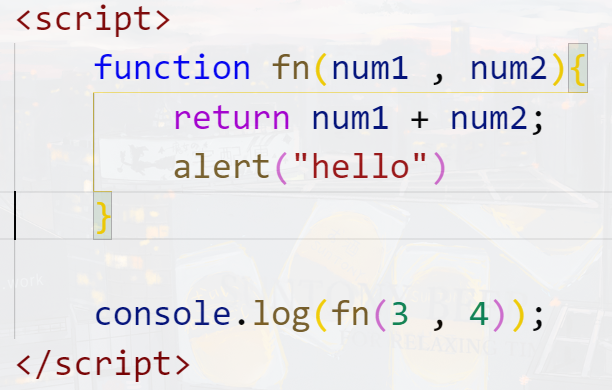
# 11.下面这段代码运行结果是?(选择一项)
**A.**页面弹出“hello”
**B.**控制台输出7
**C.**控制台输出7,页面并弹出“hello”
**D.**什么也不显示
本题考查的是return语句的使用。所以本题答案为B。
代码执行到return时,会停止执行后面的语句,只返回return中指定的内容,所以控制台只会输出num1+num2的结果7。
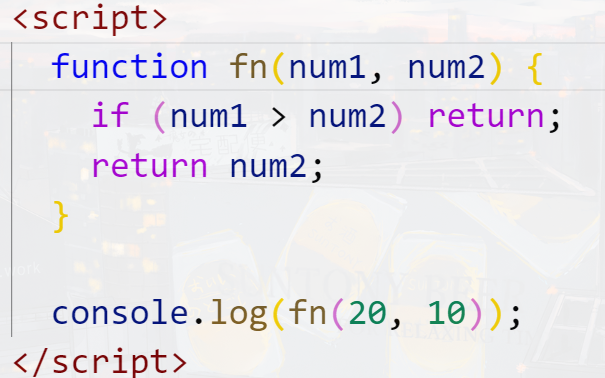
# 12.下面这段代码运行结果是?(选择一项)
**A.**10
**B.**20
**C.**undefined
**D.**没有输出
本题考察的是return语句的使用。所以本题答案为C。
如果return后面没有返回值,默认返回undefined,且执行完return语句,后面的语句不会执行了。
本题代码中,调用fun2(20,10),那么参数num1=20,num2=10。if判断num1>num2条件成立,执行return。注意return后面没有加返回值,默认为undefined,
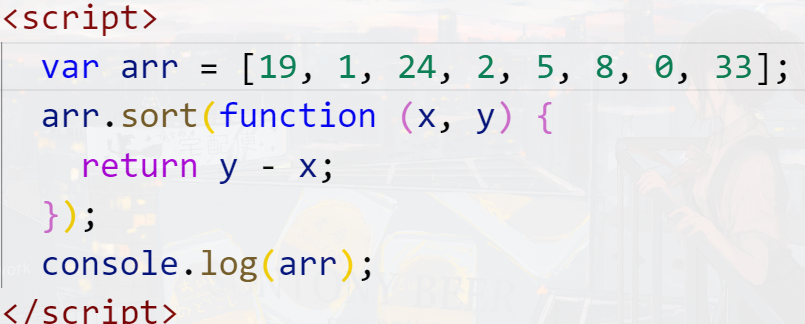
# 13.下列代码运行结果是?(选择一项)
A.[33,24,19,8,5,2,1,0]
B.[0,1,2,5,8,19,24,33]
C.[0,1,19,2,24,33,5,8]
D.[8,5,33,24,2,19,1,0]
本题考察的是数组的sort()方法。本题答案为A。
sort()方法用于对数组的元素进行排序,sort里面可以接收一个函数作为参数,return y-x时是降序排序;return x-y时,升序排序。本题代码中,进行的是降序排序,所以arr排序结果为[33,24,19,8,5,2,1,0],
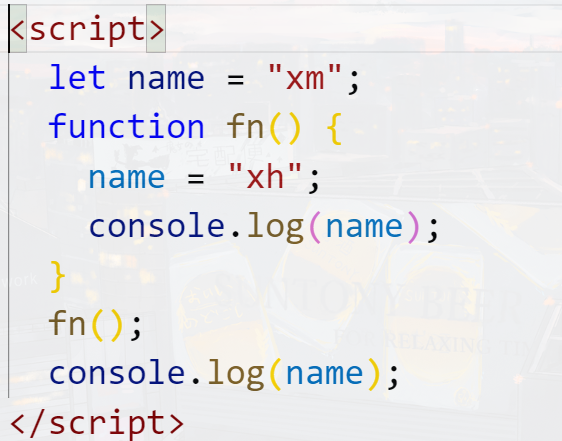
# 14.以下程序的输出结果是?(选择一项)
**A.**xm,xm
**B.**xm,xh
**C.**xh,xh
**D.**xh,xm
本题考查变量和作用域。本题代码为C。
函数会形成一个局部作用域,在函数中使用某一个变量时,会先在这个函数中查找是否定义了这个变量。如果函数中定义了此变量,那么会向上一级作用域查找。
本题代码中,函数中使用了变量name,会先在函数中查找是否定义了name。fn中并没有使用var定义变量name,然后向上一级作用域也就是全局下查找name。发现全局中已经定义了name,所以函数中name='xh'是为全局变量name重新赋值了,即在全局下输出和在函数中输出结果都是‘xh’。
# 15.关于函数,以下说法正确的是?(选择两项)
**A.**函数的形参相当于全局变量
**B.**函数内部不能定义函数
**C.**函数中初次给变量赋值时不加let,则为全局变量
**D.**函数嵌套时,变量从内到外逐层寻找它的定义
本题考查函数的基本语法。所以本题答案为CD。
函数的形参相当于一个局部变量,A说法错误。
函数内部可以嵌套多个函数,B说法错误。
函数中,第一次给变量赋值没有加var,会当做全局变量,C说法正确。
函数嵌套时,变量从内到外逐层寻找它的定义,D说法正确。
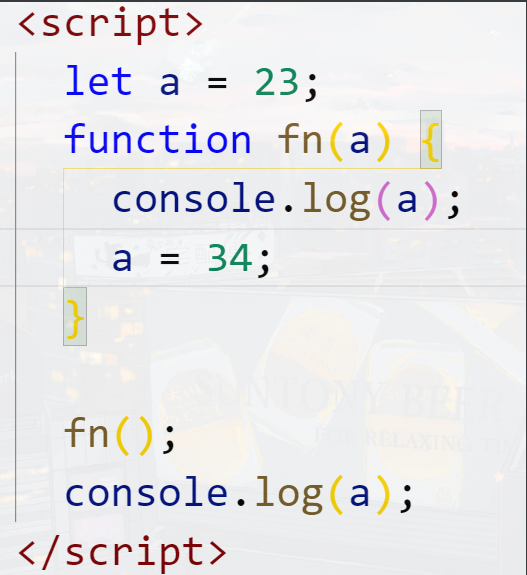
# 16.以下代码的输出结果是?(选择一项)
**A.**undefined,23
**B.**undefined,34
**C.**23,34
**D.**23,23
本题考查对参数的理解。所以本题答案为A。
参数也相当于一个局部变量。代码中,调用fn()没有传递实参,那么形参a如同变量定义未赋值一样,默认为undefined,所以第一个a输出“undefined”。
函数中,定义了局部变量a,则不会向上查找全局变量a。函数中a=34,是为参数a赋值,全局变量a依旧为23。
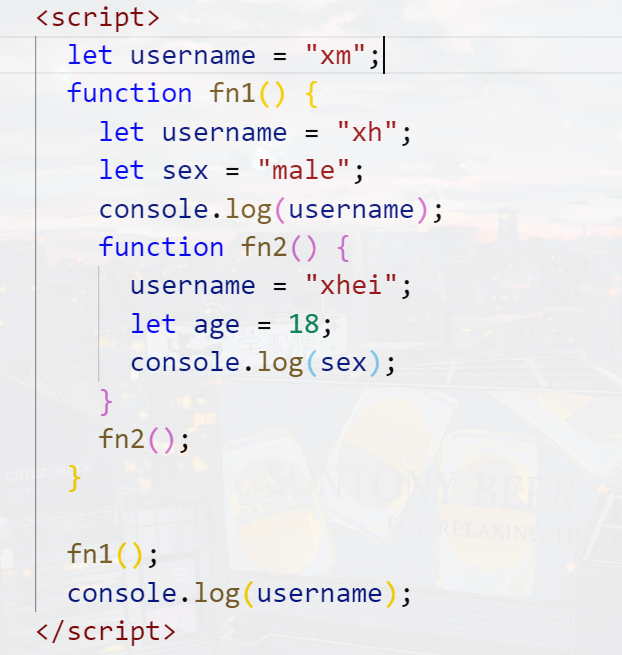
# 17.以下程序的输出结果是?(选择一项)
**A.**xh,male,xm
**B.**xh,xm,male
C. xhei,male,xm
**D.**xm,male,xh
本题考查变量和作用域。所以本题答案为A。
函数会形成一个局部作用域,如果局部作用域使用了某一个变量,会先在本作用域中进行查找。如果查找到已经定义了,那么就使用本作用域定义的变量。如果没有查找到,会一层一层往上一级作用域中查找并使用。
本题代码中,调用fn函数,fn中输出username。因为fn函数里面定义了变量username且赋值为'xh',所以输出'xh'。 fn中调用了fn2函数,fn2中修改了username的值,但是它内部并没有使用var定义这个变量,所以会向上一层作用域fn中查找此变量,即username='xhie’修改的是fn中的局部变量username。后面又输出了变量sex,同理,查找的是fn中的变量sex,输出'male'。最后全局作用域下面输出全局变量username,全局变量并没有被修改,所以输出的是'xm'。
# 18.编程练习
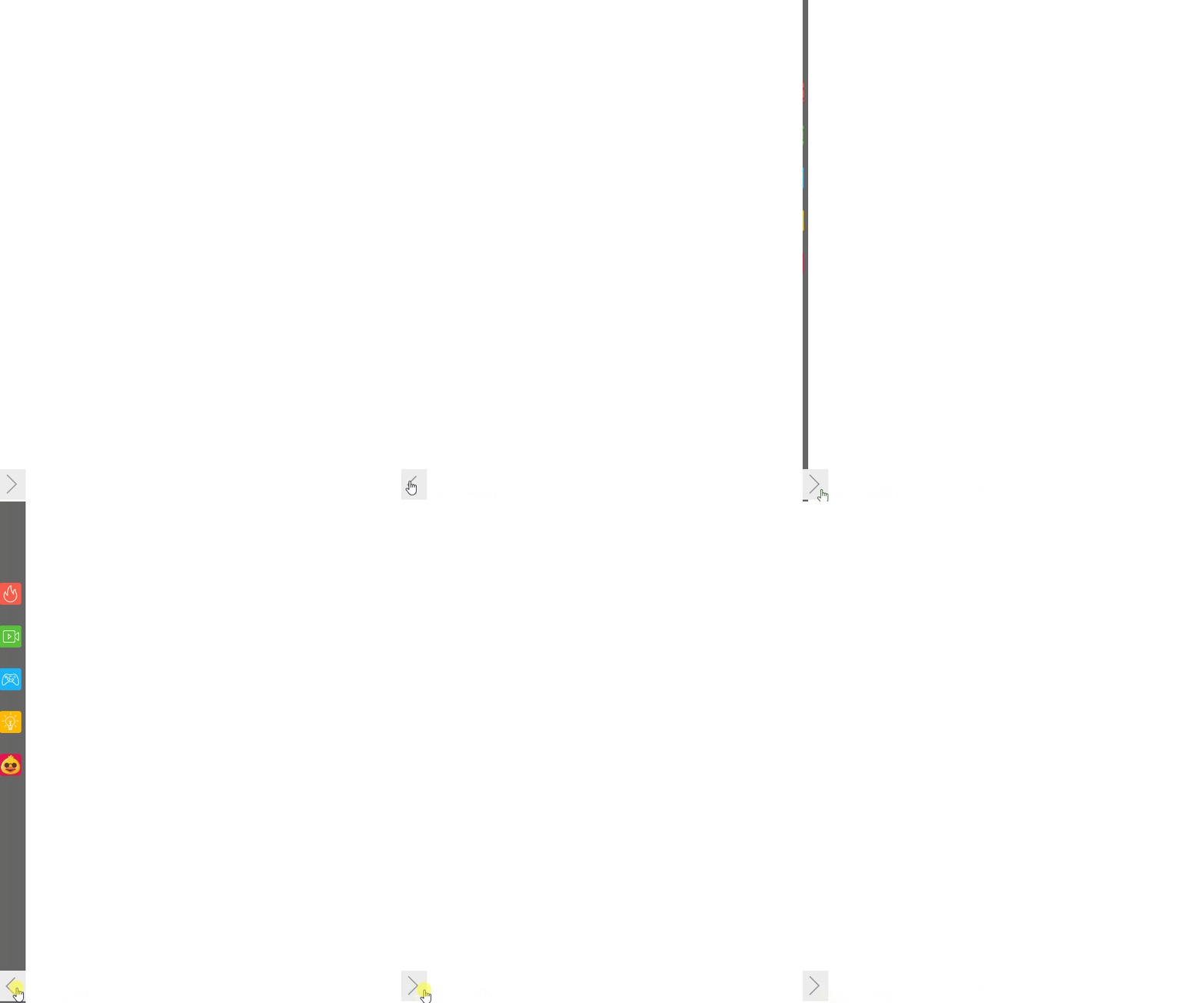
左侧边隐藏导航
<style>
    * {
        margin: 0;
        padding: 0;
        list-style: none;
    }
    #wrap ul {
        position: absolute;
        left: -50px;
        width: 50px;
        height: 100%;
        text-align: center;
        background-color: #666;
        transition: .5s ease;
    }


    #wrap ul.show{
        left: 0px;
    }

    #wrap ul li{
        margin: 25px 0;
    }

    #wrap ul li:first-child {
        margin-top:200px;
    }


    #wrap .btn {
        position: absolute;
        z-index: 1;
        bottom: 50px;
        width: 50px;
        height: 50px;
        cursor: pointer;
        background: url("https://s1.ax1x.com/2020/09/26/0iDIS0.png") 0px -60px;
        cursor: pointer;
    }

    #wrap .btn.show{
        background: url("https://s1.ax1x.com/2020/09/26/0iDIS0.png") 0px 0px;
    }
</style>
</head>
<body>
    <div id="side">
        <div id="wrap">
            <ul>
                <li>
                    <img src="https://s1.ax1x.com/2020/09/26/0iDbmF.png" alt="" />
                </li>
                <li>
                    <img src="https://s1.ax1x.com/2020/09/26/0irp6K.png" alt="" />
                </li>
                <li>
                    <img src="https://s1.ax1x.com/2020/09/26/0irPmD.png" alt="" />
                </li>
                <li>
                    <img src="https://s1.ax1x.com/2020/09/26/0iri0e.png" alt="" />
                </li>
                <li>
                    <img src="https://s1.ax1x.com/2020/09/26/0irEtA.png" alt="" />
                </li>
            </ul>

            <div class="btn"></div>
        </div>
    </div>

    <script>
        let oUl = document.querySelector("#wrap ul");
        let oBtn = document.querySelector("#wrap .btn");


        let active = true;
        oBtn.onclick = function(){
            //if(active){
            //	oUl.classList.add("show");
            //	active = false;
            //}else{
            //	oUl.classList.remove("show");
            //	active = true;

            //	// active = !active;
            //}

            oUl.classList[active?"add":"remove"]("show");
            oBtn.classList[active?"add":"remove"]("show");
            active = !active;
        }


        //oBtn.onclick = function(){
        //	oUl.classList.toggle("show");
        //	this.classList.toggle("show");
        //}

    </script>
2
3
4
5
6
7
8
9
10
11
12
13
14
15
16
17
18
19
20
21
22
23
24
25
26
27
28
29
30
31
32
33
34
35
36
37
38
39
40
41
42
43
44
45
46
47
48
49
50
51
52
53
54
55
56
57
58
59
60
61
62
63
64
65
66
67
68
69
70
71
72
73
74
75
76
77
78
79
80
81
82
83
84
85
86
87
88
89
90
91
92
93
94
95
96
97
98
99
100
101
# 19.编程练习
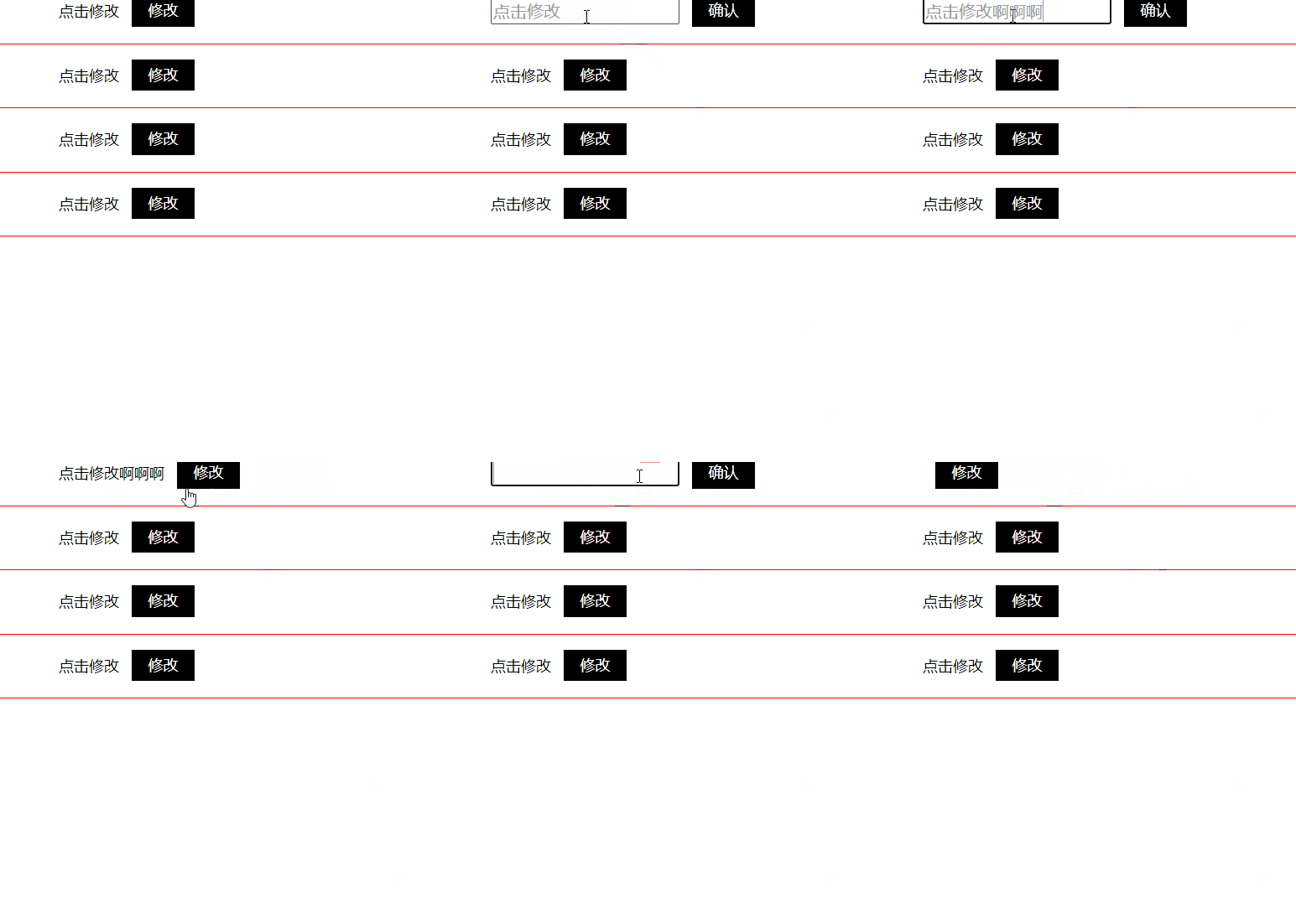
可编辑内容框
<style>
    * {
        margin: 0;
        padding: 0;
        font-family: Microsoft yahei, serif;
    }

    li {
        list-style: none;
    }

    #box ul li {
        height: 50px;
        padding-left: 50px;
        line-height: 50px;
        font-size: 12px;
        border-bottom: 1px solid red;
    }

    #box ul li span {
        float: left;
    }

    #box ul li input {
        display: none;
        float: left;
        margin-top: 14px;
        color: #999;
    }

    #box ul li p {
        float: left;
        width: 50px;
        height: 25px;
        line-height: 25px;
        text-align: center;
        margin-top: 12px;
        margin-left: 10px;
        background: #000;
        color: #fff;
        cursor: pointer;
    }

    #box ul li p.qr{
        display: none;
    }


    #box ul li.on p.xg{
        display: none;
    }

    #box ul li.on span{
        display: none;
    }

    #box ul li.on p.qr{
        display: block;
    }

    #box ul li.on input{
        display: block;
    }


</style>
</head>
<body>
    <div id="box">
        <ul>
            <li>
                <span>点击修改</span>
                <input type="text" value="点击修改">
                <p class="xg">修改</p>
                <p class="qr">确认</p>
            </li>
            <li>
                <span>点击修改</span>
                <input type="text" value="点击修改">
                <p class="xg">修改</p>
                <p class="qr">确认</p>
            </li>
            <li>
                <span>点击修改</span>
                <input type="text" value="点击修改">
                <p class="xg">修改</p>
                <p class="qr">确认</p>
            </li>
            <li>
                <span>点击修改</span>
                <input type="text" value="点击修改">
                <p class="xg">修改</p>
                <p class="qr">确认</p>
            </li>
        </ul>
    </div>

    <script>
        let aLi = document.querySelectorAll("#box ul li"),
            aSpan = document.querySelectorAll("#box ul li span"),
            aInput = document.querySelectorAll("#box ul li input"),
            aXg = document.querySelectorAll("#box .xg")
        aQr = document.querySelectorAll("#box .qr");

        let len  = aXg.length;

        for(let i=0; i< len; i++){
            aXg[i].onclick = function(){
                aLi[i].classList.add("on");

                aInput[i].value =  aSpan[i].innerText;
            }

            aQr[i].onclick = function(){
                aLi[i].classList.remove("on");

                aSpan[i].innerText = aInput[i].value;
            }

        }
    </script>
2
3
4
5
6
7
8
9
10
11
12
13
14
15
16
17
18
19
20
21
22
23
24
25
26
27
28
29
30
31
32
33
34
35
36
37
38
39
40
41
42
43
44
45
46
47
48
49
50
51
52
53
54
55
56
57
58
59
60
61
62
63
64
65
66
67
68
69
70
71
72
73
74
75
76
77
78
79
80
81
82
83
84
85
86
87
88
89
90
91
92
93
94
95
96
97
98
99
100
101
102
103
104
105
106
107
108
109
110
111
112
113
114
115
116
117
118
119
120
121
# 20.编程练习
自定义复选框
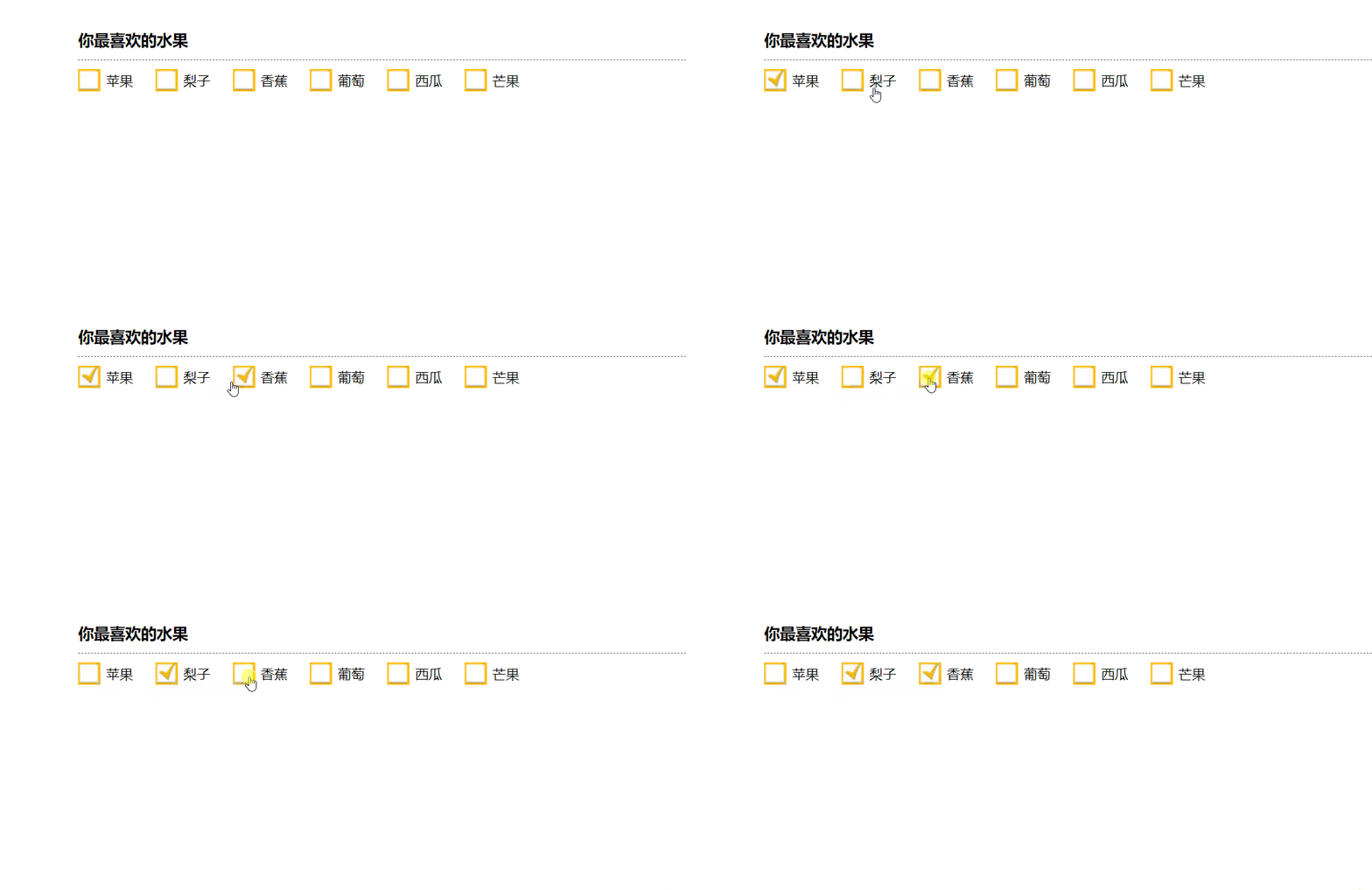
<style>
    * {
        margin: 0;
        padding: 0;
    }
    ul {
        list-style: none;
    }
    #wrap {
        width: 500px;
        margin: 100px auto 0;
    }
    #wrap h1 {
        line-height: 35px;
        font-size: 14px;
        border-bottom: 1px dashed #666;
    }
    #wrap ul {
        display: flex;
    }
    #wrap li {
        width: 80px;
        height: 50px;
        line-height: 50px;
        background-image: url("https://s1.ax1x.com/2020/09/26/0iBW26.jpg");
        background-repeat: no-repeat;
        background-position: 0 center;
        text-indent: 30px;
        cursor: pointer;
    }

    #wrap li.checked{
        background-image: url("https://s1.ax1x.com/2020/09/26/0iBIqe.jpg");
    }


</style>
</head>
<body>
    <div id="wrap">
        <h1>您最喜欢的水果</h1>
        <ul>
            <li>苹果</li>
            <li>梨子</li>
            <li>香蕉</li>
            <li>葡萄</li>
            <li>西瓜</li>
            <li>芒果</li>
        </ul>
    </div>

    <script>
        let aLi = document.querySelectorAll("#wrap ul li");

        for (let i = 0; i < aLi.length; i++) {
            aLi[i].onclick = function () {
                this.classList.toggle("checked");
            };
        }
    </script>
2
3
4
5
6
7
8
9
10
11
12
13
14
15
16
17
18
19
20
21
22
23
24
25
26
27
28
29
30
31
32
33
34
35
36
37
38
39
40
41
42
43
44
45
46
47
48
49
50
51
52
53
54
55
56
57
58
59
60
61
# 21.编程练习
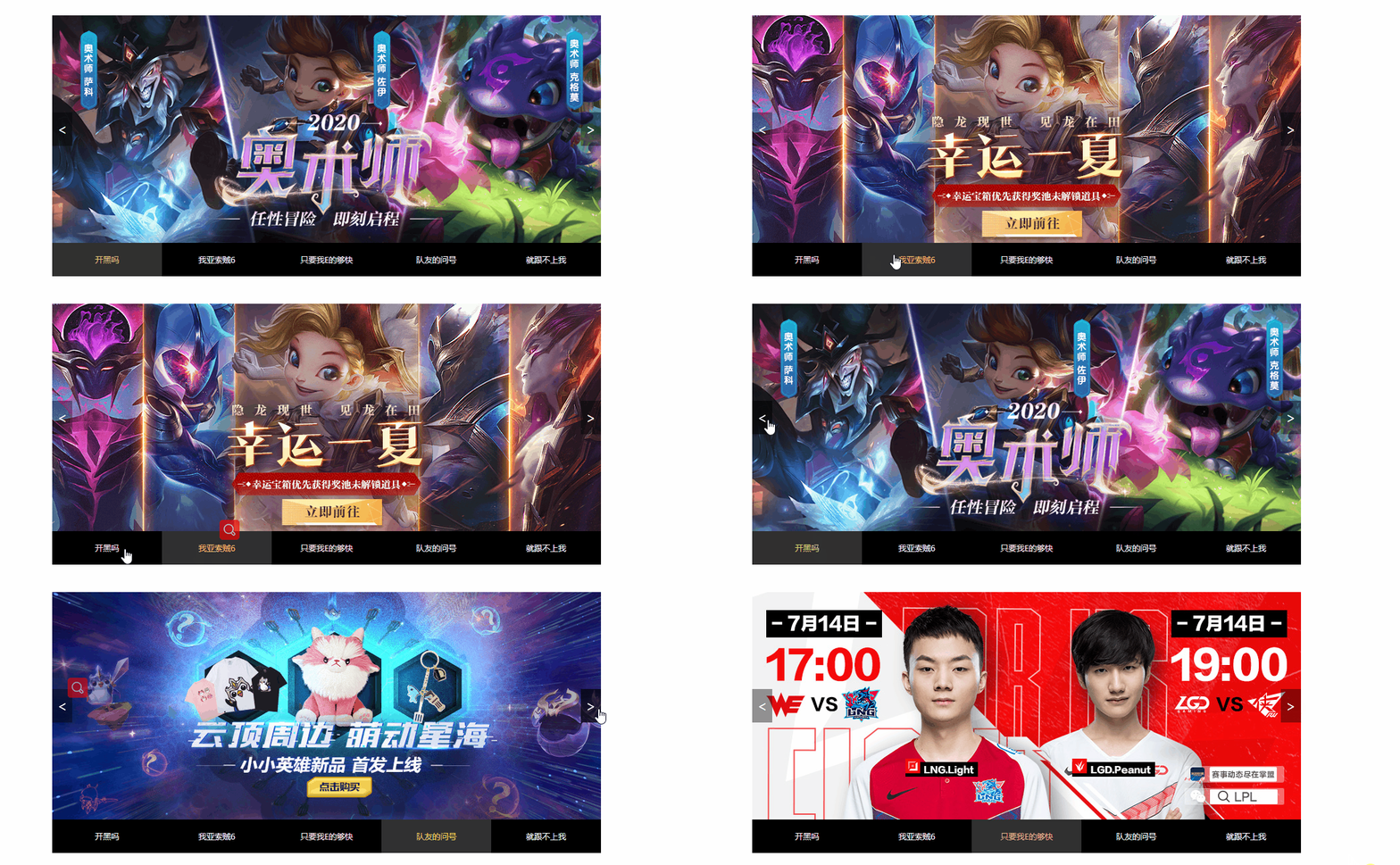
<style>
* {
margin: 0;
padding: 0;
}
ul {
list-style: none;
}
#wrap {
position: relative;
width: 1226px;
height: 580px;
margin: 200px auto 0;
}
#wrap .img {
width: 100%;
height: 100%;
}
#wrap .img img {
display: none;
position: absolute;
width: 100%;
height: 100%;
cursor: pointer;
transition: opacity 0.7s ease 0s;
}
#wrap .img img.show {
display: block;
}
#wrap a {
position: absolute;
top: 50%;
transform: translate(0, -50%);
display: block;
width: 40px;
height: 70px;
background-color: rgba(0, 0, 0, 0.7);
color: white;
user-select: none;
font-size: 30px;
text-align: center;
line-height: 70px;
text-decoration: none;
}
#wrap a.left {
left: 0;
}
#wrap a.right {
right: 0;
}
#tab {
/*overflow: hidden;*/
width: 100%;
height: 50px;
}
#tab ul {
display: flex;
width: 100%;
height: 100%;
}
#tab li {
flex: 1;
line-height: 50px;
text-align: center;
background-color: #000;
font-size: 14px;
color: #eee;
cursor: pointer;
}
#tab li.active {
background-color: #303030;
color: #e9c06c;
}
</style>
</head>
<body>
<div id="wrap">
<div class="img">
<img src="./img/1.jpg" alt="" class="show" />
<img src="./img/2.jpg" alt="" />
<img src="./img/3.jpg" alt="" />
<img src="./img/4.jpg" alt="" />
<img src="./img/5.jpg" alt="" />
</div>
<div id="tab">
<ul>
<li class="active">开黑吗</li>
<li>我亚索贼6</li>
<li>只要我E的够快</li>
<li>队友的问号</li>
<li>就跟不上我</li>
</ul>
</div>
<div class="arrow">
<a href="javascript:;" class="left"><</a>
<a href="javascript:;" class="right">></a>
</div>
</div>
<script>
// 获取左右按钮和图片
let oLeft = document.querySelector("#wrap .arrow .left"),
oRight = document.querySelector("#wrap .arrow .right"),
aImg = document.querySelectorAll("#wrap .img img");
let aTab = document.querySelectorAll("#tab ul li");
let len = aImg.length;
let index = 0;
// 左按钮
oLeft.onclick = function () {
// 给之前的index移除类名
aTab[index].classList.remove("active");
aImg[index].classList.remove("show");
//index --
index--;
// 当点击index -- 到 -1 的时候 切换到最后一张图片
if (index == -1) index = 4;
// 给index --后 所在序号的图片添加图片
aImg[index].classList.add("show");
aTab[index].classList.add("active");
};
// 右按钮
oRight.onclick = function () {
aTab[index].classList.remove("active");
aImg[index].classList.remove("show");
index++;
if (index == 5) index = 0;
aImg[index].classList.add("show");
aTab[index].classList.add("active");
};
// 循环绑定事件
for (let i = 0; i < aTab.length; i++) {
aTab[i].onclick = function () {
//改变index
index = i;
console.log(i);
// 给所有按钮和图片移除
for (let j = 0; j < len; j++) {
aTab[j].classList.remove("active");
aImg[j].classList.remove("show");
}
aTab[index].classList.add("active");
aImg[index].classList.add("show");
};
}
</script>
</body>
2
3
4
5
6
7
8
9
10
11
12
13
14
15
16
17
18
19
20
21
22
23
24
25
26
27
28
29
30
31
32
33
34
35
36
37
38
39
40
41
42
43
44
45
46
47
48
49
50
51
52
53
54
55
56
57
58
59
60
61
62
63
64
65
66
67
68
69
70
71
72
73
74
75
76
77
78
79
80
81
82
83
84
85
86
87
88
89
90
91
92
93
94
95
96
97
98
99
100
101
102
103
104
105
106
107
108
109
110
111
112
113
114
115
116
117
118
119
120
121
122
123
124
125
126
127
128
129
130
131
132
133
134
135
136
137
138
139
140
141
142
143
144
145
146
147
148
149
150
151
152
153
154
155
156
157
158
159
160
161
162
163
164
165
166
167
168
169
170
171
172