# 1.编程练习
<style>
    * {
        margin: 0;
        padding: 0;
    }
    ul {
        list-style: none;
    }

    #wrap {
        width: 300px;
        margin: 50px auto 0;
        border: 2px solid #ccc;
    }

    #wrap .tab {
        display: flex;
        align-items: center;
        background-color: pink;
        text-align: center;
    }

    #wrap .tab li {
        height: 30px;
        line-height: 30px;
        flex: 1;
        background: url("https://s1.ax1x.com/2020/09/29/0eb7nI.gif") no-repeat
            center/cover;
        cursor: pointer;
    }

    #wrap .tab li.active {
        background: url("https://s1.ax1x.com/2020/09/29/0ebWtO.gif") no-repeat
            center/cover;
    }

    #wrap .content ul {
        display: none;
    }

    #wrap .content ul {
        padding: 0 10px;
    }

    #wrap .content ul.active {
        display: block;
    }

    #wrap .content ul li {
        position: relative;
        display: flex;
        font-size: 14px;
        text-indent: 30px;
        line-height: 60px;
        border-bottom: 2px dotted #ccc;
    }

    #wrap .content ul li span {
        position: absolute;
        top: 50%;
        transform: translate(0, -50%);
        width: 21px;
        height: 15px;
        text-align: center;
        line-height: 15px;
        color: #fff;
        text-indent: 0;
        font-size: 16px;
        background: url(https://s1.ax1x.com/2020/09/29/0ebbHP.gif);
    }
</style>
</head>
<body>
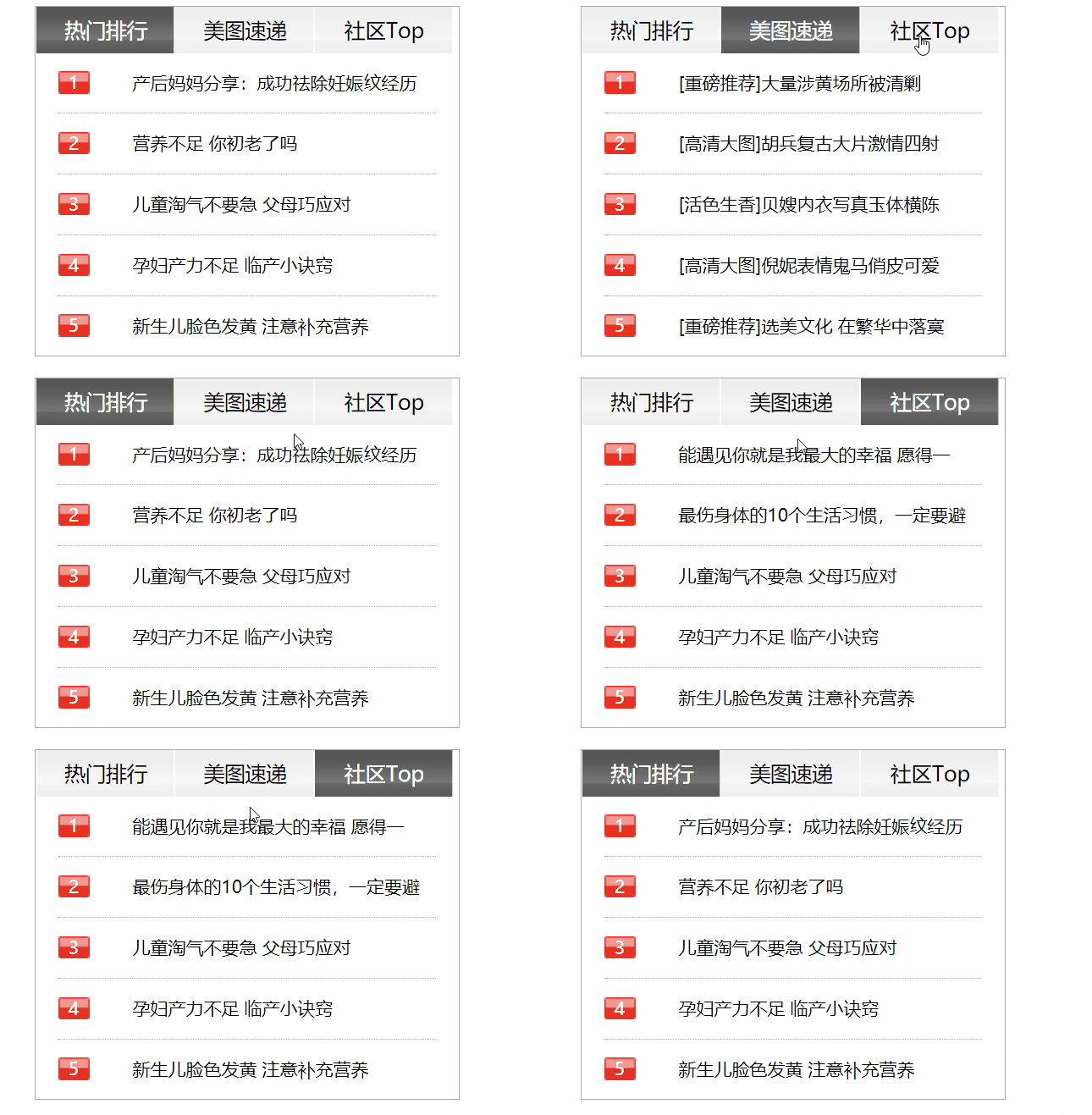
    <div id="wrap">
        <ul class="tab">
            <li class="active">热门排行</li>
            <li>美图速递</li>
            <li>社区Top</li>
        </ul>

        <div class="content">
            <ul class="active">
                <li>
                    <span>1</span>
                    <p>产后妈妈分享:成功祛除妊娠纹经历</p>
                </li>
                <li>
                    <span>2</span>
                    <p>营养不足 你初老了吗</p>
                </li>
                <li>
                    <span>3</span>
                    <p>儿童淘气不要急 父母巧应对</p>
                </li>
                <li>
                    <span>4</span>
                    <p>孕妇产力不足 临产小诀窍</p>
                </li>
                <li>
                    <span>5</span>
                    <p>新生儿脸色发黄 注意补充营养</p>
                </li>
            </ul>
            <ul>
                <li>6</li>
                <li>7</li>
                <li>8</li>
                <li>9</li>
                <li>10</li>
            </ul>
            <ul>
                <li>11</li>
                <li>12</li>
                <li>13</li>
                <li>14</li>
                <li>15</li>
            </ul>
            <ul>
                <li></li>
                <li></li>
                <li></li>
                <li></li>
                <li></li>
            </ul>
            <ul>
                <li></li>
                <li></li>
                <li></li>
                <li></li>
                <li></li>
            </ul>
        </div>
    </div>

    <script>
        let aTab = document.querySelectorAll("#wrap .tab li"),
            aContent = document.querySelectorAll("#wrap .content ul");


        for(let i = 0; i < aTab.length; i++){
            aTab[i].onclick = function(){
                for(let j = 0; j < aTab.length; j++){
                    aTab[j].classList.remove("active");
                    aContent[j].classList.remove("active");
                }
                aTab[i].classList.add("active");
                aContent[i].classList.add("active");
            }
        }

    </script>
1
2
3
4
5
6
7
8
9
10
11
12
13
14
15
16
17
18
19
20
21
22
23
24
25
26
27
28
29
30
31
32
33
34
35
36
37
38
39
40
41
42
43
44
45
46
47
48
49
50
51
52
53
54
55
56
57
58
59
60
61
62
63
64
65
66
67
68
69
70
71
72
73
74
75
76
77
78
79
80
81
82
83
84
85
86
87
88
89
90
91
92
93
94
95
96
97
98
99
100
101
102
103
104
105
106
107
108
109
110
111
112
113
114
115
116
117
118
119
120
121
122
123
124
125
126
127
128
129
130
131
132
133
134
135
136
137
138
139
140
141
142
143
144
145
146
147
148
149
150
151
152
2
3
4
5
6
7
8
9
10
11
12
13
14
15
16
17
18
19
20
21
22
23
24
25
26
27
28
29
30
31
32
33
34
35
36
37
38
39
40
41
42
43
44
45
46
47
48
49
50
51
52
53
54
55
56
57
58
59
60
61
62
63
64
65
66
67
68
69
70
71
72
73
74
75
76
77
78
79
80
81
82
83
84
85
86
87
88
89
90
91
92
93
94
95
96
97
98
99
100
101
102
103
104
105
106
107
108
109
110
111
112
113
114
115
116
117
118
119
120
121
122
123
124
125
126
127
128
129
130
131
132
133
134
135
136
137
138
139
140
141
142
143
144
145
146
147
148
149
150
151
152
# 2.编程练习
<style>
    * {
        margin: 0;
        padding: 0;
    }

    ul {
        list-style: none;
    }

     ul {
         width: 200px;
         margin: 50px;
     }

     ul li {
         overflow: hidden;
         height: 30px;
     }

     ul li.show {
         height: auto;
     }

     ul li h3 {
         line-height: 35px;
         background-color: pink;
         color: #fff;
         cursor: pointer;
         margin: 1px;
     }

     ul li div {
         display: flex;
         justify-content: space-between;
          margin: 10px;
     }

     ul li div input {
         cursor: pointer;
     }
</style>
</head>
<body>
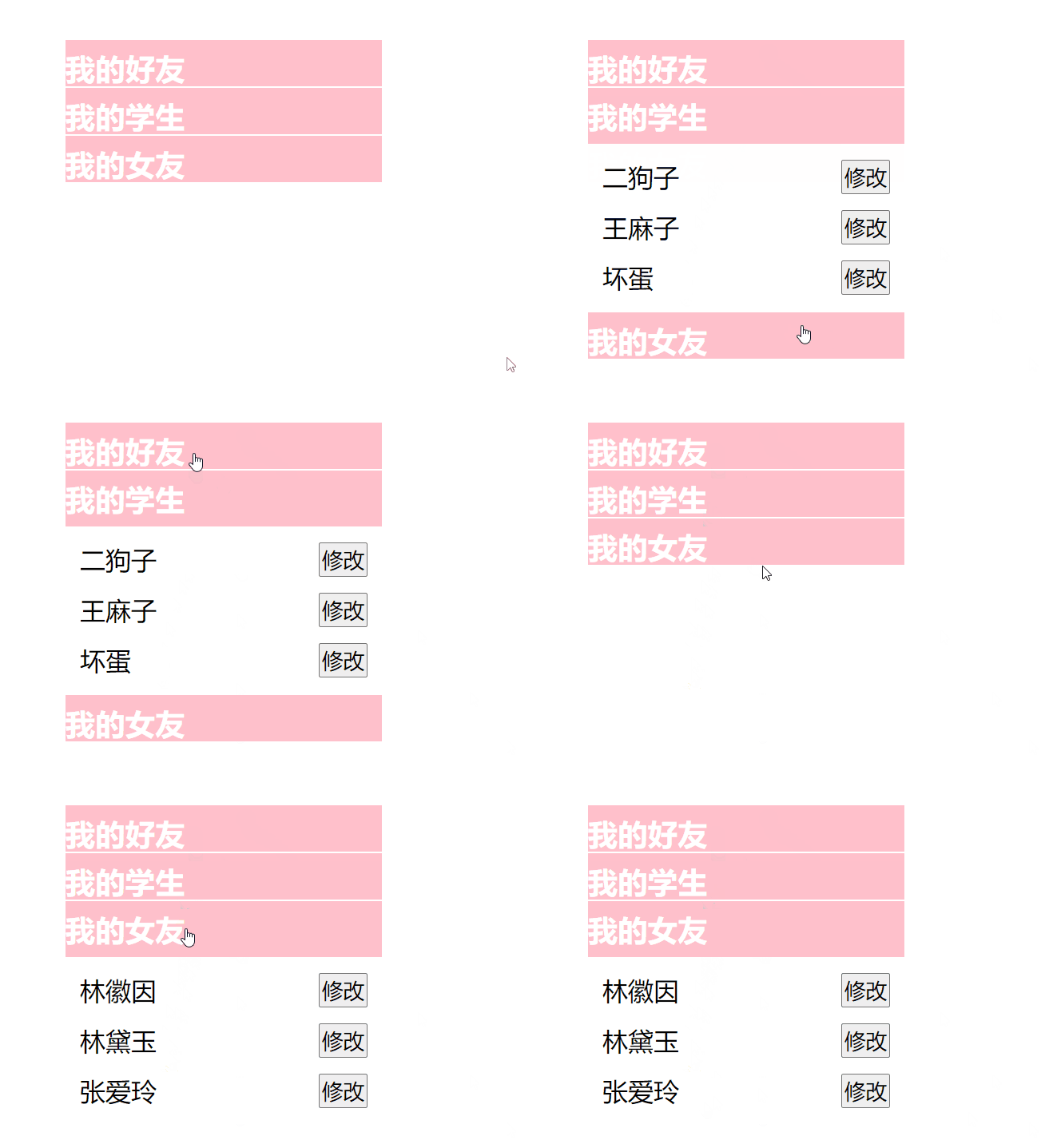
    <ul>
        <li>
            <h3>我的好友</h3>
            <div>
                <span>曾国藩</span>
              <input type="button" value="修改" />
          </div>
          <div>
              <span>李鸿章</span>
              <input type="button" value="修改" />
          </div>
          <div>
              <span>林则徐</span>
          <input type="button" value="修改" />
        </div>
      </li>
      <li>
        <h3>我的学生</h3>
          <div>
              <span>二狗子</span>
              <input type="button" value="修改" />
          </div>
          <div>
              <span>王麻子</span>
              <input type="button" value="修改" />
          </div>
          <div>
              <span>坏蛋</span>
              <input type="button" value="修改" />
          </div>
      </li>
      <li>
        <h3>我的女友</h3>
        <div>
          <span>林徽因</span>
          <input type="button" value="修改" />
        </div>
        <div>
            <span>林黛玉</span>
            <input type="button" value="修改" />
          </div>
          <div>
              <span>张爱玲</span>
              <input type="button" value="修改" />
          </div>
        </li>
      </ul>

      <script>
          let ul = document.getElementsByTagName("ul")[0];
          let head = ul.getElementsByTagName("h3");
          let list = ul.getElementsByTagName("li");
          let btn = ul.getElementsByTagName("input");
          let span = ul.getElementsByTagName("span");

          for (let i = 0; i < head.length; i++) {
              head[i].mark = false; //当前列表是否展开  false就是开启

              head[i].onclick = function () {
                  //if (head[i].mark) {
                  //  list[i].classList.remove("show");
                  //  //head[i].mark = false;
                  //} else {
                  //  for (let j = 0; j < list.length; j++) {
                  //    list[j].classList.remove("show");
                  //    head[j].mark = false;
                  //  }

                  //  list[i].classList.add("show");
                  //  //head[i].mark = true;
                  //}


                  if (!head[i].mark) {
                      for (let j = 0; j < list.length; j++) {
                          list[j].classList.remove("show");
                          head[j].mark = false;
                      }
                  }

                  list[i].classList[head[i].mark ? "remove" : "add"]("show");

            head[i].mark = !head[i].mark;
        };


          }


          // 使用索引记录
          //let lastIndex = -1; //-1代表收起状态

          //for (let i = 0; i < head.length; i++) {
          //  head[i].onclick = function () {
          //    if (lastIndex !== -1) {
          //      list[lastIndex].classList.remove("show");

          //      if (lastIndex === i) {
          //        lastIndex = -1;
          //        return;
          //      }
          //    }
          //    list[i].classList.add("show");
          //    lastIndex = i;
          //  };
          //}

          //let arr = ["确定", "修改"];

          for (let j = 0; j < btn.length; j++) {
              btn[j].mark = false; // false代表修改

              btn[j].onclick = function () {
                  //if (btn[j].mark) {
                  //  span[j].contentEditable = false;
                  //  btn[j].value = "修改";
                  //  btn[j].mark = false;
                  //} else {
                  //  span[j].contentEditable = true;
                  //  btn[j].value = "确定";
                  //  btn[j].mark = true;
                  //}

                  //btn[j].value = arr[btn[j].mark * 1];

                  btn[j].value =  btn[j].mark ? "修改":"确定";

                  span[j].contentEditable = !btn[j].mark;

                  btn[j].mark = !btn[j].mark;
              };
          }
      </script>
1
2
3
4
5
6
7
8
9
10
11
12
13
14
15
16
17
18
19
20
21
22
23
24
25
26
27
28
29
30
31
32
33
34
35
36
37
38
39
40
41
42
43
44
45
46
47
48
49
50
51
52
53
54
55
56
57
58
59
60
61
62
63
64
65
66
67
68
69
70
71
72
73
74
75
76
77
78
79
80
81
82
83
84
85
86
87
88
89
90
91
92
93
94
95
96
97
98
99
100
101
102
103
104
105
106
107
108
109
110
111
112
113
114
115
116
117
118
119
120
121
122
123
124
125
126
127
128
129
130
131
132
133
134
135
136
137
138
139
140
141
142
143
144
145
146
147
148
149
150
151
152
153
154
155
156
157
158
159
160
161
162
163
164
165
166
167
168
169
170
171
172
173
174
175
176
177
178
2
3
4
5
6
7
8
9
10
11
12
13
14
15
16
17
18
19
20
21
22
23
24
25
26
27
28
29
30
31
32
33
34
35
36
37
38
39
40
41
42
43
44
45
46
47
48
49
50
51
52
53
54
55
56
57
58
59
60
61
62
63
64
65
66
67
68
69
70
71
72
73
74
75
76
77
78
79
80
81
82
83
84
85
86
87
88
89
90
91
92
93
94
95
96
97
98
99
100
101
102
103
104
105
106
107
108
109
110
111
112
113
114
115
116
117
118
119
120
121
122
123
124
125
126
127
128
129
130
131
132
133
134
135
136
137
138
139
140
141
142
143
144
145
146
147
148
149
150
151
152
153
154
155
156
157
158
159
160
161
162
163
164
165
166
167
168
169
170
171
172
173
174
175
176
177
178
# 3.编程练习
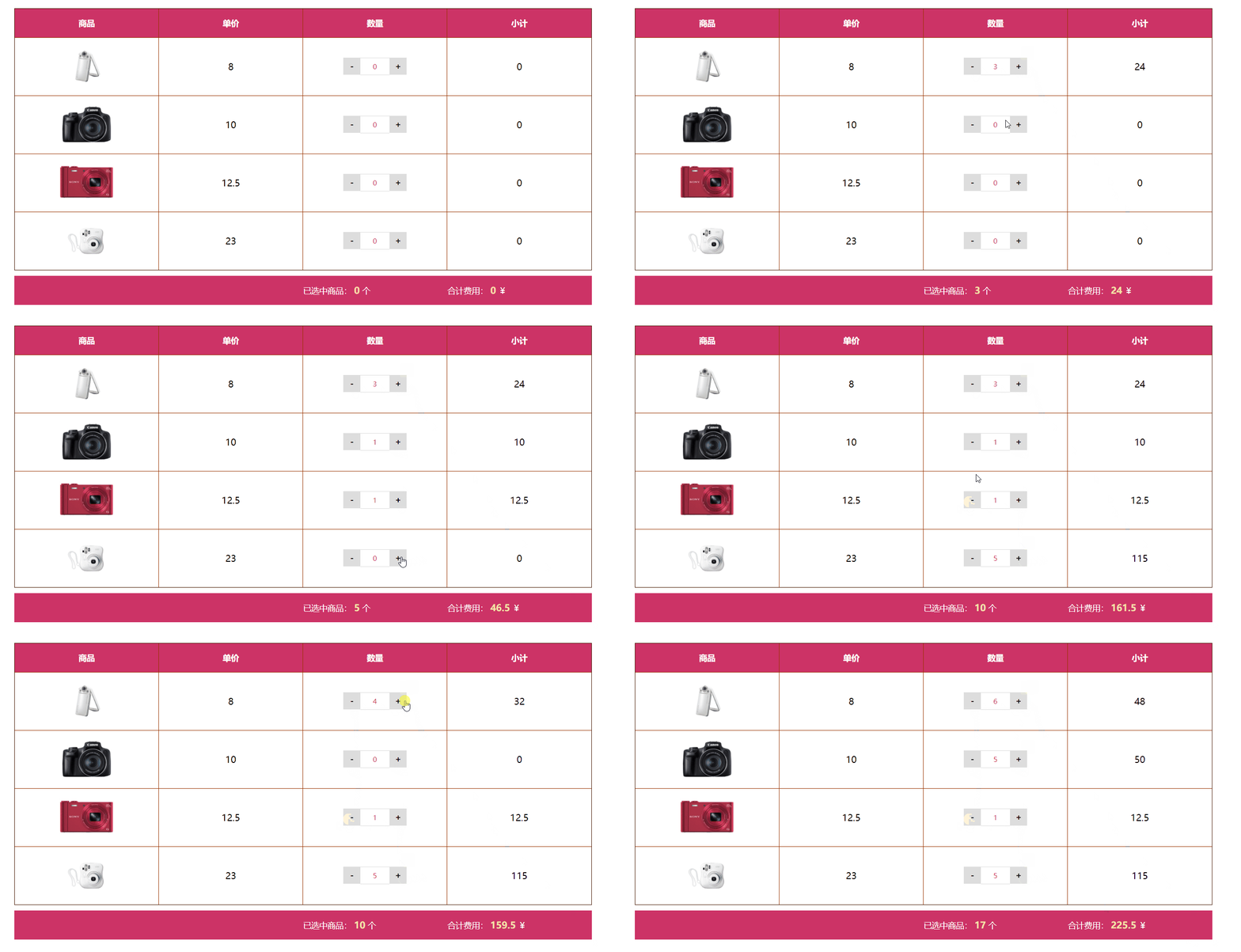
<style>
    *{ margin:0; padding:0;}
    ul{ list-style-type: none;}

    table{
        border-collapse: collapse;
        width: 1000px;
        margin: 50px auto 0;
        user-select: none;
    }

    table td{
        border:1px solid #930;
    }


    table tr td{
        width: 250px;
        height: 100px;
        text-align: center;
    }


    table tr.title td{
        height: 50px;
        background: #c36;
        color: #fff;
        font-weight: bold;
        font-size: 14px;
    }


    table tr td img{
        width: 100px;
    }


    table tr td.number span{
        display: inline-block;
        font-size: 14px;
        text-align: center;
    }


    table tr td.number span.down,table tr td.number span.add{
        width: 30px;
        height: 30px;
        background: #ddd;
        font-weight: bold;
        font-size: 14px;
        line-height: 30px;
        cursor: pointer;
    }

    table tr td.number span.num{
        width: 50px;
        height: 30px;
        line-height: 30px;
        border-top: 1px solid #ddd;
        border-bottom: 1px solid #ddd;
        color: #c36;
    }


    .box{
        width: 1000px;
        height: 50px;
        background: #c36;
        margin: 10px auto;
    }

    .box p{
        float: right;
        width: 250px;
        height: 50px;
        line-height: 50px;
        color: #fff;
        font-size: 14px;
    }
    .box p span{
        color: #f4e5a9;
        font-size: 16px;
        font-weight: bold;
    }
</style>
</head>
<body>
    <table>
        <tr class="title">
            <td>商品</td>
            <td>单价</td>
            <td>数量</td>
            <td>小计</td>
        </tr>
        <tr>
            <td><img src="img/shop1.jpg" alt=""></td>
            <td class="danjia">8</td>
            <td class="number"><span class="down">-</span><span class="num">0</span><span class="add">+</span></td>
            <td class="price">0</td>
        </tr>
        <tr>
            <td><img src="img/shop2.jpg" alt=""></td>
            <td class="danjia">10</td>
            <td class="number"><span class="down">-</span><span class="num">0</span><span class="add">+</span></td>
            <td class="price">0</td>
        </tr>
        <tr>
            <td><img src="img/shop3.jpg" alt=""></td>
            <td class="danjia">12.5</td>
            <td class="number"><span class="down">-</span><span class="num">0</span><span class="add">+</span></td>
            <td class="price">0</td>
        </tr>
        <tr>
            <td><img src="img/shop4.jpg" alt=""></td>
            <td class="danjia">23</td>
            <td class="number"><span class="down">-</span><span class="num">0</span><span class="add">+</span></td>
            <td class="price">0</td>
        </tr>
        </tbody>
    </table>

<div class="box">
    <p class="totalPrice">合计费用: <span>0</span> ¥</p>
    <p class="totalNum">已选中商品: <span>0</span> 个</p>
</div>
<script>

    (function(){
        /*
            * 在一个开发过程中,数据来源于后台 数据库
            * 前端是先获取了后端给的数据之后,然后对应渲染生成HTML页面(可以前端,可以后端)
            * */
        /*假装我们现在获取了后端的数据*/
        let data = [
            {dj:8,number:0},
            {dj:10,number:0},
            {dj:12.5,number:0},
            {dj:23,number:0}
        ];

        //获取
        let aAdd = document.querySelectorAll(".add"),
            aDown = document.querySelectorAll(".down"),
            aNum = document.querySelectorAll(".num"),
            aPrice = document.querySelectorAll(".price"),
            oTotalNum = document.querySelector(".box .totalNum span"),
            oTotalPrice = document.querySelector(".box .totalPrice span");

        let len = aAdd.length;

        //事件
        for (let i=0;i<len;i++){
            /*+*/
            aAdd[i].onclick = function(){
                /*操作数据*/
                data[i].number ++;
                /*更新HTML页面*/
                updateView(i);
            };

            /*-*/
            aDown[i].onclick = function(){
                /*如果个数是0,就不能再减了,直接结束函数*/
                if(!data[i].number)return;
                /*操作数据*/
                data[i].number --;
                /*更新HTML页面*/
                updateView(i);
            };
        }

        /*操作HTML的函数*/
        function updateView(index){
            /*操作HTML页面*/
            aNum[index].innerHTML = data[index].number;//个数
            aPrice[index].innerHTML = data[index].dj * data[index].number;//小计
            oTotalNum.innerHTML = getTotal().totalNum; //总个数
            oTotalPrice.innerHTML = getTotal().totalPrice; //总价格
        }


        /*得到总数与总价的函数*/
        function getTotal(){
            let n = 0;
            let p = 0;

            for (let i=0;i<len;i++){
                n += data[i].number;
                p += data[i].number * data[i].dj;
            }

            return {
                totalNum : n,
                totalPrice : p
            };
        }


        /*if (data[i]>0){
                        /!*操作数据*!/
                        data[i].number --;
                    }*/


    })();

</script>
1
2
3
4
5
6
7
8
9
10
11
12
13
14
15
16
17
18
19
20
21
22
23
24
25
26
27
28
29
30
31
32
33
34
35
36
37
38
39
40
41
42
43
44
45
46
47
48
49
50
51
52
53
54
55
56
57
58
59
60
61
62
63
64
65
66
67
68
69
70
71
72
73
74
75
76
77
78
79
80
81
82
83
84
85
86
87
88
89
90
91
92
93
94
95
96
97
98
99
100
101
102
103
104
105
106
107
108
109
110
111
112
113
114
115
116
117
118
119
120
121
122
123
124
125
126
127
128
129
130
131
132
133
134
135
136
137
138
139
140
141
142
143
144
145
146
147
148
149
150
151
152
153
154
155
156
157
158
159
160
161
162
163
164
165
166
167
168
169
170
171
172
173
174
175
176
177
178
179
180
181
182
183
184
185
186
187
188
189
190
191
192
193
194
195
196
197
198
199
200
201
202
203
204
205
206
207
208
2
3
4
5
6
7
8
9
10
11
12
13
14
15
16
17
18
19
20
21
22
23
24
25
26
27
28
29
30
31
32
33
34
35
36
37
38
39
40
41
42
43
44
45
46
47
48
49
50
51
52
53
54
55
56
57
58
59
60
61
62
63
64
65
66
67
68
69
70
71
72
73
74
75
76
77
78
79
80
81
82
83
84
85
86
87
88
89
90
91
92
93
94
95
96
97
98
99
100
101
102
103
104
105
106
107
108
109
110
111
112
113
114
115
116
117
118
119
120
121
122
123
124
125
126
127
128
129
130
131
132
133
134
135
136
137
138
139
140
141
142
143
144
145
146
147
148
149
150
151
152
153
154
155
156
157
158
159
160
161
162
163
164
165
166
167
168
169
170
171
172
173
174
175
176
177
178
179
180
181
182
183
184
185
186
187
188
189
190
191
192
193
194
195
196
197
198
199
200
201
202
203
204
205
206
207
208
# 4.编程练习
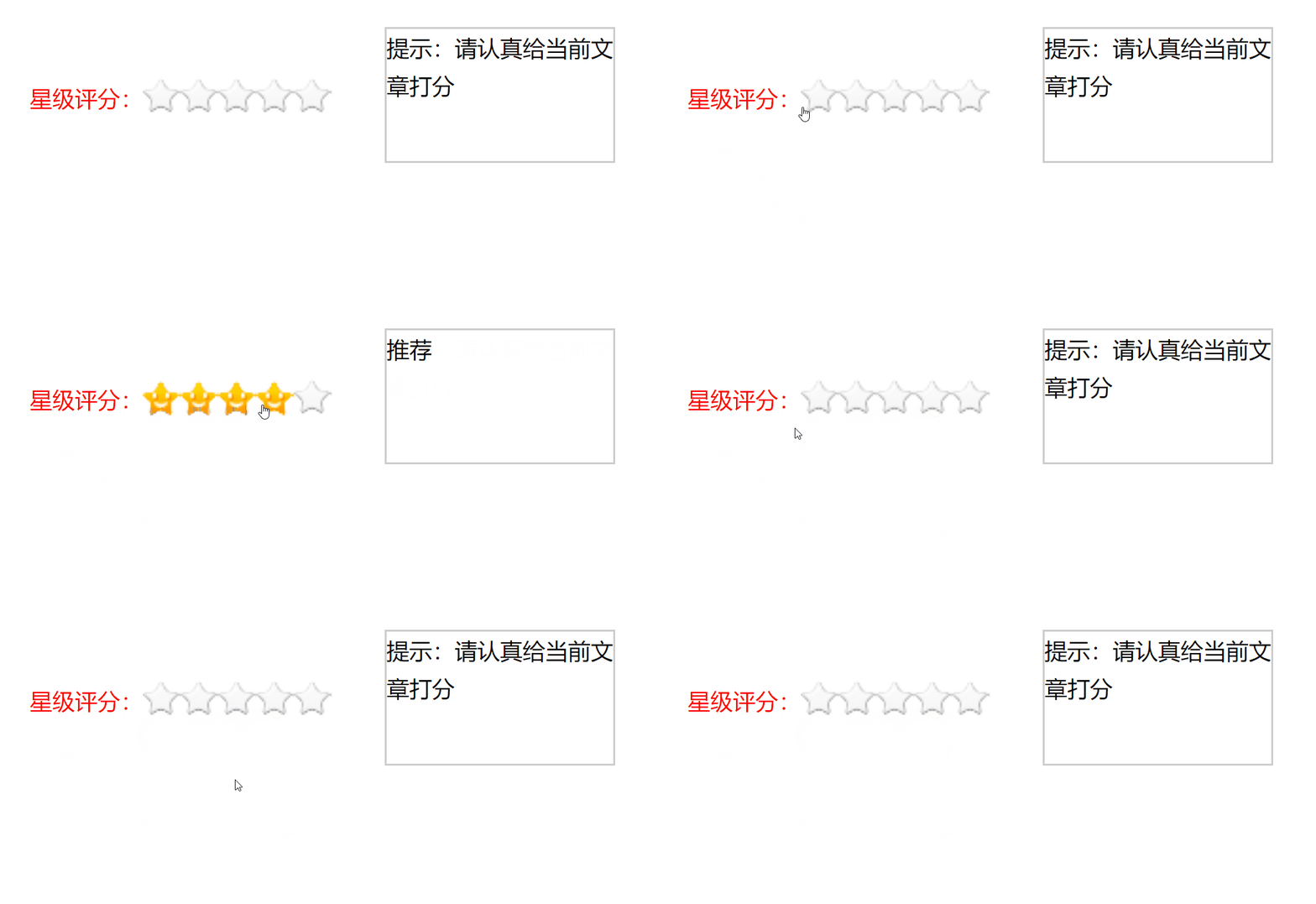
<style>
    * {
        margin: 0;
        padding: 0;
    }
    ul {
        list-style: none;
    }

    #box {
        display: flex;
        justify-content: space-evenly;
        width: 350px;
        height: 75px;
        margin: 50px auto 0;
        font-size: 12px;
        line-height: 75px;
    }

    #box > span {
        color: red;
    }
    #box ul {
        display: flex;
        width: 100px;
        height: 20px;
        margin-top: 27px;
        cursor: pointer;
    }

    #box ul li {
        width: 20px;
        height: 20px;
        background: url("https://s1.ax1x.com/2020/09/29/0eqdbt.png");
        cursor: pointer;
    }
    #box p {
        width: 120px;
        height: 70px;
        line-height: 20px;
        border: 1px solid #ccc;
    }

    #box ul li.on {
        background-position: 0 -27px;
    }

    #box p span {
        display: none;
    }

    #box p span.on {
        display: block;
    }
</style>
</head>
<body>
    <div id="box">
        <span>星级评分:</span>
        <ul>
            <li></li>
            <li></li>
            <li></li>
            <li></li>
            <li></li>
        </ul>
        <p>
            <span class="on">提示:请认真给当前文章打分</span>
            <span>很差</span>
            <span>较差</span>
            <span>还行</span>
            <span>推荐</span>
            <span>力荐</span>
        </p>
    </div>

    <script>
        /*星级评分*/
        (function () {
            /*定义变量*/
            let aLi = document.querySelectorAll("#box ul li");
            let aSpan = document.querySelectorAll("#box p span");
            let oUl = document.querySelector("#box ul");

            //初始的值不是0
            let idx = -1;

            /* li添加移入事件 */
            for (let i = 0; i < aLi.length; i++) {
                /*li添加移入事件*/
                aLi[i].onmouseenter = function () {
                    //通过序号 i,可以判断前后
                    //前面的都加名字
                    //for(let j = 0; j <= i; j++){
                    //    aLi[j].classList.add("on");
                    //}

                    //后面的都去掉名字
                    //for(let j = i + 1; j < aLi.length; j++){
                    //    aLi[j].classList.remove("on");
                    //}

                    /*操作小星星的样式*/
                    for (let j = 0; j < aLi.length; j++) {
                        //if(j <= i){
                        //    aLi[j].classList.add("on");
                        //}else{
                        //    aLi[j].classList.remove("on");
                        //}
                        aLi[j].classList[ j <= i ? "add" : "remove"]("on");
                    }

                    /*操作p标签的显示*/
                    for(let j = 0; j < aSpan.length; j++){
                        aSpan[j].classList.remove("on");
                    }

                    aSpan[ i+1 ].classList.add("on");
                };

                /*li添加点击事件,点击之后改变index的值,以便于离开之后的页面变化*/
                aLi[i].onclick = function () {
                    idx = i;
                };


            }

            /*离开ul触发还原*/
            oUl.onmouseleave = function () {

                for (let j = 0; j < aLi.length; j++) {
                    aLi[j].classList[j <= idx ? "add" : "remove"]("on");
                }

                for(let j = 0; j < aSpan.length; j++){
                    aSpan[j].classList.remove("on");
                }

                aSpan[ idx +1 ].classList.add("on")
            };

            /*根据传入的界线,来改变HTML页面*/
            function view(goudan){
                /*操作小星星的样式*/
                for (let j=0;j<len;j++){
                    aLi[j].classList[ j>goudan?"remove":"add" ]("on");
                }
                /*操作p标签的显示*/
                for (let j=0;j<aSpan.length;j++){
                    aSpan[j].classList.remove("on");
                }
                aSpan[goudan+1].classList.add("on");
            }
        })();
    </script>
</body>
1
2
3
4
5
6
7
8
9
10
11
12
13
14
15
16
17
18
19
20
21
22
23
24
25
26
27
28
29
30
31
32
33
34
35
36
37
38
39
40
41
42
43
44
45
46
47
48
49
50
51
52
53
54
55
56
57
58
59
60
61
62
63
64
65
66
67
68
69
70
71
72
73
74
75
76
77
78
79
80
81
82
83
84
85
86
87
88
89
90
91
92
93
94
95
96
97
98
99
100
101
102
103
104
105
106
107
108
109
110
111
112
113
114
115
116
117
118
119
120
121
122
123
124
125
126
127
128
129
130
131
132
133
134
135
136
137
138
139
140
141
142
143
144
145
146
147
148
149
150
151
152
153
154
155
156
157
158
2
3
4
5
6
7
8
9
10
11
12
13
14
15
16
17
18
19
20
21
22
23
24
25
26
27
28
29
30
31
32
33
34
35
36
37
38
39
40
41
42
43
44
45
46
47
48
49
50
51
52
53
54
55
56
57
58
59
60
61
62
63
64
65
66
67
68
69
70
71
72
73
74
75
76
77
78
79
80
81
82
83
84
85
86
87
88
89
90
91
92
93
94
95
96
97
98
99
100
101
102
103
104
105
106
107
108
109
110
111
112
113
114
115
116
117
118
119
120
121
122
123
124
125
126
127
128
129
130
131
132
133
134
135
136
137
138
139
140
141
142
143
144
145
146
147
148
149
150
151
152
153
154
155
156
157
158