
# 1.关于if…else语法,下面说法错误的是?(选择一项)
**A.**else不可以省略
**B.**else可以省略
**C.**if语句中如果只有一条语句,可以省略大括号{}
**D.**if语句如果有多条语句,不可以省略大括号{}
本题考查if..else的基本语法。
else可以省略,A说法错误,B说法正确。
if语句中如果有一条语句,可以省略大括号{};如果有多条语句,则不可以省略。所以C和D说法都正确,本题答案为A。
# 2.下面代码的运行结果是?(选择一项)
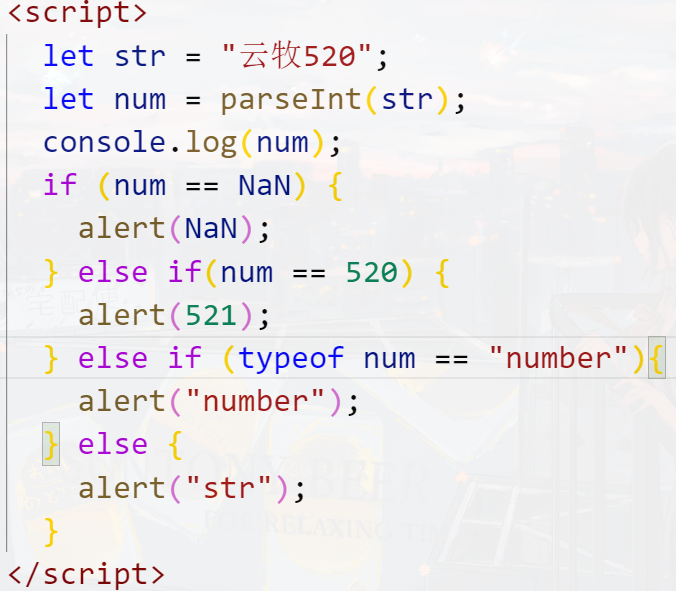
**A.**NaN
**B.**521
**C.**number
**D.**str
本题考察的知识点比较综合,包括数据类型转换,以及if判断。
parseInt()把字符串转换为整数的时候,只返回字符串开头的数字。如果字符串开头不是数字,那么会返回NaN。例如parseInt("123aaa")返回123,parseInt("aaa123")返回NaN。
if..else if...else判断中,符合哪一个if或者else if的判断条件,就会执行哪一个判断中的语句。如果每一个条件不符合,则默认执行else。
本题代码中,"IMOOC521"开头并不是数字,所以会返回NaN。NaN不与任何数据相等,包括它本身,所以A和B不对。NaN是特殊的number类型,即typeof num检查类型返回的是"number",符合第三个判断。
所以本题答案为C。
# 3.代码运行结果是?(选择一项)
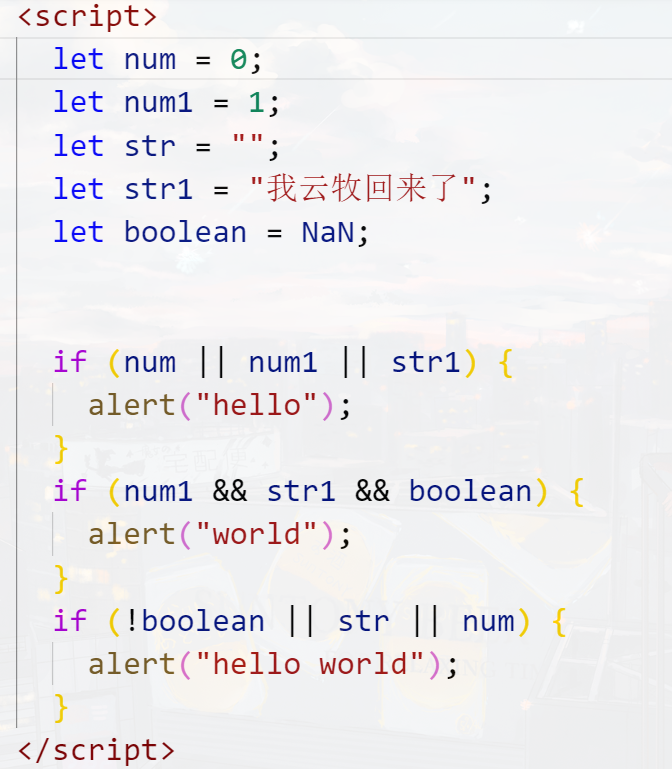
**A.**hello
B. world
**C.**hello world
**D.**hello hello world
本题考察的是if语句的判断以及逻辑运算符的判断。
而if条件中,如果返回的是true,则表示条件成立;如果返回的是false,则表示条件不成立。
使用逻辑或(||)时,如果有一个操作数为true,那么整个逻辑或表达式返回的就是true;第一个if条件里面,num是false、num1是true、str1是true,所以整个逻辑或表达式返回的是true,故会弹出hello;第三个if条件里面,!blean是true,str是false,num是false,所以整个逻辑或表达式返回的是true,故会弹出hello world。
使用逻辑与(&&)时,只要有一个操作数为false,那么整个逻辑与表达式返回的就是false;第二个if条件里面,num1是true,str1是true,blean为false,所以整个逻辑与表达式返回的是false,故不执行里面的语句,不弹出world。
本题答案为D。
# 4.小云同学去超市买了20本JavaScript书,书的均价32元,那么小慕应该支付多少钱呢?(选择一项)
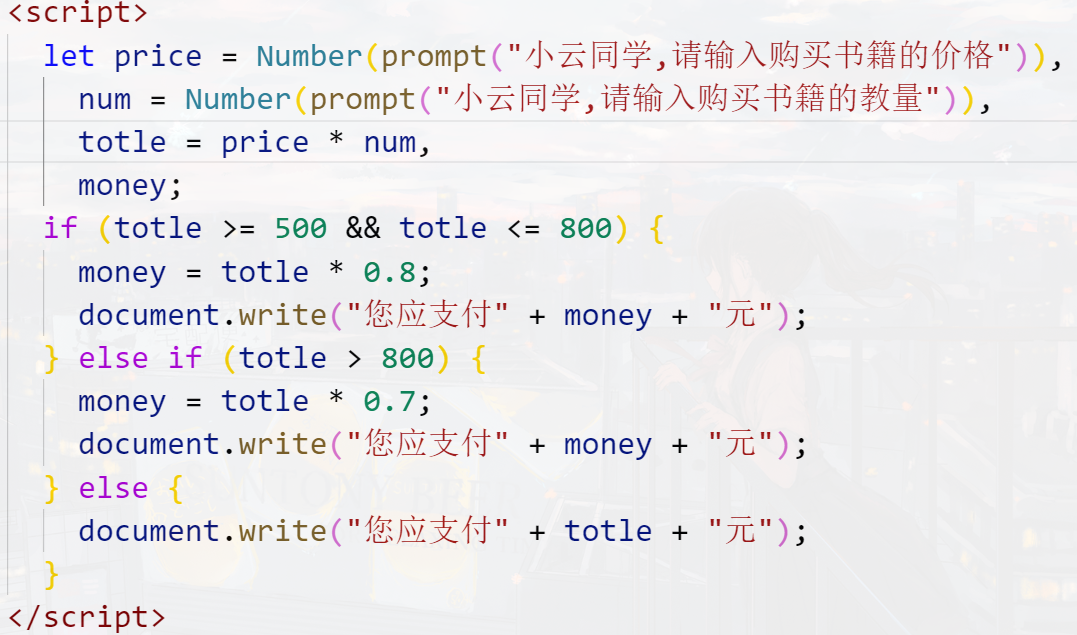
**A.**640元
**B.**512元
**C.**448元
**D.**320元
本题考察的是if语句的判断以及数据的算数操作。
20本书籍,每本32元,总价是640元,大于500元但是没超过800元,所以打8折,价格是512元。
所以本题答案为B。
# 5.如下代码,当在输入框中输入"1"时,页面中会输出什么?(选择一项)
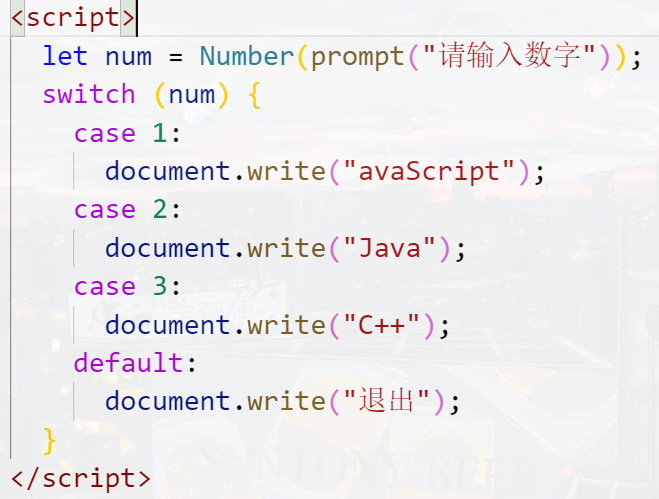
A. JavaScript
B. JavaScript Java C++
C. 退出
**D.**JavaScript Java C++ 退出
本题考察的是switch语句的语法。
switch语句中通过break语句来阻止代码自动的向下一个case运行,本题中,每个case后面没有break语句,所以它会向后面一直执行,输出每个case的执行代码。
所以本题答案为D。
# 6.下面代码运行结果是?(选择一项)
A. 85
B. 及格
C. 60
**D.**不及格
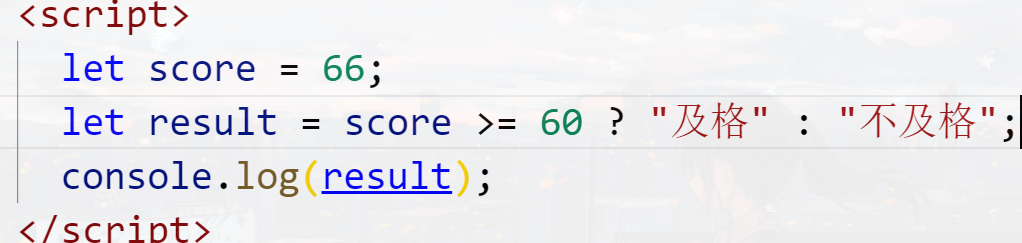
本题考察的是三元运算符。
(判断条件)?条件成立执行的语句:条件不成立执行的语句。本题代码中,sorce=85,85>60,条件成立,执行第一句代码,故输出“及格”。
所以本题答案为B。
# 7.编程练习
当打开页面时,弹出一个输入学生成绩的输入框,当用户输入成绩时,对成绩进行判断!
判断要求如下:
(1)当输入的成绩是90~100时(这里包括等于100的时候),弹出警告框“优秀”
(2)当输入的成绩是80~89时,弹出警告框“良好”
(3)当输入的成绩是70~79时,弹出警告框“一般”
(4)60到69为及格当输入的成绩是60~69时,弹出警告框“及格”
(5)当输入的成绩是小于60时,弹出警告框“不及格”
(6) 如果输入的成绩小于0或者大于100,弹出警告框“您输入的成绩有误!!!”
任务
1、写出输入框,输入框上的文字提示是:”请输入学生的成绩” 2、手动输入成绩,用一个变量来接收输入的成绩 3、使用条件语句对成绩做出判断
# 8.编程练习

<script>
      let oA = document.querySelectorAll("#main .btn")[0],
          oR = document.querySelectorAll("#main .btn")[1],
          oMain = document.querySelector("#main");

      let size = 16;

      oA.onclick = function () {
        if (size < 24) {
          size++;
          oMain.style.fontSize = size + "px";
        }
      };

      oR.onclick = function () {
        if (size > 12) {
          size--;
          oMain.style.fontSize = size + "px";
        }
      };
    </script>
2
3
4
5
6
7
8
9
10
11
12
13
14
15
16
17
18
19
20
21
# 9.编程练习
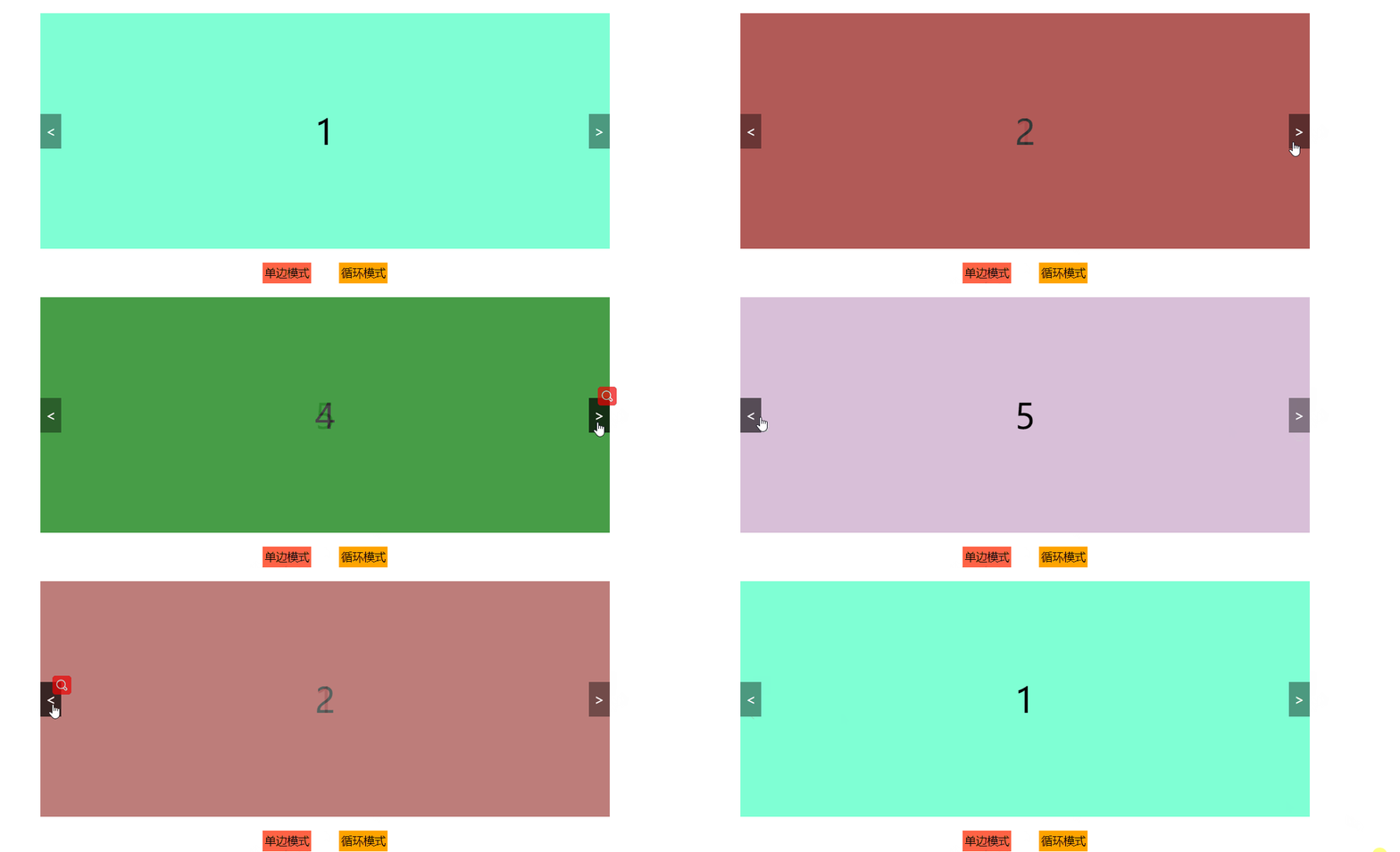
<style>
* {
margin: 0;
padding: 0;
}
#wrap {
position: relative;
width: 820px;
height: 340px;
margin: 100px auto 0;
}
.img {
width: 100%;
height: 100%;
}
.img img {
/* display: none; */
width: 100%;
height: 100%;
opacity: 0;
position: absolute;
transition: 0.6s;
cursor: pointer;
}
.img img.active {
opacity: 1;
/* display: block; */
}
#wrap span {
position: absolute;
top: 50%;
margin-top: -25px;
width: 30px;
height: 50px;
font-size: 20px;
background-color: rgba(0, 0, 0, 0.4);
color: #fff;
line-height: 50px;
text-align: center;
cursor: pointer;
transition: 0.3s;
user-select: none;
}
span:hover {
background-color: rgba(0, 0, 0, 0.7);
}
.left {
left: 0;
}
.right {
right: 0;
}
</style>
</head>
<body>
<div id="wrap">
<div class="img">
<img src="./img/1.jpg" alt="" class="active" />
<img src="./img/2.jpg" alt="" />
<img src="./img/3.jpg" alt="" />
<img src="./img/4.jpg" alt="" />
<img src="./img/5.jpg" alt="" />
</div>
<div class="arrow">
<span class="left"><</span>
<span class="right">></span>
</div>
</div>
<script>
let oLeft = document.querySelector("#wrap .left");
let oRight = document.querySelector("#wrap .right");
let oImg = document.querySelectorAll("#wrap .img img");
//通过获取的aImg的数量 来知道最大限度 便于后期维护
let len = oImg.length;
//定义变量 方便知道当前是第几张
let index = 0;
oLeft.onclick = function () {
if (index > 0) {
oImg[index].classList.remove("active");
index--;
console.log(index);
oImg[index].classList.add("active");
}
};
oRight.onclick = function () {
if (index < len - 1) {
oImg[index].classList.remove("active");
index++;
console.log(index);
oImg[index].classList.add("active");
}
};
</script>
2
3
4
5
6
7
8
9
10
11
12
13
14
15
16
17
18
19
20
21
22
23
24
25
26
27
28
29
30
31
32
33
34
35
36
37
38
39
40
41
42
43
44
45
46
47
48
49
50
51
52
53
54
55
56
57
58
59
60
61
62
63
64
65
66
67
68
69
70
71
72
73
74
75
76
77
78
79
80
81
82
83
84
85
86
87
88
89
90
91
92
93
94
95
96
97
98
99
100
101
102
103
104
105
106
107
108
109
110
111
# 10.编程练习
 (opens new window)](https://imgchr.com/i/w4UpxP)
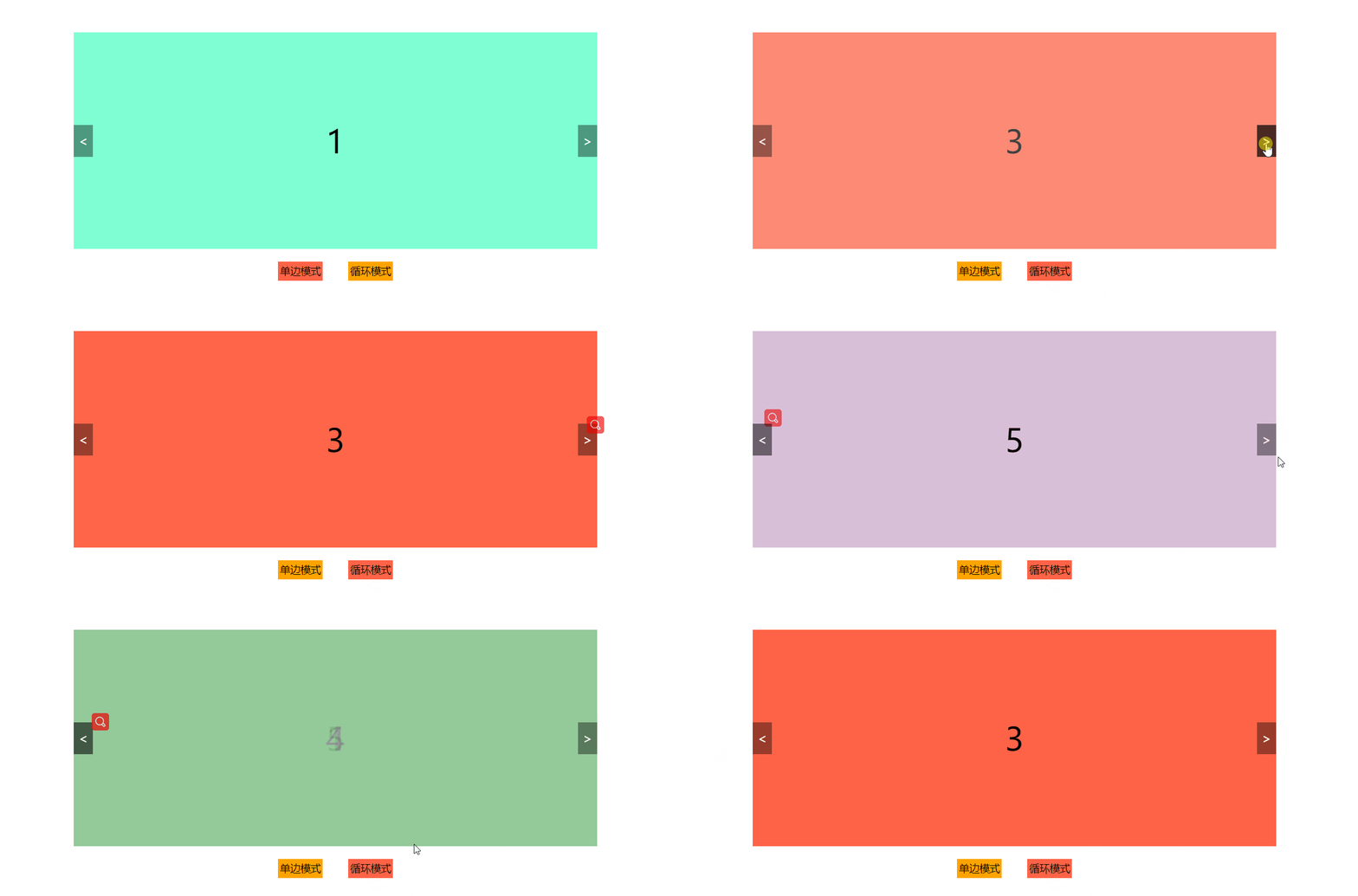
//循环切换
oLeft.onclick = function () {
    oImg[index].classList.remove("active");

    index--;

    if (index == -1) index = len - 1;

    oImg[index].classList.add("active");
};

oRight.onclick = function () {
    oImg[index].classList.remove("active");

    index++;

    index %= len;
    // if (index == len) index = 0;

    oImg[index].classList.add("active");
};
2
3
4
5
6
7
8
9
10
11
12
13
14
15
16
17
18
19
20
21
结合
<script>
    let oLeft = document.querySelector("#wrap .left");
    let oRight = document.querySelector("#wrap .right");
    let oImg = document.querySelectorAll("#wrap .img img");

    let len = oImg.length;
    let index = 0;

    let oP = document.querySelectorAll(".toggle p");

    let mode = true; //认为规定一个布尔值 为后面代码提供参考  规定0是单边  1是循环

    oP[0].onclick = function () {
        this.classList.add("on");
        oP[1].classList.remove("on");
        mode = true;
    };

    oP[1].onclick = function () {
        this.classList.add("on");
        oP[0].classList.remove("on");
        mode = false;
    };

    oLeft.onclick = function () {
        if (mode) {
            if (index > 0) {
                oImg[index].classList.remove("active");
                index--;
                console.log(index);
                oImg[index].classList.add("active");
            }
        } else {
            oImg[index].classList.remove("active");

            index--;

            if (index == -1) index = len - 1;

            oImg[index].classList.add("active");
        }
    };

    oRight.onclick = function () {
        if (mode) {
            if (index < len - 1) {
                oImg[index].classList.remove("active");

                index++;

                console.log(index);

                oImg[index].classList.add("active");
            }
        } else {
            oImg[index].classList.remove("active");

            index++;

            index %= len;
            // if (index == len) index = 0;

            oImg[index].classList.add("active");
        }
    };
</script>
2
3
4
5
6
7
8
9
10
11
12
13
14
15
16
17
18
19
20
21
22
23
24
25
26
27
28
29
30
31
32
33
34
35
36
37
38
39
40
41
42
43
44
45
46
47
48
49
50
51
52
53
54
55
56
57
58
59
60
61
62
63
64
65
66
← 04-表达式和操作符 06-循环 →