
# 1.关于数组的描述,下列说法正确的是? (选择两项)
**A.**数组可以用来保存一组不同类型的数据
**B.**数组的length属性可以获得数组的长度
**C.**数组的索引是从1开始的正整数
**D.**使用()获取数组的索引
本题考查的是数组的概念和运用。
数组可以用来保存一组不同类型的数据,A说法正确;
数组的length属性可以获得数组的长度,B说法错误;
数组的索引(下标)是从0开始的正整数,不是从1开始的,C说法错误;
使用[ ]获取数组的索引,不是使用(),D说法错误;
本题答案为AB。
# 2.创建数组的基本方式有两种,下列创建数组的方式错误的是?(选择一项)
**A.**var arr=new Array(1);
**B.**var arr=new array( );
**C.**var arr=[ ];
**D.**var arr=[ 1,2,"3"];
参考解析:
本题考查的是数组的创建方式。
第一种方式是使用new Array()构造函数,第二种是直接使用包含数组项的[ ]来表示。
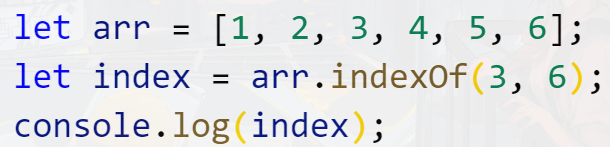
B中代码var arr=new array( ),其中array书写有误,正确书写为Array。所以本题答案为B。
# 3.下面这段代码运行结果是?(选择一项)
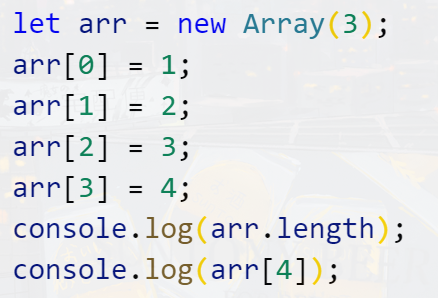
**A.**控制台输出3和4
**B.**控制台输出4和4
**C.**控制台输出4和undefined
**D.**控制台输出3和undefined
本题考查的是定义数组和数组添加元素。
本题代码中,使用了var arr=new Array(3)定义了一个数组arr,且数组的长度为3。虽然设置了长度为3,但是我们可以继续往数组中添加项,即arr[3]=4是往数组中,添加了第4个元素,数组的长度变为4,所以arr.length输出为4;而arr[0]=1,arr[1]=2,arr[2]=3则是更改数组前三项的内容。
arr[4]是获取索引(下标)4的元素,但是这个数组的索引最大是3,索引为4的项没有定义,所以输出的是undefined。
本题答案为C。
# 4.下面这段代码运行结果是?(选择一项)
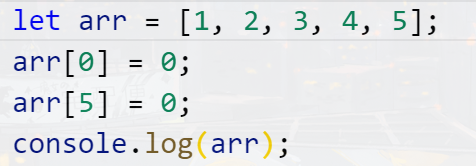
A.[0, 2, 3, 4, 5, 0]
B.[1, 2, 3, 4, 5]
C.[0, 1, 2, 3, 4, 5, 0]
D.[0, 1, 2, 3, 4, 5,]
本题考查数组中元素的添加与修改。
数组可以通过索引(下标)的形式为数组添加元素,也可以通过索引的方式去修改当前数组的元素。
数组的索引是从0开始,arr[0]=0是把数组的第一个元素1修改成0。数组arr中没有索引为5的元素,所以arr[5]=0是在数组索引为5的位置,添加了一个0。数组arr最终的结果为[0, 2, 3, 4, 5, 0],本题答案为A。
# 5.下面这段代码运行结果是?(选择一项)
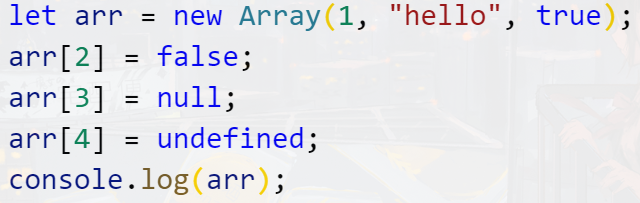
**A.**控制台输出[1,"hello",true]
**B.**控制台输出[1,"hello",false]
**C.**控制台输出[1,"hello",false,null,undefined]
**D.**控制台输出[1,"hello",true,null,undefined]
本题考查数组中元素的添加与修改。
数组可以通过索引(下标)的形式为数组添加项,也可以通过索引的方式去修改当前数组的项,而且数组里的数据可以是所有的数据类型。
本题代码中,定义了一个数组arr,且数组默认有3个元素,即1、"hello"、true,相当于arr=[1,"hello",true]。arr[2]=false是把数组中索引为2的元素true改为false。数组中没有定义索引为3和索引为4的元素,所以arr[3]=null和arr[4]=undefined,是在数组arr索引为3和索引为4的地方添加了两个元素。
最终arr为[1,"hello",false,null,undefined],本题答案为C。
# 6.下面这段代码运行结果是?(选择一项)

**A.**9
**B.**10
**C.**7
**D.**5
本题考查的是数组属性length的使用。
arr.length是获取数组arr的长度。数组中元素的索引(下标)是从0开始的,计算数组的长度,就等于它的最后一项索引值加1。本题代码中,数组arr最后一个元素索引是9,所以这个数组的长度是10。
本题答案为B。
# 7.下面代码的输出结果是?(选择一项)
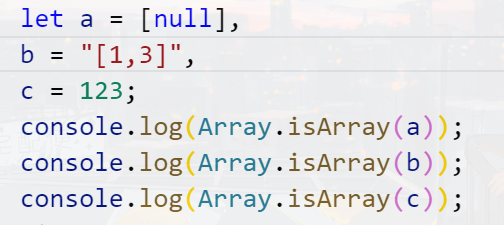
**A.**true,true,false
**B.**true,true,true
**C.**true,false,false
**D.**false,true,false
本题考查isArray方法的使用。
isArray检测一个变量是否为数组,如果是,则返回true。如果不是,则返回false。
[null]是一个数组,"[1,3]"和null都不是数组。所以输出的结果依次为true,false,false,本题答案为C
# 8.关于数组的方法下列选项正确的是?(选择两项)
**A.**push()是把新的参数添加到数组的最前面,返回值是数组的新长度;
**B.**unshift()是把新的参数添加到数组的尾部,返回值是数组的新长度;
**C.**pop()是删除数组中的最后一个元素,返回值是被删除的那个元素;
**D.**shift()是删除数组中的第一个元素,返回值是被删除的那个元素;
本题考查的是数组相关的方法。
push()是把新的参数添加到数组的尾部,返回值是数组的新长度,A说法错误;
unshift()是把新的参数添加到数组的最前面,返回值是数组的新长度,B说法错误;
pop()是删除数组中的最后一个元素,返回值是被删除的那个元素,C说法正确;
shift()是删除数组中的第一个元素,返回值是被删除的那个元素,D说法正确;
本题答案为CD。
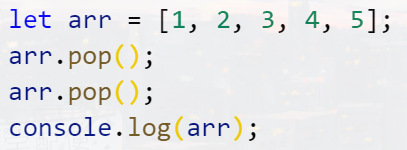
# 9.代码的运行结果是?(选择一项)
A.[3,4,5]
B.[2,3,4,5]
C.[1,2,3]
D.[1,2,3,4]
本题考查的是数组的pop方法。
pop()是删除数组中的最后一个元素,返回值是被删除的那个元素;本题中使用了两次pop(),那么就从数组的末尾删除两个项。arr最终结果为[1,2,3],本题答案为C。
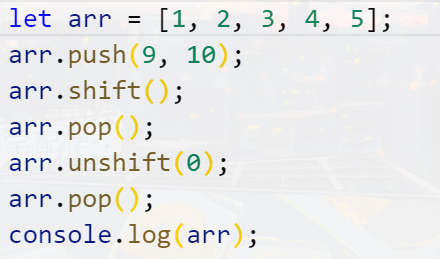
# 10以下代码运行结果为?(选择一项)
A.[0,9,10,1,2,3,4,5]
B.[0,1,2,3,4,5,9,10]
C.[1,2,3,4,5]
D.[0,2,3,4,5]
本题考查的是数组的相关方法。
push()是把新的参数添加到数组的尾部,把9和10放在数组的后面,数组是[1,2,3,4,5,9,10]
shift()是删除数组中的第一个元素,数组是[2,3,4,5,9,10]
pop()是删除数组中的最后一个元素,数组是[2,3,4,5,9]
unshift()是把新的参数添加到数组的最前面,给数组的开头增加一个0,数组是[0,2,3,4,5,9]
最后pop()把数组最后面的9再删除,数组最后结果是[0,2,3,4,5]
所以本题答案为D。
# 11.关于数组的splice()方法,下列说法正确的是?(选择两项)
**A.**splice()可以删除数组项,插入数组项以及替换数组项
**B.**splice(index,count)中的参数count是要删除的项目数量,如果设置为0,则不会删除任何项。
**C.**splice(index,count)的两个参数都是可选的。
**D.**splice(index,count,item1,item2)插入项从count处开始
本题考查的是数组的splice方法。
splice()可以删除数组项,插入数组项以及替换数组项,A说法正确;
splice(index,count)中的参数count是要删除的项目数量,如果设置为0,则不会删除任何项,B说法正确;
splice的删除方法有两个参数,第一个是index,它必须要有,第二个是count,可设置也可不设置,如果设置的话,那么删除的个数就是count所定的,如果不设置,那么删除从index开始的所有值。C中说两个参数都是可选的错误;
splice(index,count,item1,item2)是数组的替换方法,在指定的index位置插入值,count是删除项的个数,item1和item2是要替换的数据。D中说插入项从count处开始错误。
所以本题答案为AB。
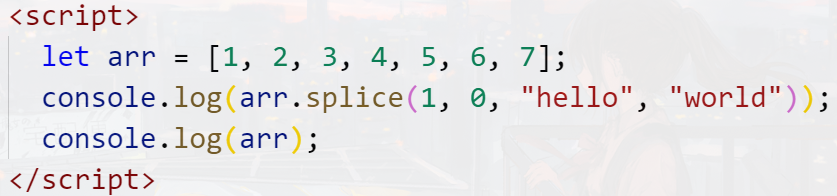
# 12.下面代码运行结果是?(选择一项)
A.["hello","world"] ,[1,2,3,4,5,6,7]
B.[ ],[1, "hello","world",2,3,4,5,6,7]
C.["hello","world"],[1, "hello","world",2,3,4,5,6,7]
D.[ ],[1,2,3,4,5,6,7]
本题考查的是数组splice的插入方法。
splice(index,0,item1,item2)方法的第一个参数index是插入数组项的起始位置,0是表示不删除任何项,所以返回的是一个空数组;后面的数值表示插入的项,即把"hello"和"world"插入到索引为1和索引为2的位置。arr最终结果为[1, "hello","world",2,3,4,5,6,7],本题答案为B。
# 13.下面代码运行结果是?(选择一项)

A.["study"],["good","good","eat","day","day","up"]
B.["eat" ],["good","good","eat","day","day","up"]
C.["study"],["good","good","study","eat","day","up"]
D.["eat" ],["good","good","study","eat","day","up"]
本题考查的是数组splice的替换方法,正确选项为A。
splice(index,count,item1,item2)方法的第一个参数index是替换数组项的起始位置,count表示要被替换的项的个数,item1和item2表示要替换的内容。另外,它返回的是被替换的内容。
本题代码中,arr.splice(2,1,"eat")表示从数组索引为2的位置开始替换,替换的个数为1,替换的内容为"eat"。所以数组中"study"被替换成"eat"。arr.splice(2,1,"eat")返回的结果是"study",数组替换之后的结果为["good","good","eat","day","day","up"]。
本题答案为A。
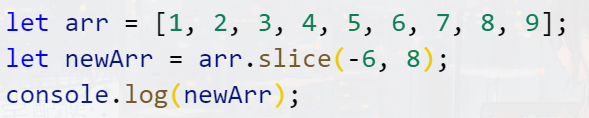
# 14.下面代码运行结果是?(选择一项)
A.[8]
B.[5,6,7,8,9]
C.[4,5,6,7,8]
D.[4,5,6,7,8,9]
本题考查的是数组的slice方法。
slice()是从已有的数组中返回选定的元素,原有的数组不会发生变化,返回值是一个新的数组,它有两个参数start和end。如果参数有负数,那么用数组的长度加上这个负数,得到的值就是这个位置的索引(下标)。注意,slice截取数组元素时,不包含结束位置(end)的元素。
本题代码中,arr.slice(-6,9)第一个参数-6是负数,用数组长度9减去-6,得出的值为3,即开始位置索引为3。第二个参数为8,但是截取时不包含8,即截取到索引为7的位置。所以arr.slice(-6,9)返回的结果是[4,5,6,7,8],本题答案为C。
# 15.以下代码中,需要使用数组的哪一个方法,可以让结果输出false?(选择一项)
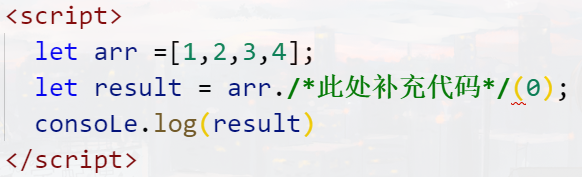
**A.**indexOf
**B.**concat
**C.**join
**D.**includes
本题考查数组各方法的使用。
indexOf返回指定元素在数组中的位置,如果没有这个元素,则返回-1。
concat 用于连接数组,返回的是连接后的数组。
join 是把数组中的元素拼接成字符串,返回的是字符串。
includes 是检测数组中是否包含某一个元素,如果没有,则返回false。这里代码中不包含0,所以会返回false**,本题答案为D。**
# 16.下列代码运行结果是?(选择一项)
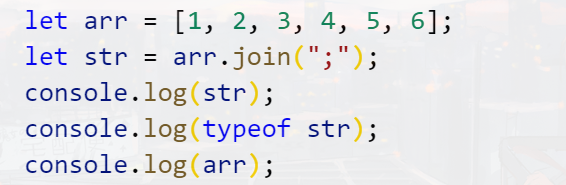
**A.**1;2;3;4;5;6,number,[1,2,3,4,5,6]
**B.**1;2;3;4;5;6,number,[1;2;3;4;5;6]
**C.**1;2;3;4;5;6,string,[1;2;3;4;5;6]
**D.**1;2;3;4;5;6,string,[1,2,3,4,5,6]
本题考察的是数组的join()方法。
join()方法用于把数组中的所有元素变成一个字符串,并通过指定的分隔符进行分隔,返回的不是数组,而是一个字符串,且不会改变原数组。
本题代码中,arr.join(";")通过分号把数组arr分割成字符串,结果为"1;2;3;4;5;6"。返回的结果赋值给了str,所以str通过typeof检测类型输出为"string"。原数组arr不会改变,依旧为string,[1,2,3,4,5,6]。
本题答案为D。
# 17.下列代码运行结果是?(选择一项)
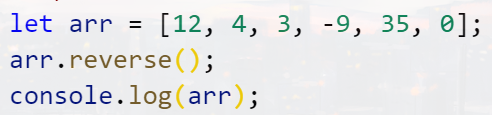
A.[-9,0,3,4,12,35]
B.[0,35,-9,3,4,12]
C.[35,12,4,3,0,-9]
D.[0,12,3,35,4,-9]
本题考查的是数组的reverse()方法。
reverse()方法用于颠倒数组中元素的顺序,不会进行排序。所以本题代码中,数组arr颠倒顺序后,结果为[0,35,-9,3,4,12],本题答案为B。
# 18.代码的运行结果是?(选择一项)
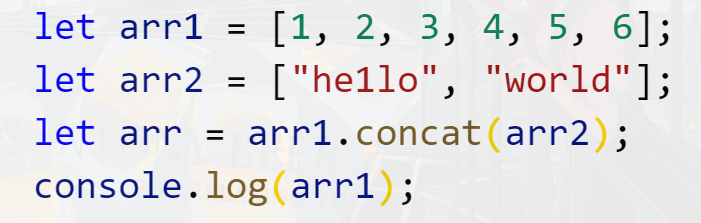
A.["hello","world"];
B.[1,2,3,4,5,6];
C.[1,2,3,4,5,6, "hello","world"];
D.[ ]
本题考查的是数组的concat方法。
concat()方法用于连接两个或多个数组,返回值是一个新结合的数组,并且不会改变原数组。
本题代码中,是把arr1和arr2合并成一个新数组,并赋值给了arr。但是原数组arr1和arr2并不会改变,所以输出arr1结果为[1,2,3,4,5,6],本题答案为B。
# 19.下面代码运行结果是?(选择一项)
**A.**2
B.-1
**C.**5
**D.**0
本题考查的是数组indexOf()的方法。
indexOf()有两个参数,第一个参数是要查找的项,第二个是查找项的起点位置的索引。如果查找到该项,则返回它从查找位置起,首次出现的位置。如果没有查找到,则返回-1。
本题代码中,arr.indexOf(3,6)意思是从数组arr索引(下标)为6的位置开始查找数字3。这个数组没有索引为6的项,所以返回-1。
本题答案为B。
# 20.以下选项中,说法正确的是?(选择一项)
A.[]==[]比较的结果为true
**B.**null==null 比较结果为true
**C.**undefined==undefined比较结果为false
**D.**false==false比较结果为false
本题考查基本类型和引用类型的比较。
基本类型比较值是否相同,引用类型比较内存地址是否相同。
[]==[]: 两个空数组指向的内存地址不一样,比较结果为false。A说法错误。
null==null:null为基本类型,比较结果为true。B说法正确。
undefined==undefined :undefined 为基本类型,比较结果为true。C说法错误。
false==false :false为基本类型,比较结果为true。D说法错误。
所以本题答案为B。
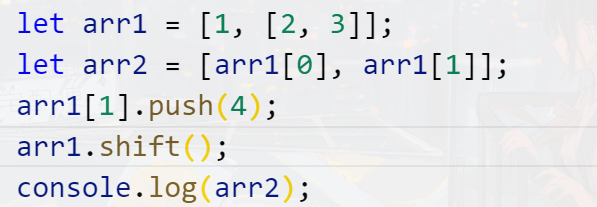
# 21.以下程序的输出结果是什么?(选择一项)
A.[1,[2,3]]
B. [2,3]
C. [2,3,4]
D.[1,[2,3,4]]
本题主要考查浅克隆的理解和运用。
var arr2=[arr1[0],arr1[1]] 中,并没有直接把arr1赋值给arr2, 它们两个指向的内存地址不一样,所以给arr1添加或者删除元素不会影响到arr2。
但arr2中的元素,是直接复制arr1中的元素。由于arr1[1]是引用类型, 故arr1[1]==arr2[1],那么在arr1[1]删除或者添加元素会影响到arr2的结果。
所以本题答案为D。
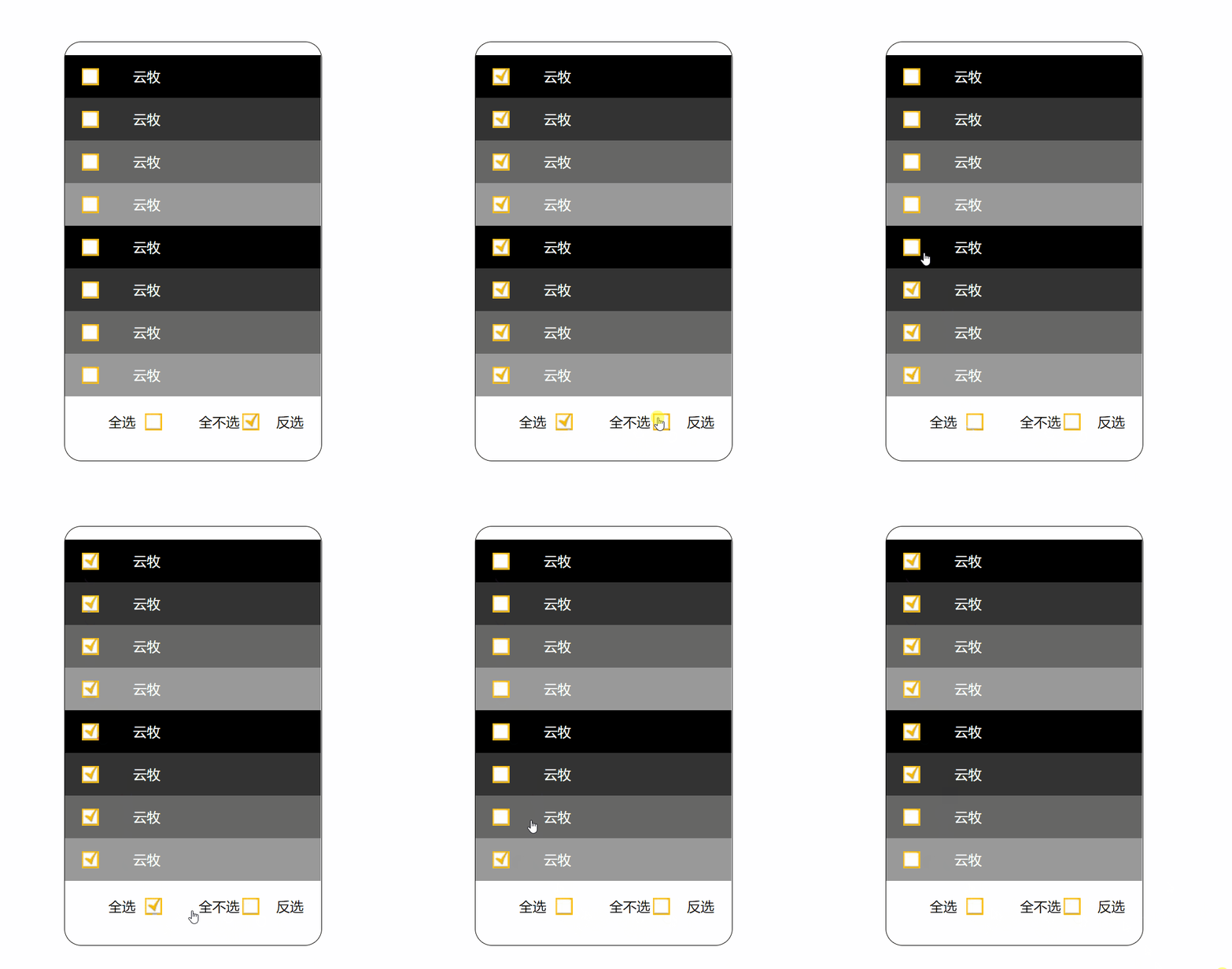
# 22.编程练习
<style>
    * {
        margin: 0;
        padding: 0;
        user-select: none;
    }
    ul {
        list-style: none;
    }

    #wrap {
        width: 300px;
        padding: 15px 0;
        border: 1px solid black;
        border-radius: 20px;
        margin: 100px auto 0;
    }

    #wrap ul li {
        line-height: 50px;
        text-indent: 40px;
        cursor: pointer;
        background: url(https://s1.ax1x.com/2020/09/26/0iBW26.jpg) no-repeat
            20px center;
    }

    #wrap ul li.checked {
        background: url(https://s1.ax1x.com/2020/09/26/0iBIqe.jpg) no-repeat
            20px center;
    }

    #wrap ul li:nth-child(4n + 1) {
        background-color: #000;
    }
    #wrap ul li:nth-child(4n + 2) {
        background-color: #333;
    }
    #wrap ul li:nth-child(4n + 3) {
        background-color: #666;
    }
    #wrap ul li:nth-child(4n + 4) {
        background-color: #999;
    }

    #wrap ul li span {
        color: #fff;
        font-size: 16px;
        margin-left: 40px;
    }

    #wrap .btn {
        display: flex;
        justify-content: space-evenly;
        /*height: 60px;*/
        line-height: 60px;
    }
    #wrap .btn div:not(.reverse) {
        cursor: pointer;
        display: flex;
        justify-content: center;
        flex: 0.35;

        background: url(https://s1.ax1x.com/2020/09/26/0iBW26.jpg) no-repeat
            right center;
    }

    #wrap .btn div.checked {
        background: url(https://s1.ax1x.com/2020/09/26/0iBIqe.jpg) no-repeat
            right center;
    }
</style>
</head>
<body>
    <div id="wrap">
        <ul>
            <li><span>云牧</span></li>
            <li><span>云牧</span></li>
            <li><span>云牧</span></li>
            <li><span>云牧</span></li>
            <li><span>云牧</span></li>
            <li><span>云牧</span></li>
            <li><span>云牧</span></li>
            <li><span>云牧</span></li>
        </ul>

        <div class="btn">
            <div class="all">全选</div>
            <div class="noAll checked">全不选</div>
            <div class="reverse">反选</div>
        </div>
    </div>

    <script>
        let aLi = document.querySelectorAll("#wrap ul li"),
            oAll = document.querySelector("#wrap .all"),
            oNoAll = document.querySelector("#wrap .noAll"),
            oReverse = document.querySelector("#wrap .reverse"),
            count = 0;

        for (let i = 0; i < aLi.length; i++) {
            aLi[i].mark = false;

            aLi[i].onclick = function () {
                if (aLi[i].mark) {
                    //aLi[i].classList.remove("checked");
                    //aLi[i].mark = false;
                    count--;
                } else {
                    //aLi[i].classList.add("checked");
                    //aLi[i].mark = true;
                    count++;
                }

                aLi[i].classList.toggle("checked");
                aLi[i].mark = !aLi[i].mark;
                console.log(count);

                isNum(count);
                //  switch (count) {
                //    case aLi.length:
                //      oAll.classList.add("checked");
                //      oNoAll.classList.remove("checked");
                //      oReverse.classList.remove("checked");
                //      break;

                //    case 0:
                //      oAll.classList.remove("checked");
                //      oNoAll.classList.add("checked");
                //      oReverse.classList.remove("checked");
                //      break;

                //    default:
                //      oAll.classList.remove("checked");
                //      oNoAll.classList.remove("checked");
                //      oReverse.classList.remove("checked");
                //      break;
                //  }
            };
        }

        oAll.onclick = function () {
            for (let i = 0; i < aLi.length; i++) {
                aLi[i].classList.add("checked");
                aLi[i].mark = true;
            }

            count = aLi.length;

            isNum(count);

            //switch (count) {
            //  case aLi.length:
            //    oAll.classList.add("checked");
            //    oNoAll.classList.remove("checked");

            //    break;

            //  case 0:
            //    oAll.classList.remove("checked");
            //    oNoAll.classList.add("checked");

            //    break;

            //  default:
            //    oAll.classList.remove("checked");
            //    oNoAll.classList.remove("checked");

            //    break;
            //}
        };

        oNoAll.onclick = function () {
            for (let i = 0; i < aLi.length; i++) {
                aLi[i].classList.remove("checked");
                aLi[i].mark = false;
            }

            count = 0;

            isNum(count);

            //switch (count) {
            //  case aLi.length:
            //    oAll.classList.add("checked");
            //    oNoAll.classList.remove("checked");

            //    break;

            //  case 0:
            //    oAll.classList.remove("checked");
            //    oNoAll.classList.add("checked");

            //    break;

            //  default:
            //    oAll.classList.remove("checked");
            //    oNoAll.classList.remove("checked");

            //    break;
            //}
        };

        oReverse.onclick = function () {
            for (let i = 0; i < aLi.length; i++) {


                //console.log(count);

                aLi[i].classList.toggle("checked");


                if (aLi[i].mark) {
                    //aLi[i].mark = !aLi[i].mark;
                    //aLi[i].classList.remove("checked");
                    count--;
                } else {
                    //aLi[i].mark = !aLi[i].mark;
                    //aLi[i].classList.add("checked");
                    count++;
                }
                aLi[i].mark = !aLi[i].mark;
            }

            isNum(count);
            //switch (count) {
            //  case aLi.length:
            //    oAll.classList.add("checked");
            //    oNoAll.classList.remove("checked");
            //    break;
            //  case 0:
            //    oAll.classList.remove("checked");
            //    oNoAll.classList.add("checked");
            //    break;
            //  default:
            //    oAll.classList.remove("checked");
            //    oNoAll.classList.remove("checked");
            //    break;
            //}

        };

        function isNum(n) {
            switch (n) {
                case aLi.length:
                    oAll.classList.add("checked");
                    oNoAll.classList.remove("checked");
                    break;
                case 0:
                    oAll.classList.remove("checked");
                    oNoAll.classList.add("checked");
                    break;
                default:
                    oAll.classList.remove("checked");
                    oNoAll.classList.remove("checked");
                    break;
            }
        }
    </script>
</body>
2
3
4
5
6
7
8
9
10
11
12
13
14
15
16
17
18
19
20
21
22
23
24
25
26
27
28
29
30
31
32
33
34
35
36
37
38
39
40
41
42
43
44
45
46
47
48
49
50
51
52
53
54
55
56
57
58
59
60
61
62
63
64
65
66
67
68
69
70
71
72
73
74
75
76
77
78
79
80
81
82
83
84
85
86
87
88
89
90
91
92
93
94
95
96
97
98
99
100
101
102
103
104
105
106
107
108
109
110
111
112
113
114
115
116
117
118
119
120
121
122
123
124
125
126
127
128
129
130
131
132
133
134
135
136
137
138
139
140
141
142
143
144
145
146
147
148
149
150
151
152
153
154
155
156
157
158
159
160
161
162
163
164
165
166
167
168
169
170
171
172
173
174
175
176
177
178
179
180
181
182
183
184
185
186
187
188
189
190
191
192
193
194
195
196
197
198
199
200
201
202
203
204
205
206
207
208
209
210
211
212
213
214
215
216
217
218
219
220
221
222
223
224
225
226
227
228
229
230
231
232
233
234
235
236
237
238
239
240
241
242
243
244
245
246
247
248
249
250
251
252
253
254
255
256
257
258
259
260